Creating Many Buildings
Once you know what a good building looks like, you rarely place them one at a time. This page covers the two "many at once" tools that are not a whole city — lining a street, and controlling how much variety a big fill produces without drowning your project in mesh files.
For a whole city grid or a district you can shape, see Cities and Districts.
Lining a street (street rows)
2 Build ▸ Street fills one or both sides of a road with seeded buildings, all facing the carriageway. It is the right tool for a single stretch of road — an approach to a track, a scripted drive-past, a boulevard you want to control by hand.
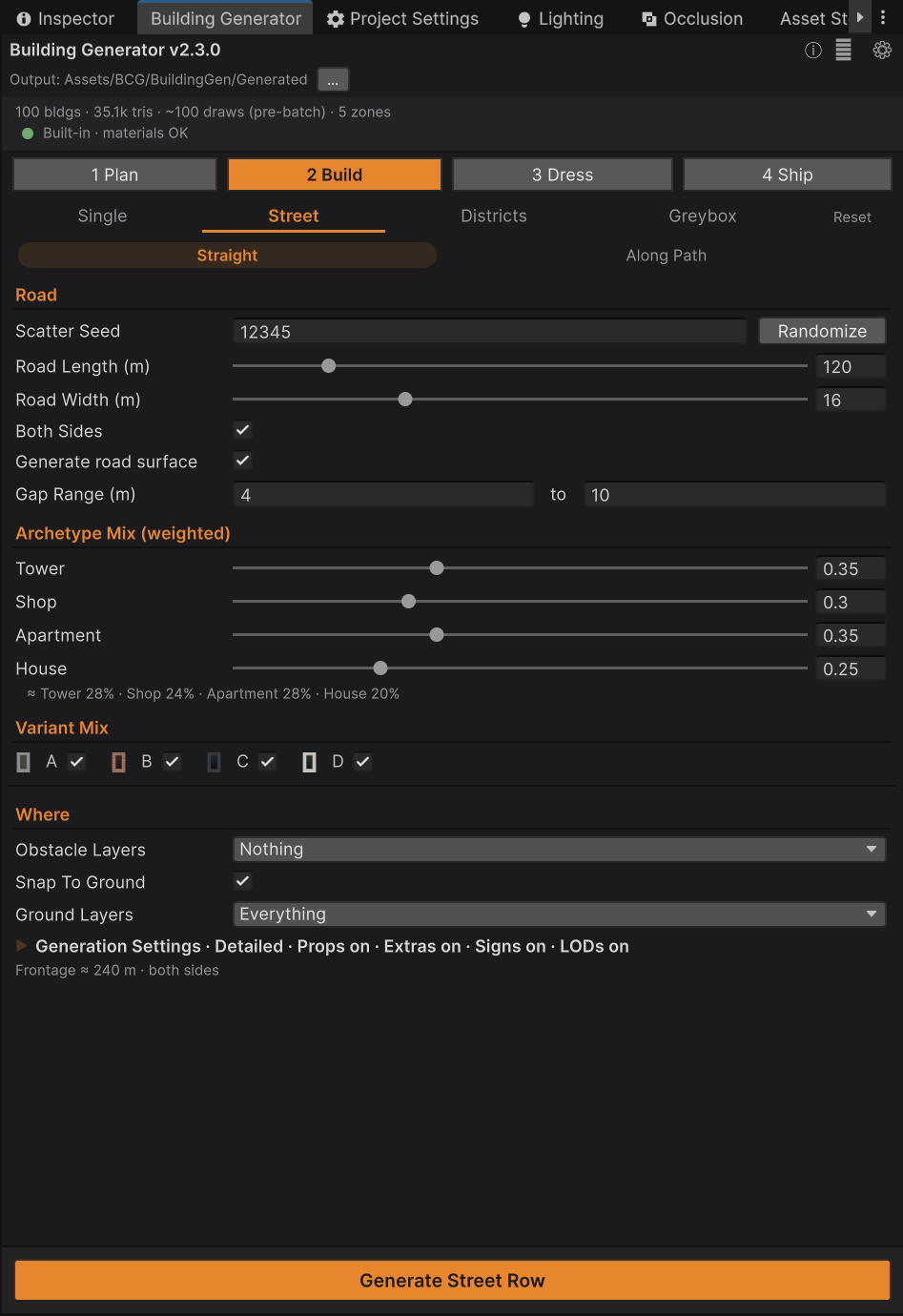
| Field | Default | What it does |
|---|---|---|
| Scatter Seed | 12345 | Drives everything: which archetype each plot gets, its size, its palette, the gaps |
| Road Length (m) | 120 | Plots are placed until this length is filled |
| Road Width (m) | 16 | The clear carriageway between the two rows |
| Both Sides | on | Line the far side of the road as well |
| Generate road surface | off | Also build real road geometry — see Roads |
| Gap Range (m) | 4 – 10 | Random spacing between neighbouring buildings |
Press Generate Street Row. Everything lands under one parent named BCG_StreetRow_{seed}, and
the whole row is a single Undo step.
Controlling the mix
Archetype Mix (weighted) sets how likely each kind of building is. The defaults are Tower 0.35, Shop 0.30, Apartment 0.35, House 0.25.
The numbers are relative weights, not percentages — the tool normalises them, and shows you
what they actually work out to underneath, e.g. ≈ Tower 28% · Shop 24% · Apartment 28% · House
20%. Setting all four to 1.0 gives an even mix; setting House to 0 removes houses entirely.
Variant Mix below it is the palette allowlist — untick B and no brick buildings appear in this row. Tick only C for a uniform glass-curtain financial district.
Curved streets
The Straight | Along Path toolbar at the top of the pane switches between the straight row above and buildings that follow a polyline you draw in the scene. That is how you line a bend, a racing line, or any road that is not a straight segment — see Paths and Roads.
Filling a district
For anything bigger than one street, use a district: a box you draw in the scene that gets filled with buildings in alternating rows, like a real city block. Select the box, go to 2 Build ▸ Districts, and press Populate Selected Zones.
Districts are the subject of their own page, because they are also where per-neighbourhood style lives — see Cities and Districts.
Big fills do not freeze the Editor
Any fill that produces a lot of buildings runs asynchronously — one building per frame. This matters more than it sounds: writing a mesh and prefab asset costs roughly a tenth of a second, so a five-hundred-building district done in one go would lock Unity up for the best part of a minute.
While a fill is running:
- Progress appears in the City Ledger at the top of the window (
Populating 240/512), which carries the only Cancel button in the tool. - Commands that would fight the running job grey out. A few that cannot conflict stay live, including Fix Materials and Select All Generated.
- Closing the window does not stop the job. It keeps going and finishes.
- Cancel stops it where it is. The buildings placed so far stay in the scene and can be removed with a single Undo.
Keeping variety under control
A thousand-building city that writes a thousand unique meshes is slow to generate and heavy on disk. Two settings in Generation Settings ▸ Saving control that trade-off.
Reuse Existing Assets
On by default. When a building's mesh and prefab already exist for the same archetype, size, seed and cell width — and those assets still match your current options — they are loaded instead of being rebuilt. This skips the per-building asset write, which is the expensive part, and makes repeat fills feel near-instant.
The "still match your current options" check is important and it is strict. Mesh files carry a name tag recording which content options built them, so a props-on mesh and a props-off mesh are different files and can never overwrite each other. If you flip an option, the affected buildings are genuinely rebuilt rather than silently reused.
After you update the package itself, run Regenerate All so your existing assets pick up any improvements in the generator — reuse cannot detect that the generator changed, only that your settings did.
Mesh Variety
Available on every generating pane except Single, and 0 by default, meaning unlimited. Set it to a number and that becomes the cap on how many distinct building designs a fill may draw per archetype.
With a pool of, say, 12, buildings that share a footprint reuse the same mesh. You get:
- far fewer asset files,
- instant repeats, because the mesh is already built,
- and identical scene-only meshes that static-batch together.
What you do not get is a visibly repetitive city, for two reasons: palettes are still mixed across the pool, and rows alternate their facing, so the same mesh rarely reads as the same building twice in one view. Placement, sizes, gaps and palettes are unaffected — the layout of a given seed is identical at any pool size.
A good starting point for background filler is somewhere between 8 and 20 per archetype. Use 0 (unlimited) for hero areas the camera lingers on.
Where the output goes
| Tool | Parent object | Notes |
|---|---|---|
| Single / Variation Row | (scene root) | Loose buildings, grouped as "(loose)" in the health dashboard |
| Street Row | BCG_StreetRow_{seed} |
One Undo step for the whole row |
| Along Path | BCG_StreetPathRow_{pathName}_{seed} |
Regenerating replaces the previous output |
| District fill | BCG_Zone_{markerName}_{seed} |
Repopulating replaces the previous output |
Straight street rows stack — generate twice and you have two rows. Path and district fills replace, because they are tied to a specific piece of scene geometry that remembers what it last produced.
Common questions
Some buildings are missing from my row. Either the plots were too small — the tool needs about 7.8 m of frontage for a building — or an Obstacle Layers mask rejected those spots. The Console reports how many were relocated and how many were skipped after every fill.
Everything came out the same size. Check that you have not narrowed the archetype mix to one type with a fixed footprint. Street rows jitter cell width from a small pool (2.6, 3.0 or 3.4 m), so variety mostly comes from mixing archetypes.
Can I fill several districts at once? Yes — select them all and press Populate Selected Zones. There is also Populate All In Scene, which finds every district in the open scene and refills each with its own settings.
Where to go next
- Cities and Districts — the one-button city and per-district styling.
- Paths and Roads — curved streets and real road geometry.
- Optimising — LODs, combining, and what to do before you ship.