Damage, Crashes, and Boundaries
This document covers the optional gameplay layer that turns hard impacts into crashes and lets you respawn the helicopter, plus the boundary volumes that detect when an aircraft leaves the playable area or hits water. It explains the RHCP_Damage module's crash-detection state machine and its fields, how to respawn (manually or automatically), how to react to crashes and boundary entries from your own code or with no code at all, and how the RHCP_BoundaryZone component reports out-of-bounds and water entries without adding a single tag to your project. Both pieces are entirely optional — a helicopter with neither is simply indestructible and unbounded.
How Crash Detection Works
Crash handling lives in the RHCP_Damage module, a small state machine with two states: Normal and Crashed (the RHCP_DamageState enum). While Normal, the module watches the collisions the hub records each physics step; the moment a collision's relative impact speed reaches the impact threshold, the helicopter transitions to Crashed. It stays crashed — ignoring all further impacts — until something reposes it back to Normal. This is a deliberate re-entry guard: a single crash raises exactly one crash event, even if the airframe tumbles through several contacts in the same step.
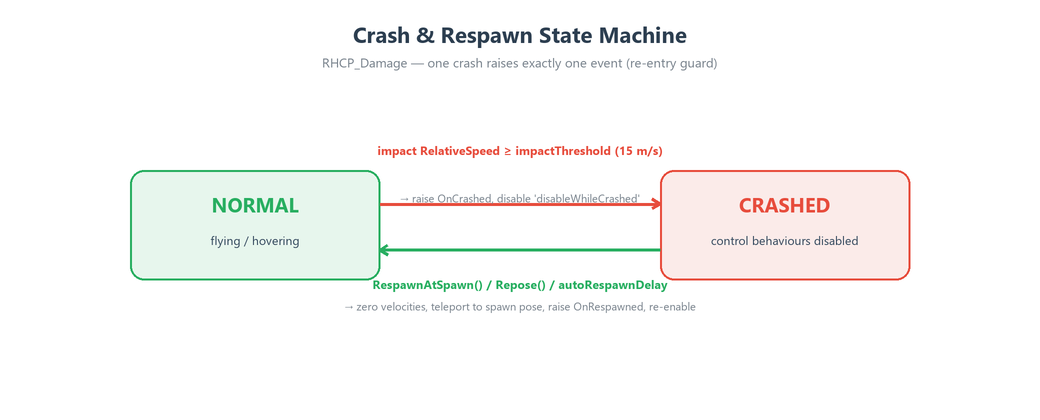
The module does not do its own collision handling. The RHCP_Helicopter hub is the only collision handler in the component graph; it routes every contact into a per-step buffer of RHCP_ImpactData records (each carrying the relative speed in m/s, the collision impulse, and the contact point and normal). The damage module reads that buffer in its fixed tick — which runs after the flight model — and compares each impact's RelativeSpeed against the threshold. Centralizing collisions in the hub means you can add or remove the damage module without touching anything else, and there is exactly one place that decides what "a crash" means.
Because the threshold is a single serialized field on the module, there is one source of truth for crash sensitivity. This replaces the original 2018 asset, which duplicated the same hard-coded 15 in two different scripts. If the damage module is absent, no impact ever becomes a crash and the helicopter is non-destructible.
Adding the Damage Module
The damage module is not added by the Setup Wizard — the wizard builds a flyable airframe (model, physics, rotors, preset, audio, VFX, camera, input), and crash/respawn behavior is a gameplay decision left to you. Add it yourself when you want crashes: select the helicopter's hub GameObject (the one with RHCP_Helicopter) and use Add Component ▸ BoneCracker Games ▸ RHCP ▸ RHCP Damage, or drag the RHCP_Damage script onto it. The module registers with the hub automatically, so no wiring is required to make it active.
On the first frame, the module caches the helicopter's starting pose — both position and rotation — as the default respawn point. Caching the rotation as well as the position fixes a long-standing v1 bug where respawned helicopters always snapped to Quaternion.identity regardless of how they had been placed. From then on, RespawnAtSpawn() returns the aircraft to exactly where and how it began the scene.
Field Reference
All five fields are on the RHCP_Damage inspector. The first three control behavior; the last two are no-code event hooks (see Reacting to Crashes).
| Field | Type | Default | Purpose |
|---|---|---|---|
impactThreshold |
float (m/s) | 15 |
Relative impact speed at or above which a collision counts as a crash. This is the single source of the crash threshold; raise it to make the airframe more durable, lower it to make light bumps fatal. |
autoRespawnDelay |
float (s) | 0 |
Seconds after a crash before the module automatically reposes to the cached spawn pose. 0 means manual — nothing respawns until your code (or a UnityEvent) calls a respawn method. |
disableWhileCrashed |
List<Behaviour> |
empty | Behaviours disabled the instant a crash is detected and re-enabled on repose. Typical entries are the input manager and the rotor modules, so a crashed helicopter goes limp instead of flying out of the wreck. |
onCrashed |
UnityEvent |
— | An inspector event invoked when a crash is detected, mirroring the hub's OnCrashed C# event for no-code wiring (play a sound, show a "Crashed" panel, etc.). |
onRespawned |
UnityEvent |
— | An inspector event invoked after the helicopter is reposed, mirroring the hub's OnRespawned event. |
Respawning
Respawning is called reposing in the API because it moves the rigidbody to a clean, known pose. The module exposes two methods for it. RespawnAtSpawn() returns the helicopter to the spawn pose it cached at startup — this is the common case and what the demo's restart key uses. Repose(Vector3 position, Quaternion rotation) reposes to any pose you supply, which is how you implement checkpoints, respawn pads, or teleporting between mission areas.
Both methods do the same cleanup so the aircraft arrives in a flyable state: they zero the rigidbody's linear and angular velocities, teleport the rigidbody and its transform to the target pose, re-enable everything in disableWhileCrashed, set the state back to Normal, and raise the respawn events. Zeroing the velocities matters — without it, a crashed helicopter would carry its tumbling momentum into the respawn and immediately fall over again.
You choose between automatic and manual respawn with autoRespawnDelay. Set it to a positive number of seconds for a hands-off "crash, pause, recover" loop with no scripting. Leave it at 0 (the default) when you want control — for example, to play a wreck animation, deduct a life, or wait for the player to press a key before recovering. In manual mode, your respawn call typically happens inside an OnCrashed handler.
Reacting to Crashes
There are two ways to respond to a crash or a respawn: the hub's C# events (for scripting) and the module's UnityEvents (for no-code wiring in the inspector). Both fire for the same moments, so use whichever fits your project.
The hub exposes the events because the hub is the asset's public surface; the damage module raises them through the hub internally. Subscribe to them on the RHCP_Helicopter:
Event (on RHCP_Helicopter) |
Signature | Fires when |
|---|---|---|
OnCrashed |
Action<float> |
A crash is detected. The payload is the impact's relative speed in m/s, so you can scale effects by how hard the hit was. |
OnRespawned |
Action |
The helicopter has been reposed after a crash. |
OnBoundaryEnter |
Action<RHCP_BoundaryZone> |
The helicopter enters a boundary trigger (see Boundary Zones). |
A minimal manual-respawn handler looks like this:
using BoneCrackerGames.RHCP;
using UnityEngine;

public class CrashRecovery : MonoBehaviour
{
    [SerializeField] private RHCP_Helicopter helicopter;
    private RHCP_Damage damage;

    private void Awake() => damage = helicopter.GetComponent<RHCP_Damage>();

    private void OnEnable()  => helicopter.OnCrashed  += HandleCrash;
    private void OnDisable() => helicopter.OnCrashed  -= HandleCrash;

    private void HandleCrash(float impactSpeed)
    {
        Debug.Log($"Crashed at {impactSpeed:F1} m/s");
        damage.RespawnAtSpawn();      // or Repose(checkpointPos, checkpointRot) for a checkpoint
    }
}
If you prefer no code, drag your target objects into the onCrashed and onRespawned UnityEvent slots on the RHCP_Damage inspector and pick the methods to call — for example, calling RHCP_Damage.RespawnAtSpawn from onCrashed, or enabling a "Press R to restart" panel. The UnityEvent mirrors exist specifically so a designer can wire crash reactions without writing a script. For the full list of hub members and signatures, consult the XML documentation comments on RHCP_Helicopter and RHCP_Damage (surfaced by your IDE's IntelliSense).
Boundary Zones
A boundary zone is a trigger volume that notifies the helicopter when it leaves the playable area or enters water. The RHCP_BoundaryZone component sits on a GameObject with a Collider set to Is Trigger (the component flips the collider to a trigger automatically when you first add it). When a helicopter's rigidbody enters the volume, the zone calls the hub, which raises OnBoundaryEnter once per logical entry. As with crashes, the zone enforces no policy of its own — it only reports the entry, and your code decides what happens.
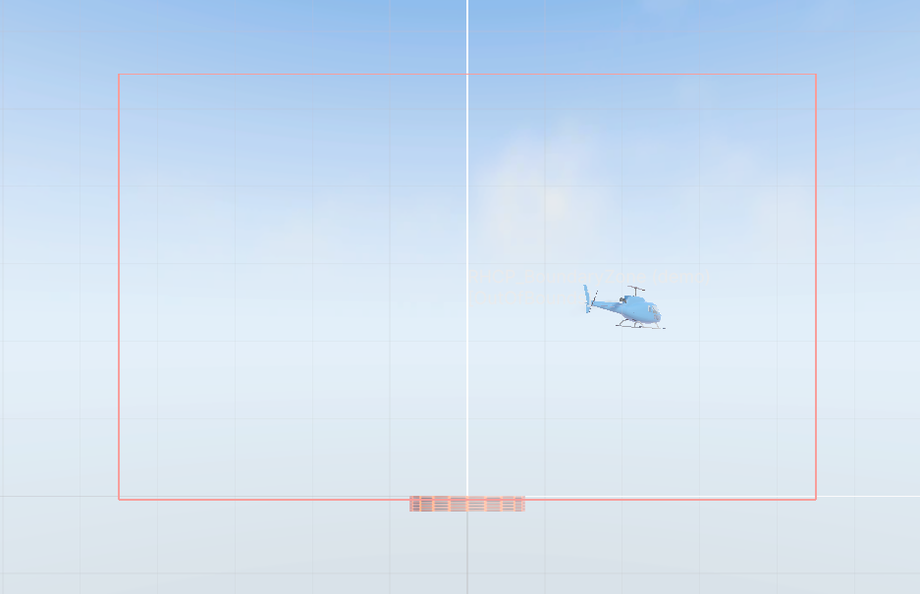
Each zone declares what it represents through its zoneType field, an RHCP_BoundaryZone.ZoneType enum with two values: Water (a water surface or volume, typically treated as a ditching) and OutOfBounds (the edge of the playable area, typically treated as a respawn). The default is OutOfBounds. Because the type travels with the OnBoundaryEnter payload, a single handler can apply different policies to water versus the map edge.
A key design point: boundary detection ships as a component, not as tags. The 2018 asset relied on custom WaterLevel and OutOfBounds tags, which forced buyers to edit their Project Settings on import. RHCP_BoundaryZone removes that dependency entirely — RHCP adds no tags, layers, or input axes to your project. The zone is also debounced per rigidbody, so a compound airframe built from several colliders still raises exactly one entry event instead of one per collider. For the editor menu helper that creates a ready-made boundary object, see Editor Tools.
Wiring a Boundary to a Respawn
The end-to-end flow is: place a RHCP_BoundaryZone trigger around (or under) your level, subscribe to OnBoundaryEnter, and respawn from the handler. The zone's Type lets one handler cover both the map edge and water:
using BoneCrackerGames.RHCP;
using UnityEngine;

public class BoundaryRespawn : MonoBehaviour
{
    [SerializeField] private RHCP_Helicopter helicopter;
    private RHCP_Damage damage;

    private void Awake() => damage = helicopter.GetComponent<RHCP_Damage>();

    private void OnEnable()  => helicopter.OnBoundaryEnter += HandleBoundary;
    private void OnDisable() => helicopter.OnBoundaryEnter -= HandleBoundary;

    private void HandleBoundary(RHCP_BoundaryZone zone)
    {
        // Both cases respawn here, but you could damage, score, or warn on water instead.
        if (zone.Type == RHCP_BoundaryZone.ZoneType.Water ||
            zone.Type == RHCP_BoundaryZone.ZoneType.OutOfBounds)
        {
            damage.RespawnAtSpawn();
        }
    }
}
Because the zone reports the entry rather than acting on it, you are free to make water a hard reset while out-of-bounds only shows a "turn back" warning, or any other combination your game needs. If the helicopter has no RHCP_Damage module, you can still respond to OnBoundaryEnter in other ways (a penalty, a message); respawning specifically needs the damage module's repose methods.
How the Demo Uses It
The bundled demo scene shows the pattern in miniature. Its RHCP_DemoController listens for the RestartDemo input action (the R key, or Select on a gamepad) and calls RespawnAtSpawn() on the helicopter's damage module, returning the hero Maverick to its starting pad. This is the same manual-respawn path described above, driven by an input action instead of a crash. Treat the demo controller as a reference for wiring respawn to whatever trigger your game prefers — a key, a UI button, a crash, or a boundary entry.
The demo deliberately keeps respawn policy in the demo layer rather than the core modules, which is exactly how the asset is meant to be used: the runtime modules detect and report, and your game code decides the consequences. None of this depends on the demo content, so you can delete the demo and reimplement the same behavior in your own controller.
Tips
- Add
disableWhileCrashedentries for the input manager and rotor modules so a crashed helicopter stops responding to controls and stops producing thrust. Without them, a crash leaves the aircraft fully flyable, which usually reads as a bug. The module re-enables them automatically on repose. - Scale crash effects by the impact magnitude. The
OnCrashedpayload is the relative impact speed, so a gentle scrape and a high-speed nose-in can drive different audio, particle, or camera-shake responses from the same handler. The camera system already adds a crash punch on impact — see Cameras. - Use
Reposefor checkpoints.RespawnAtSpawn()always returns to the scene-start pose; for checkpoint or mission-segment restarts, store your own pose and callRepose(position, rotation)instead. - Tune
impactThresholdto your content. The15m/s default suits a mid-size airframe; lower it for fragile arcade craft or raise it for forgiving training modes. It is the only value that decides what counts as a crash. - Keep boundary zones as triggers. The component sets
Is Triggerfor you when added, but if you swap the collider later, make sure it stays a trigger orOnBoundaryEnterwill never fire. If a crash or boundary respawn is misbehaving, see Troubleshooting.