Cameras
Realistic Helicopter Controller Pro (RHCP) ships a self-contained, layered camera rig with three flight cameras — chase, cockpit, and orbit — plus optional spring-arm collision avoidance, procedural and crash shake, banking/feel motion, and smooth crossfades between modes. This document explains how the rig is organized, how to switch and configure each camera, and every field on the RHCP_CameraConfig tuning asset. The whole system is hand-rolled with no Cinemachine or other third-party dependency, no custom tags/layers/input axes, and zero per-frame garbage collection in normal flight.
The single most important design rule to keep in mind: every optional layer is off or neutral by default. A fresh rig with no config asset (or the bundled default config) reproduces a clean follow-and-cockpit feel exactly. You opt in to collision, orbit, shake, and feel motion by authoring an RHCP_CameraConfig — nothing surprises you out of the box.
Camera System Overview
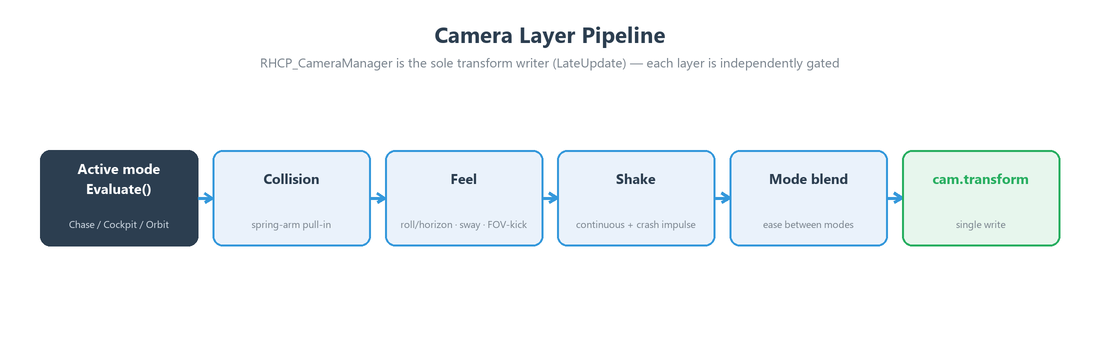
The rig is built from one driver and a set of pose providers. RHCP_CameraManager owns the single Camera (and the AudioListener that travels with it) and is the sole writer of the camera transform. Each frame, in LateUpdate (after physics interpolation, so the image is smooth at any frame rate), the manager asks the active mode for a desired pose, runs a shared layer pipeline on top of it, and writes the result once. The individual camera modes never touch the Camera directly — they only compute and return a value.
That value is RHCP_CameraPose, a small struct of position (Vector3, world space), rotation (Quaternion, world space), and fov (float, vertical field of view in degrees). Modes derive from the abstract RHCP_CameraMode base class and implement two methods: Activate() (called when the mode becomes active, to seed its smoothing state so the entry frame snaps cleanly with no lurch) and Evaluate(float dt) (called every frame to produce the pose). Modes are injected with their references through Configure(...) — there are no name lookups and no FindObjectOfType calls anywhere in the camera code.
The pose provider design exists so the manager can share work across all modes: collision avoidance, camera shake, banking/feel, and mode-blend crossfades all run once in the manager and apply to whichever mode is active. The manager reads only read-only telemetry from RHCP_Helicopter (airspeed, attitude, rotor RPM, acceleration, and so on) and the helicopter's input manager (camera-switch, look, and zoom state); it never writes helicopter or rigidbody state. It also subscribes to the helicopter's OnCrashed and OnRespawned events so a crash kicks the camera and a respawn clears any leftover shake.
Camera Modes
The set of shipped modes is defined by the RHCP_CameraManager.Mode enum. There are exactly three modes at launch.
| Mode | Enum value | Component | Description |
|---|---|---|---|
| Chase | Mode.Chase |
RHCP_ChaseCamera |
Damped follow behind and above the helicopter, with a velocity-led look-at and an airspeed-driven FOV widen. The default starting mode. |
| Cockpit | Mode.Cockpit |
RHCP_CockpitCamera |
Interior view rigidly attached to the cockpit pivot, with clamped freelook that recenters when released. |
| Orbit | Mode.Orbit |
RHCP_OrbitCameraMode |
Aircraft-centred "spot" view on a sphere around the helicopter; player-swung, zoomable, recenters behind the tail. |
Chase is the default because it is the most forgiving general-purpose flight view. Cockpit gives an immersive in-seat perspective, and Orbit is the showcase/inspection view — swing it around to check a landing zone or admire the airframe. The manager's startMode field selects which mode the rig begins in (default Chase).
Orbit is optional in the rig: the manager's orbit reference may be left unwired, and the mode-cycle logic simply skips any mode whose behaviour component is not assigned. Chase and cockpit are always present in the shipped RHCP_CameraRig prefab; the Setup Wizard's camera step adds the orbit mode and assigns the bundled default config so a wizard-built rig is the full Chase + Cockpit + Orbit launch rig. See Setup Wizard for that step.
Switching Cameras
There are two ways to change the active camera: the player's input, and the scripting API.
At runtime, the Camera Switch action cycles forward through the available modes (wrapping back to the first after the last). The manager reads the edge-latched cameraSwitchPressed flag from the input state and de-bounces it with a rising-edge latch, so one press toggles exactly once regardless of frame rate. The cycle skips any mode whose component is unwired, so on a Chase + Cockpit rig (no orbit) it behaves as a simple two-way toggle. The default bindings are:
| Action | Keyboard | Gamepad |
|---|---|---|
| Camera Switch | C |
North face button (Y / Triangle) |
For full input details and how to rebind, see Controls and Input.
From code, RHCP_CameraManager exposes a small public API:
// Read the current mode (the HUD uses this to drive its camera-mode visibility mask).
RHCP_CameraManager.Mode current = manager.CurrentMode;

// Jump straight to a specific mode (seeds it so the entry frame snaps cleanly).
manager.SetMode(RHCP_CameraManager.Mode.Cockpit);

// Cycle forward to the next wired mode (what Camera Switch calls internally).
manager.ToggleMode();
SetMode resets the feel/smoothing accumulators and, if a non-zero blend duration is configured, starts a crossfade from the current pose into the new mode (see Mode Blend). ToggleMode walks forward from the current mode and activates the first one whose component is wired, which is why an unassigned orbit slot is simply skipped rather than producing a dead camera.
Chase Camera
The chase camera (RHCP_ChaseCamera) follows a fixed anchor in the helicopter's local space, damps toward it, and looks at a point led slightly ahead by the velocity vector so the view anticipates fast forward flight. At low speed it sits at its base field of view; as airspeed climbs it widens the FOV toward a maximum to convey speed. All smoothing is framerate-independent, and on activation the mode snaps to its target pose so a switch into chase never drifts in from a stale position.
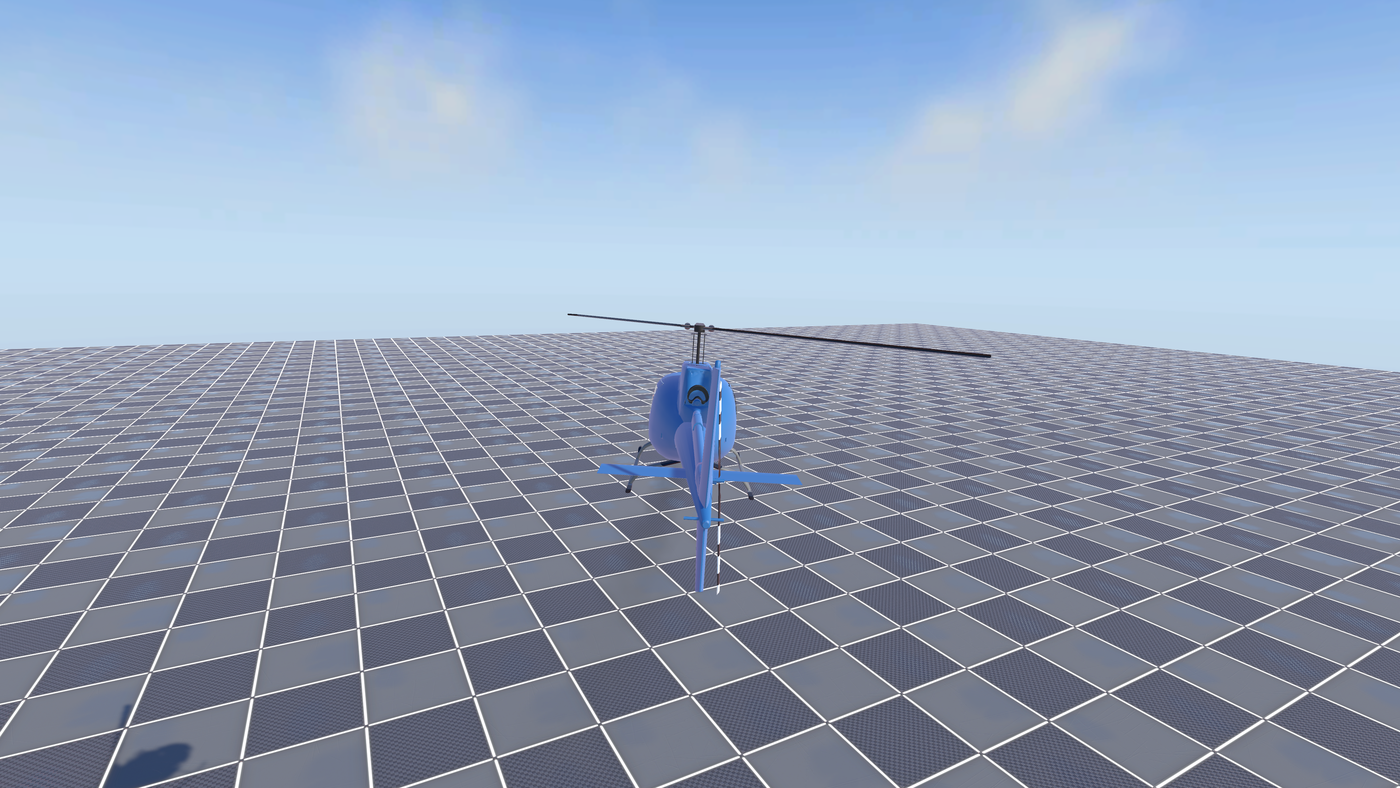
The serialized fields on the chase component (with their defaults) are:
| Field | Default | Range | Meaning |
|---|---|---|---|
anchorOffset |
(0, 4, -10) |
— | Anchor offset in the helicopter's local space. -Z is behind, +Y is above. |
positionRate |
4 |
0.5–20 | Position follow rate (1/s). Higher is tighter and snappier. |
rotationRate |
6 |
0.5–20 | Look rotation rate (1/s). |
lookAheadByVelocity |
0.3 |
≥ 0 | How far ahead to look, in seconds of velocity (a lead at speed). |
baseFov |
60 |
20–120 | Base field of view at low speed. |
maxFov |
75 |
20–140 | Maximum field of view at the top of the airspeed envelope. |
fovAirspeedMin |
10 |
≥ 0 | Airspeed (m/s) at which the FOV begins to widen. |
fovAirspeedMax |
60 |
≥ 0 | Airspeed (m/s) at which the FOV reaches its maximum. |
fovRate |
2 |
0.5–10 | FOV change rate (1/s). |
The chase camera is an exterior view and therefore participates in the spring-arm collision pass when collision is enabled in the config. It can also opt into a player orbit layer: when the config's OrbitEnabled is on, holding the FreeLook gesture swings the chase anchor around the helicopter (yaw freely, pitch clamped to the config's PitchClampOrbit), and after the configured recenter delay of no input the anchor eases back to the tail. With orbit off (the default), the chase anchor stays fixed and behaves exactly as the base follow.
Cockpit Camera
The cockpit camera (RHCP_CockpitCamera) rigidly attaches to the helicopter's CockpitCameraPivot transform — referenced directly, never looked up by name — and applies clamped freelook on top of it. While the FreeLook modifier is held, the look input pans the view within yaw and pitch clamps; releasing it eases the view back to center. Because the view is mounted to the pivot, it inherits the airframe's motion naturally, so the manager applies horizon-lock rather than bank-roll to it (it stabilizes the inherited roll instead of adding roll), and it suppresses positional shake (the airframe motion is already carried through the rigid mount — adding positional shake would double-count it).
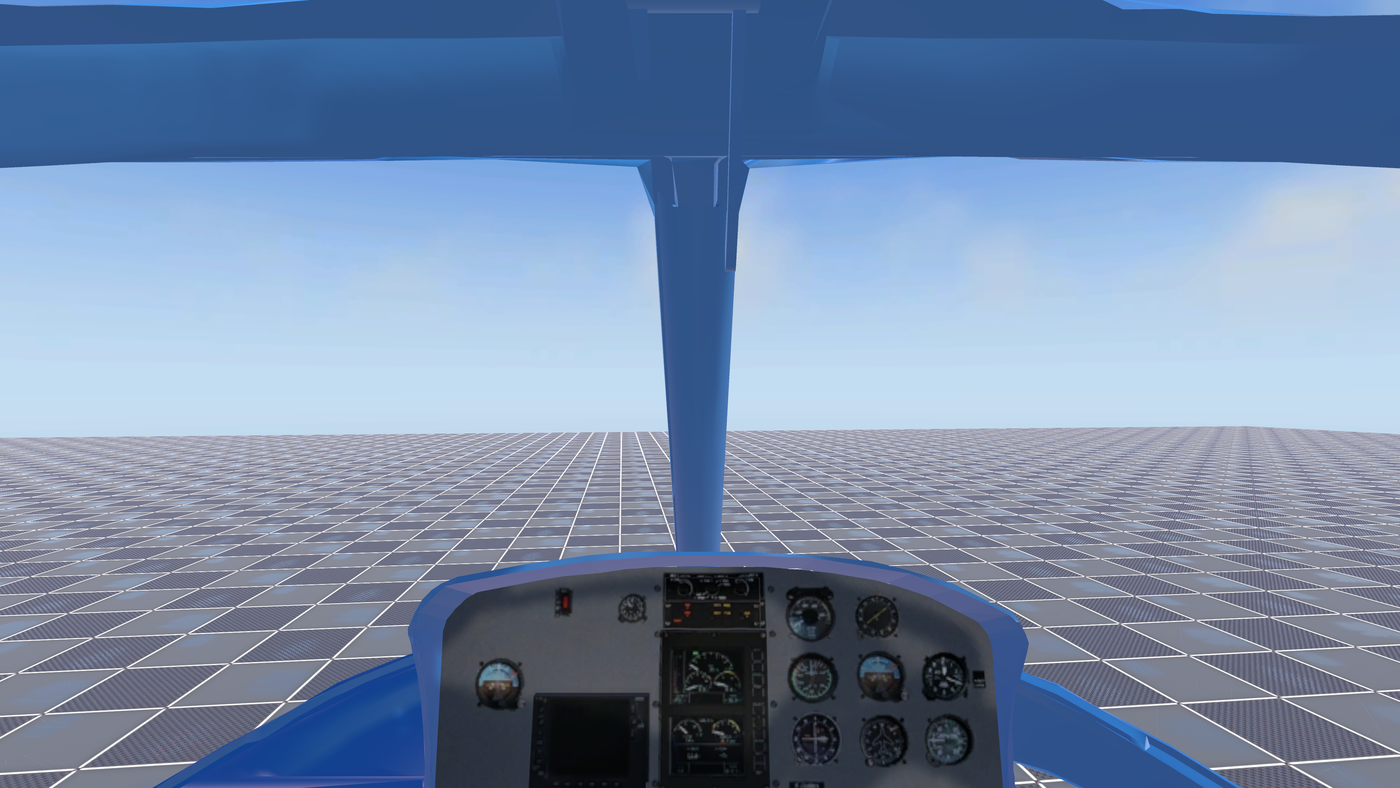
If the helicopter has no cockpit pivot assigned, the mode falls back to a fixed local offset. The serialized fields are:
| Field | Default | Range | Meaning |
|---|---|---|---|
fallbackLocalOffset |
(0, 1.2, 1.5) |
— | Local offset from the helicopter origin used when no cockpit pivot marker is assigned. |
cockpitFov |
60 |
30–90 | Fixed cockpit field of view (no airspeed coupling). |
yawClamp |
120 |
10–180 | Maximum freelook yaw from center, in degrees. |
pitchClamp |
60 |
10–89 | Maximum freelook pitch from center, in degrees. |
lookGain |
1 |
0.05–5 | Freelook gain: degrees of view per unit of look delta. |
recenterRate |
6 |
0.5–20 | Recenter rate after FreeLook is released (1/s). |
A key behavioural detail: cockpit freelook is lock-free with respect to the controls. The input provider only emits look delta while FreeLook is held, and it freezes the cyclic accumulator during that gesture, so the helicopter keeps flying its held cyclic while the pilot looks around the cockpit. You do not lose control of the aircraft to glance out the side window.
Orbit Camera
The orbit camera (RHCP_OrbitCameraMode) places the camera on a sphere around the helicopter at a configurable distance, always looking at it. Unlike chase, it does not lead the velocity vector — it is the inspection/showcase view. The orbit frame follows the helicopter's heading, so the resting position sits behind the tail, but it stays horizon-level. The player swings it with the FreeLook gesture (yaw free, pitch clamped) and zooms it in or out with the Zoom input; after an idle delay with no look input it recenters behind the tail and back to its resting pitch.
The orbit mode reads its distance, sensitivity, clamps, recenter timing, and zoom behaviour from the RHCP_CameraConfig when one is assigned, falling back to its own serialized values otherwise. The serialized fallback fields are:
| Field | Default | Range | Meaning |
|---|---|---|---|
defaultDistance |
10 |
≥ 0.5 | Fallback orbit distance from the helicopter (m), used when no config is assigned. |
restPitch |
12 |
-89–89 | Resting orbit pitch the view recenters to (degrees; positive looks down at the aircraft). |
fallbackSensitivity |
0.15 |
0.05–5 | Fallback orbit sensitivity (degrees per look unit) when no config is assigned. |
positionRate |
8 |
0.5–20 | Position follow rate (1/s). |
rotationRate |
10 |
0.5–20 | Look rotation rate (1/s). |
fov |
60 |
20–120 | Field of view (degrees). |
When a config is present, the orbit distance is the config's DefaultDistance, clamped into [MinDistance, MaxDistance], and the Zoom input dollies it within that range at the config's ZoomSpeed. Like chase, orbit is an exterior view, so it uses the spring-arm collision pass when collision is enabled.
Collision Avoidance
RHCP_CameraCollision is a spring-arm helper, owned by the manager and applied to exterior modes (chase and orbit) before the feel and shake layers. It sphere-casts from a pivot on the helicopter (the rigidbody's world center of mass) out to the desired camera position; if geometry blocks the line, the camera is pulled in to the hit point minus the probe radius, then eased back out when the path clears. Using a sphere cast rather than a ray keeps the near-clip plane corners outside the wall, not just the camera origin, so the view never pokes through geometry.
The pass is engineered to ship cleanly with no project-settings dependency. The helicopter's own colliders are excluded by identity — any collider whose attached rigidbody is the helicopter, or whose transform is a child of the helicopter root, is skipped — so no custom layer is required. An optional CollisionMask on the config lets you exclude environment layers such as water or foliage. The cast is allocation-free (it uses Physics.SphereCastNonAlloc into a preallocated buffer and ignores triggers), and the helper holds no static state.
Collision is disabled by default (collisionEnabled = false on the config, and a null config means no collision). When enabled, the pull-in is immediate by default so the camera never clips, while the push-out is eased at the configured extend rate — the classic "snap in, glide out" spring-arm behaviour. The pass also reports a clearance value (current distance minus minimum standoff) that the shake layer uses to keep positional shake from poking the camera through a wall.
Note: collision casts against whatever you point
CollisionMaskat. If you turn collision on but leave the mask set to Nothing, the spring arm can never hit anything and provides no protection. The editor validator flags this combination so you can catch it before shipping (see Editor Tools).
Camera Shake
RHCP_CameraShake produces a six-axis offset (three position, three rotation) from coherent Perlin noise, plus a one-shot decaying impulse for crashes and hard landings. The continuous shake's amplitude is modulated by game state, so the camera breathes with the machine: it sums an idle baseline, a term proportional to normalized rotor RPM (spool-up vibration), a term proportional to airspeed (high-power buffet), and a ground-wash term that ramps up near the ground (rotor downwash). The noise is sampled along Time.time with distinct per-axis seeds so the six channels decorrelate into independent jitter rather than a single wobble — and it never uses Random, so it is deterministic and allocation-free.
The impulse channel is what drives crash feel. The manager subscribes to the helicopter's OnCrashed(float magnitude) event and feeds an impulse scaled by the impact magnitude (clamped to a configurable maximum), which then decays over time. On OnRespawned the manager resets the shake so there is no leftover jitter after a respawn. The impulse fires even when continuous shake is disabled, so you can have crash kicks without ambient shake if you prefer.
Per-mode gating keeps the result honest: exterior modes (chase, orbit) take the full six-axis shake, while the cockpit mode suppresses the positional component (its rigid pivot mount already carries the airframe's motion) and applies only rotational shake. When collision is active, the positional shake is additionally clamped to a fraction of the resolved clearance so a violent impulse cannot punch the camera through a wall. The continuous shake is off by default (shakeEnabled = false) — a default config produces no ambient shake. Note that the crash impulse channel is independent: with a default config it still has a non-zero crashImpulseScale and maxImpulseAmplitude, so a crash still kicks the camera even with continuous shake off (set crashImpulseScale = 0 to disable that too).
RHCP_CameraConfig Reference
RHCP_CameraConfig is a ScriptableObject that holds the cross-cutting layer tuning the manager applies on top of a mode's pose: orbit, collision, feel, shake, and mode-blend (plus a reserved master feel knob, see below). Per-mode framing geometry (chase offset/rates/FOV, cockpit pivot/clamps) stays on the mode components themselves — the config is the single source of truth for the camera system's layered behaviour, not for each mode's base framing. Create one via Assets > Create > BoneCracker Games > RHCP > Camera Config, then assign it to the manager's config field.
Every value below is read-only at runtime (exposed through expression-bodied properties); the asset is authored in the inspector and never written by the running game. A null config reproduces the baseline feel, and the bundled default config ships with every layer gate off (orbitEnabled/collisionEnabled/shakeEnabled all false, blendDuration and all *01 feel gains 0) — the same baseline. (The crash-impulse fields default non-zero, so a crash still kicks the camera; see Camera Shake.)
Feel — Master
| Field | Default | Range | Meaning |
|---|---|---|---|
smoothness |
0 |
0–1 | Master feel knob (reserved). The field and its read-only property exist on the config, but the current runtime does not yet read it — it is a placeholder for a future calmer/cinematic rate-scaling pass and has no effect on the camera today. Leave it at 0. |
Orbit
| Field | Default | Range | Meaning |
|---|---|---|---|
orbitEnabled |
false |
— | Enable player orbit in chase and orbit modes. Off is the baseline (no orbit). |
orbitSensitivity |
0.15 |
≥ 0 | Degrees of orbit rotation per unit of accumulated look input. |
pitchClampOrbit |
70 |
5–89 | Maximum orbit pitch from level, in degrees. |
minDistance |
4 |
≥ 0.5 | Minimum orbit/chase distance (zoom-in limit), in metres. |
maxDistance |
20 |
≥ 0.5 | Maximum orbit/chase distance (zoom-out limit), in metres. |
defaultDistance |
10 |
≥ 0.5 | Default orbit distance, in metres. |
zoomSpeed |
1 |
≥ 0 | Metres of distance change per unit of accumulated Zoom input. 0 disables zoom. Result is clamped to [minDistance, maxDistance]. |
recenterDelay |
2.5 |
≥ 0 | Seconds of no look input before the orbit recenters to the tail. |
recenterRate |
3 |
0.5–20 | Orbit recenter rate (1/s). |
Collision
| Field | Default | Range | Meaning |
|---|---|---|---|
collisionEnabled |
false |
— | Enable the spring-arm collision pass on exterior modes. Off is the baseline (no clearance check). |
probeRadius |
0.25 |
0.05–2 | Spring-arm probe sphere radius, in metres (keep it at least the near-clip half-diagonal). |
minStandoff |
0.4 |
≥ 0 | Minimum standoff from the pivot the camera is pulled in to, in metres. |
collisionMask |
Everything (~0) |
— | Layers the spring arm casts against. The helicopter's own colliders are always excluded by identity; triggers are ignored. |
pullInImmediate |
true |
— | Contract instantly on a hit (never clip). When off, the pull-in is damped at the extend rate. |
extendRate |
4 |
0.5–20 | Rate the camera eases back out to full distance when the path clears (1/s). |
Feel — Roll & Horizon
| Field | Default | Range | Meaning |
|---|---|---|---|
horizonLock01 |
0 |
0–1 | Chase up-vector blend: 0 = world-up (horizon-locked, the baseline); 1 = inherit airframe roll. |
bankRollFollow01 |
0 |
0–1 | How much the chase camera rolls with the airframe's bank. 0 = no roll follow (baseline). |
bankRollLagRate |
4 |
0.5–20 | Bank-roll follow lag rate (1/s). |
Feel — Sway & FOV Kick
| Field | Default | Range | Meaning |
|---|---|---|---|
accelSwayGain |
0 |
≥ 0 | Acceleration sway gain (camera leans opposite the g-vector). 0 = no sway (baseline). |
accelSwayClamp |
0.5 |
≥ 0 | Maximum acceleration sway offset, in metres. |
accelSwayRate |
4 |
0.5–20 | Acceleration sway smoothing rate (1/s). |
accelSmoothRate |
8 |
0.5–30 | Low-pass rate (1/s) applied to the hub's per-physics-step acceleration before the sway and FOV-kick layers read it — removes render-rate aliasing of the stepped acceleration signal. |
fovKickGain |
0 |
≥ 0 | FOV widen per unit of forward acceleration. 0 = no kick (baseline). |
fovKickDecay |
3 |
0.5–20 | FOV kick decay rate (1/s). |
cockpitHeadSway01 |
0 |
0–1 | Cockpit "human head" inertia (positional sway plus look-into-turns) — reserved. The field and property exist on the config, but the current runtime does not yet read it; cockpit head-sway is a planned follow-up and has no effect today. 0 = rigid mount (baseline). |
Shake — Continuous
| Field | Default | Range | Meaning |
|---|---|---|---|
shakeEnabled |
false |
— | Enable continuous six-axis procedural shake. Off is the baseline (no shake). |
idleAmplitude |
0 |
≥ 0 | Idle shake amplitude (always present while shake is on). |
rpmAmplitude |
0 |
≥ 0 | Shake amplitude added in proportion to normalized rotor RPM. |
speedAmplitude |
0 |
≥ 0 | Shake amplitude added in proportion to airspeed. |
groundWashAmplitude |
0 |
≥ 0 | Shake amplitude added near the ground (rotor wash). |
groundWashHeight |
10 |
≥ 0.01 | AGL height (m) at/below which the ground-wash shake reaches full strength; it fades linearly to zero at this height. |
frequency |
8 |
≥ 0 | Base noise frequency, in Hz. |
posAmpScale |
0.03 |
≥ 0 | Positional shake scale, in metres at unit amplitude. |
rotAmpScale |
0.4 |
≥ 0 | Rotational shake scale, in degrees at unit amplitude. |
shakeClampVsClearance01 |
0.5 |
0–1 | Fraction of the resolved collision clearance the positional shake may use (keeps shake from poking walls). |
Shake — Impulse
| Field | Default | Range | Meaning |
|---|---|---|---|
crashImpulseScale |
0.02 |
≥ 0 | Impulse amplitude per m/s of crash impact magnitude. |
impulseDecayRate |
3 |
0.5–20 | Impulse decay rate (1/s). |
maxImpulseAmplitude |
1 |
≥ 0 | Maximum impulse amplitude (clamps violent crashes). |
Mode Blend
| Field | Default | Range | Meaning |
|---|---|---|---|
blendDuration |
0 |
≥ 0 | Crossfade duration between modes, in seconds. 0 = instant cut plus on-entry snap (the baseline). |
blendCurve |
EaseInOut(0,0,1,1) |
— | Crossfade easing curve (x and y in 0–1). |
Mode Blend (crossfade behaviour)
With a non-zero blendDuration, switching modes captures the current pose and eases from it into the new mode's pose over the configured time, using blendCurve to shape the transition (position lerps, rotation slerps, FOV lerps). With blendDuration = 0 the switch is an instant cut, and the entering mode's Activate() seeds its smoothing so the first frame snaps cleanly. This is why a default-config rig cuts hard between cameras while a tuned rig can glide. The HUD's camera-mode visibility mask continues to read CurrentMode throughout, so widgets that hide in cockpit (for example) behave correctly across a blend; see HUD and Mobile.
Setting the Target
The camera rig follows whichever RHCP_Helicopter you point it at. You can wire the manager's target field in the inspector, or set it at runtime:
// Retarget the rig to a helicopter at runtime.
RHCP_CameraManager manager = cameraRig.GetComponent<RHCP_CameraManager>();
manager.SetTarget(helicopter);
SetTarget does everything needed to follow a new aircraft: it resolves the helicopter's RHCP_InputManager (so the camera reads that pilot's look/zoom/switch state), re-subscribes the crash/respawn events to the new target, configures all three mode components with the new references and config, and activates the rig's start mode. Because it re-resolves the input manager and re-subscribes events cleanly, you can call it as often as you like — for example when spawning a fresh helicopter or switching which aircraft the player controls.
If you assign the target in the inspector instead, the manager calls SetTarget itself on Start, so a scene-authored rig just works. The bundled RHCP_CameraRig prefab already has its Camera, AudioListener, and the chase/cockpit/orbit components wired to the manager — you only need to supply the target helicopter.
Tips
A few practical notes for getting the most out of the rig:
- Start from the bundled default config, then enable one layer at a time. Because every layer is neutral at its default, turning on
collisionEnabled, thenorbitEnabled, thenshakeEnabledin sequence lets you feel exactly what each contributes without confusing interactions. Duplicate the bundled config rather than editing it in place so you can always fall back to baseline. - Cheap, high-impact wins first. Continuous shake (a small
idleAmplitudeplus a littlerpmAmplitudeandgroundWashAmplitude) and the crash impulse give the most "alive" feel for the least tuning. AddaccelSwayGainandfovKickGainfor a visceral speed sense in chase. - For low flying, enable collision. With
collisionEnabled = trueand a sensiblecollisionMask(your terrain/buildings layers), the chase and orbit cameras stay out of geometry automatically. KeeppullInImmediateon so the camera never clips on a sudden obstacle, and raiseprobeRadiusslightly if you still see the near plane catch a corner. - Cockpit horizon-lock vs. immersion. The cockpit inherits the airframe's roll through its rigid pivot mount; raise
horizonLock01toward1to stabilize that inherited roll toward world-up (at the default0it follows the airframe fully). (cockpitHeadSway01is reserved for a future human-head-inertia pass and does nothing yet.) - Mode cycling respects what is wired. If you ship a rig without the orbit component, Camera Switch simply toggles Chase/Cockpit — no dead frames. Conversely, wire orbit (the wizard does this for you) to get the full three-mode cycle.
- Don't fight the dt-independence. All smoothing rates are in 1/s and are framerate-independent; raise a rate to tighten a response, lower it to loosen — there is no need to special-case frame rate.
For deeper scripting (custom modes, reading telemetry, driving shake from your own systems), consult the XML documentation comments on the camera runtime types (surfaced by your IDE's IntelliSense). Related docs: Controls and Input for the camera-switch/look/zoom bindings, Setup Wizard for building a full rig automatically, and Editor Tools for the validator rules and scene gizmos that check your camera setup.