System Architecture
Traffic Overtaker is built as a layer of small, single-responsibility managers that sit on top of the bundled Realistic Car Controller Pro (RCCP) physics engine. Every gameplay scene is a flat stack of these managers, each owning one concern — road treadmill, path/waypoints, traffic pooling, lane geometry, camera, UI, and the gameplay state machine. They never reference each other through fragile direct assignments; instead a single locator (TO_SceneManager) finds and caches them on demand, and a static event bus (TO_Events) carries cross-system messages. Understanding these wiring patterns is the key to reskinning the project safely: once you know how the managers are discovered and how they talk to each other, you can rename, restyle, or replace any one of them without breaking the rest.
This page describes the runtime architecture — the manager hierarchy, the two singleton patterns the codebase uses, the TO_Events static event bus, the TO_API persistence/navigation layer, and how TO_SceneManager acts as the central service locator. All code conventions follow the asset standard: the TO_ prefix on every game class, all TO code wrapped in the BoneCrackerGames namespace, and the RCCP_ prefix preserved on the bundled physics engine under Assets/TO/Realistic Car Controller Pro/ (which stays global/namespace-less).
The Manager Hierarchy
A gameplay scene is intentionally shallow. Open TO_Scene_Sunny and the Hierarchy root contains one GameObject per system, plus the player spawn point, the two UI canvases, the floating-origin fixer, the road, and the standard Unity scene objects. There is no deep nesting and no master "game object" that owns everything — each manager is independent and is located at runtime by TO_SceneManager.
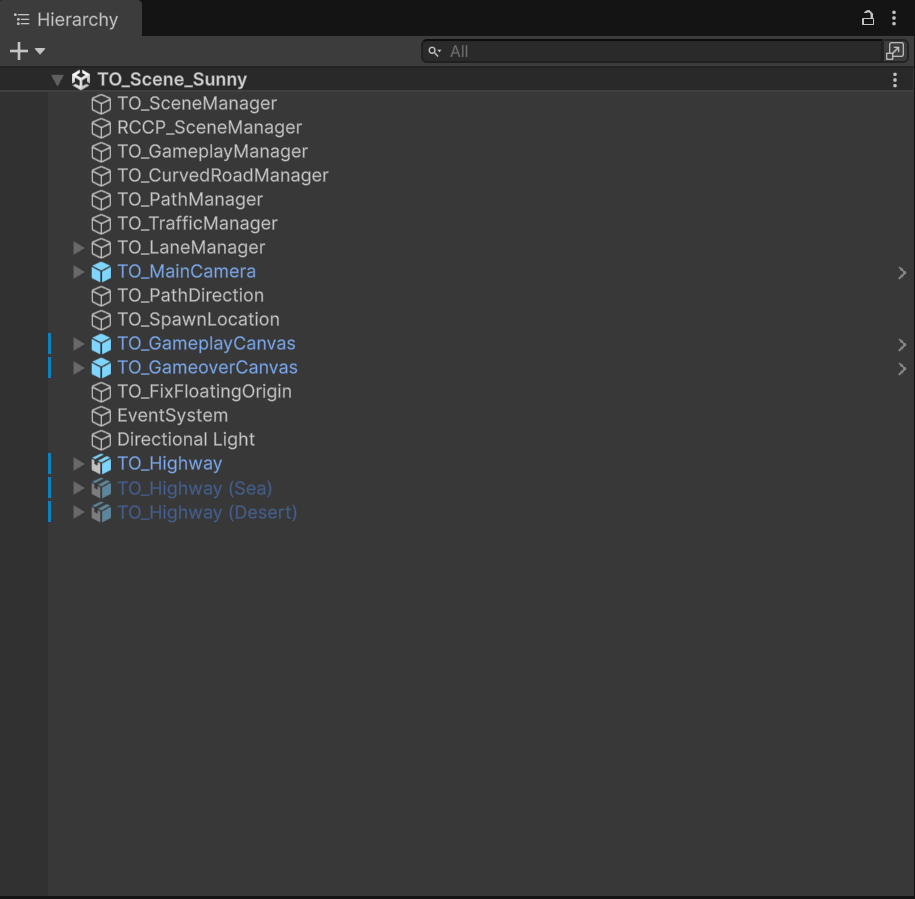
The Hierarchy of TO_Scene_Sunny, showing the single-responsibility manager stack that every gameplay scene shares.
| Root GameObject | Component class | Responsibility |
|---|---|---|
TO_SceneManager |
TO_SceneManager |
Central service locator; lazily finds and caches all other managers |
RCCP_SceneManager |
RCCP_SceneManager |
RCCP's own scene-level vehicle manager |
TO_GameplayManager |
TO_GamePlayManager |
Spawns the player, runs the countdown, state, pause, game-over, customization |
TO_CurvedRoadManager |
TO_CurvedRoadManager |
Road segment treadmill pooling and spawning |
TO_PathManager |
TO_PathManager |
Collects road waypoints, finds the closest path point to the player |
TO_TrafficManager |
TO_TrafficManager |
Spawns/pools traffic cars and answers the lead-car query |
TO_LaneManager |
TO_LaneManager |
Defines the 2-lane geometry (right travel lane, left oncoming lane) |
TO_MainCamera |
TO_Camera |
Gameplay camera (Top / TPS / TPS_Fixed / FPS modes) |
TO_PathDirection |
TO_PathDirection |
Path direction helper |
TO_SpawnLocation |
(Transform) | Where the player vehicle is instantiated at race start |
TO_GameplayCanvas |
TO_UI_GameplayPanel |
In-race HUD |
TO_GameoverCanvas |
TO_UI_GameOverPanel |
Game-over panel |
TO_FixFloatingOrigin |
TO_FixFloatingOrigin |
Recenters the world to avoid float precision drift |
EventSystem |
EventSystem |
Unity UI input event system |
Directional Light |
Light |
Scene key light |
TO_Highway |
(road mesh) | The road model (with (Sea) / (Desert) environment variants) |
Note the deliberate naming split: the GameObject is named
TO_GameplayManager, but the component class isTO_GamePlayManager(capital P in Play). When you script against the manager always use the class nameTO_GamePlayManager; the GameObject name is only a label. See 05_Scenes.md for the full per-scene object inventory.
Two Singleton Patterns
The codebase uses two different singleton strategies, and it is worth knowing which is which because they behave differently when a manager is missing from the scene.
Generic TO_Singleton<T>
Assets/TO/Scripts/Misc/TO_Singleton.cs is a thread-safe generic base class: public class TO_Singleton<T> : MonoBehaviour where T : MonoBehaviour. Its static Instance property takes a lock (m_Lock), returns the cached m_Instance if present, otherwise calls FindFirstObjectByType(typeof(T)), and — if still nothing is found — creates a new GameObject and attaches the component. The DontDestroyOnLoad line is intentionally commented out, so the auto-created instance lives and dies with the scene. In this project only TO_SceneManager derives from TO_Singleton<T> (public class TO_SceneManager : TO_Singleton<TO_SceneManager>), which is appropriate because the locator must always exist even if someone forgot to place it.
Manual FindFirstObjectByType static property
Every other manager uses a lighter, hand-written singleton: a private static backing field and a public static Instance property that does a null-check then FindFirstObjectByType<T>(). Crucially, this pattern does not auto-create a GameObject — if the manager is absent from the scene the property returns null. This is the pattern used by TO_GamePlayManager, TO_TrafficManager, TO_LaneManager, TO_PathManager, TO_CurvedRoadManager, TO_MainMenuManager, TO_PathDirection, and TO_UIOptionsManager, among others. (TO_SoundtrackManager is even simpler — a plain public static TO_SoundtrackManager Instance; field assigned at startup.)
| Aspect | TO_Singleton<T> (generic) |
Manual static property |
|---|---|---|
| Defined in | Scripts/Misc/TO_Singleton.cs |
Inline in each manager |
| Thread-safe lock | Yes (m_Lock) |
No |
| Auto-creates GameObject if missing | Yes | No (returns null) |
DontDestroyOnLoad |
No (commented out) | No |
| Used by | TO_SceneManager only |
TO_GamePlayManager, TO_TrafficManager, TO_LaneManager, TO_PathManager, TO_CurvedRoadManager, TO_MainMenuManager, and others |
The practical takeaway for reskinners: if you build a new gameplay scene from scratch, the manual-singleton managers must actually be present in the scene or their Instance accessors will be null. The TO_SceneManager inspector's Check & Create All Managers button (see 12_EditorTools.md) exists precisely to guarantee that.
TO_SceneManager — the Central Service Locator
TO_SceneManager is the hub that decouples every system from every other. Rather than each manager holding direct references, they all ask TO_SceneManager for what they need, and TO_SceneManager resolves the reference once and caches it. It exposes one lazy property per manager — each getter null-checks a private backing field, runs FindFirstObjectByType<…>() on the first access, and returns the cached value thereafter:
| Property | Returns | Group |
|---|---|---|
GameplayManager |
TO_GamePlayManager |
Gameplay |
CurvedRoadManager |
TO_CurvedRoadManager |
Gameplay |
PathManager |
TO_PathManager |
Gameplay |
TrafficManager |
TO_TrafficManager |
Gameplay |
LaneManager |
TO_LaneManager |
Gameplay |
PlayerCamera |
TO_Camera |
Gameplay |
GameplayPanel |
TO_UI_GameplayPanel |
Gameplay |
GameoverPanel |
TO_UI_GameOverPanel |
Gameplay |
Event |
EventSystem |
Gameplay |
MainMenuManager |
TO_MainMenuManager |
Main menu |
MainMenuPanel |
TO_UI_MainmenuPanel |
Main menu |
ShowroomCamera |
TO_Camera_Showroom |
Main menu |
RCCPSceneManager |
RCCP_SceneManager |
RCCP |
A scene declares its kind through the LevelType enum ({ MainMenu, Gameplay }) exposed as the levelType field — surfaced in the inspector as the Level Type dropdown. On Awake(), TO_SceneManager calls GetAllComponents(), which switches on levelType: in the Gameplay branch it warms the gameplay locators (GameplayManager, RCCPSceneManager, CurvedRoadManager, PathManager, TrafficManager, LaneManager, PlayerCamera); in the MainMenu branch it warms only MainMenuManager. This means the locator does the expensive FindFirstObjectByType sweep once at scene start, and only for the systems that scene actually uses. The custom inspector adds per-manager status buttons that show green when the manager is found and red (click to create) when it is missing, plus the Check & Create All Managers button — a reskin-friendly way to validate a hand-built scene without entering Play Mode.
TO_Events — the Static Event Bus
Assets/TO/Scripts/Misc/TO_Events.cs is a static class that carries cross-system notifications so subscribers (UI panels, audio, scoring popups) can react without holding references to the publisher. Each event follows the same three-part convention: a delegate, a static event of that delegate type, and a static Event_OnXxx() raiser method that null-checks before invoking. The raisers are what other code calls; the events are what UI and audio subscribe to.
| Event | Delegate | Raiser method | Payload |
|---|---|---|---|
OnCountDownStarted |
onCountDownStarted |
Event_OnCountDownStarted() |
— |
OnRaceStarted |
onRaceStarted |
Event_OnRaceStarted() |
— |
OnPlayerSpawned |
onPlayerSpawned |
Event_OnPlayerSpawned(TO_Player) |
TO_Player player |
OnPlayerDied |
onPlayerDied |
Event_OnPlayerDied(TO_Player, int[]) |
TO_Player player, int[] scores |
OnPaused |
onPaused |
Event_OnPaused() |
— |
OnResumed |
onResumed |
Event_OnResumed() |
— |
OnVehicleChanged |
onVehicleChanged |
Event_OnVehicleChanged(int) |
int carIndex |
OnOptionsChanged |
OptionsChanged |
Event_OnOptionsChanged() |
— |
Subscribing is the standard C# += in OnEnable and -= in OnDisable:
private void OnEnable() {
    TO_Events.OnRaceStarted += HandleRaceStarted;
    TO_Events.OnPlayerDied += HandlePlayerDied;
}

private void OnDisable() {
    TO_Events.OnRaceStarted -= HandleRaceStarted;
    TO_Events.OnPlayerDied -= HandlePlayerDied;
}
Because the events are static, any new system you add during a reskin can listen to the game's lifecycle without wiring a single inspector reference. Note that TO_API exposes two further static events of its own — OnPlayerMoneyChanged and OnPlayerNameChanged — which fire when currency or the player name changes; these live on the API rather than the event bus because they are tied to persistence.
TO_API — the Static Persistence & Navigation Layer
Assets/TO/Scripts/TO_API.cs is the single static entry point for everything that must survive a scene change or app restart. All of it is backed by Unity PlayerPrefs, so there is no save file to manage. Its surface groups into a handful of concerns:
- Currency —
GetCurrency(),AddCurrency(int),ConsumeCurrency(int)(each raisesOnPlayerMoneyChanged), reading/writing theCurrencykey. - Vehicle ownership —
UnlockedVehicles(),UnlockVehicle(int),LockVehicle(int),UnlockAllVehicles(),OwnedVehicle(int), keyed as{PrefabName}Owned(the player-car prefab's GameObject name, e.g.M3_E46Owned, not the roster's display name). - High score —
GetHighScores()returns a one-element array from thebestScoreOvertakekey (single-mode game). - Navigation —
MainMenu(),RestartGame(),ResetGame()(the last callsPlayerPrefs.DeleteAll()then reloadsTO_Settings.Instance.mainMenuSceneIndex). - Settings — audio/music volume, draw distance, shadows, post-processing, quality level, and mobile controller type, each persisted to its own key and firing
TO_Events.Event_OnOptionsChanged(). - Profile —
GetPlayerName()/SetPlayerName(string), plusGetTotalPlayedTime()/SetTotalPlayedTime()and theIsFirstGameplay()helper.
Settings defaults are not hard-coded in the API — each getter falls back to a value on TO_Settings.Instance (for example GetAudioVolume() defaults to TO_Settings.Instance.defaultAudioVolume), so a reskinner re-tunes defaults in one ScriptableObject rather than chasing constants through code. The full method signatures and the complete PlayerPrefs key list are documented in 14_APIReference.md.
The Gameplay Orchestrator: TO_GamePlayManager
TO_GamePlayManager is where the per-run state machine lives and where most of the TO_Events are fired. On Start() it reads SelectedPlayerCarIndex from PlayerPrefs, fixes mode to the single Mode.Overtake value (the Mode enum has exactly one member), and calls SpawnPlayer(). Spawning goes through RCCP.SpawnRCC(...) to instantiate the chosen vehicle with full RCCP physics, then performs the AI takeover: it puts TO_PlayerStabilizer into stabilityOnly mode, sets RCCP_CarController.externalControl = true, flips the input override flags (overridePlayerInputs, overrideExternalInputs) and zeroes the input deadzones, and finally attaches the TO_OvertakeAI driver brain. The countdown coroutine StartRaceDelayed() waits four seconds, sets gameStarted = true, hands control to RCCP, and raises Event_OnRaceStarted(). When the player crashes, CrashedPlayer(...) raises Event_OnPlayerDied(...) and schedules FinishRace(), which writes the new maximum to bestScoreOvertake. The manager also exposes SaveCustomization() / LoadCustomization() / ApplyCustomization() wrappers around RCCP's Customizer. Vehicle spawning is covered in detail in 06_PlayerVehicles.md.
Because TO_GamePlayManager is the publisher of nearly the entire lifecycle, the cleanest place to hook custom behaviour during a reskin is to subscribe to its events, not to edit the orchestrator itself — the manager stays untouched while your new UI, audio, or analytics react to OnPlayerSpawned, OnRaceStarted, and OnPlayerDied.
Startup Order
The architecture relies on a predictable execution order: TO_SceneManager.Awake() warms the locators first, then TO_GamePlayManager.Start() spawns the player and begins the countdown. To keep this deterministic across domain reloads, the project pins script execution order through the TO_ScriptExecutionOrderManager editor tool (reachable from Tools > BoneCracker Games > Traffic Overtaker as Validate / Reset / Show Script Execution Order). If you add a new manager that must initialize before or after the existing ones, register it there rather than relying on Unity's default ordering.
See Also
- 05_Scenes.md — the full scene inventory, root objects, and Build Settings scene list.
- 14_APIReference.md — complete
TO_APImethod signatures and PlayerPrefs key reference. - 12_EditorTools.md — the
TO_SceneManagerinspector, status buttons, and Check & Create All Managers. - 06_PlayerVehicles.md — how
TO_GamePlayManagerspawns vehicles and hands control to the AI.