What You Get
An inventory of the package: what shipped, where it lives, and which parts you are expected to edit.
Package layout
The main content is installed under Assets/CCDS/.
| Folder | Contents |
|---|---|
Scripts/ |
Runtime systems, including the optional networking integration |
Editor/ |
Inspectors, windows, validation, the scene overlay and multiplayer setup |
Scenes/ |
4 scenes |
Prefabs/ |
41 prefabs in Cameras, Markers, Minimap, Misc, Missions, UI, Wheels |
Resources/ |
Settings assets, vehicle prefabs, tutorials, GUI skin |
Documentation/HTML/ |
Offline manual — open 00_Index.html |
OptionalPhotonBootstrap/ |
Editor tooling that detects the optional Photon SDK |
Realistic Car Controller Pro/ |
Bundled RCCP V3.5.0 |
Realistic Traffic Controller/ |
Bundled RTC V2.0 |
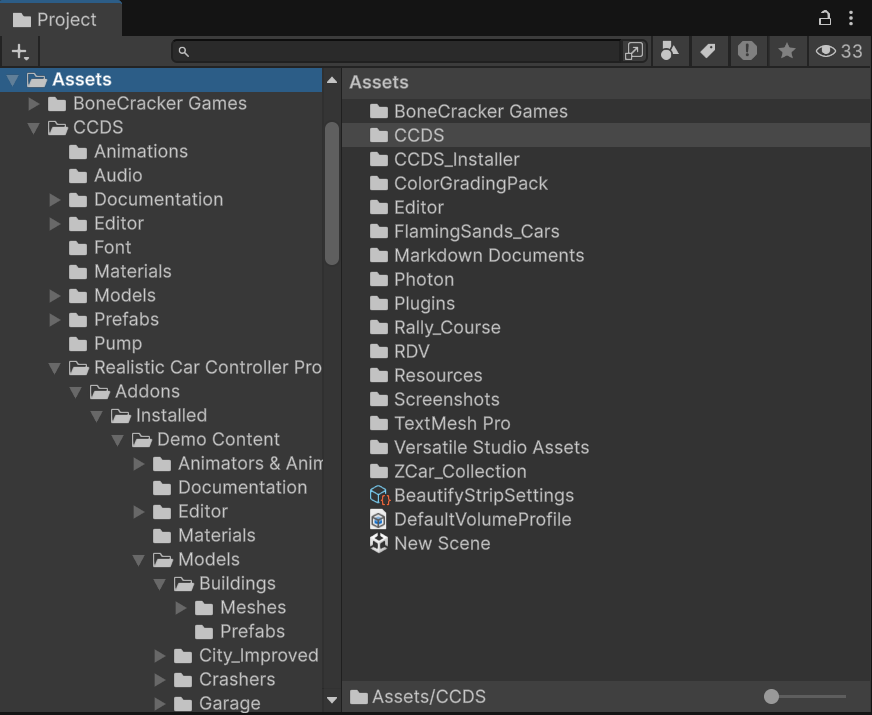
Assets/CCDS_Installer/ holds the first-import Setup Wizard. It is tooling, not runtime content.
The repository's root Documentation/ directory contains the Markdown authoring sources. The manual shipped with the asset is the HTML version under Assets/CCDS/Documentation/HTML/.
Single-player and optional multiplayer
Single-player runs without Photon PUN2 or an App ID. Import Photon separately when you want multiplayer, then use Tools → BoneCracker Games → CCDS → Multiplayer Setup to check its status, or the Setup Wizard to configure the App ID.
Both modes use the same scenes, vehicles and save data. Without the SDK, multiplayer controls are hidden; the authored network settings remain available for adding Photon later. See Multiplayer for setup and testing.
Scenes
| Index | Scene | Role |
|---|---|---|
| 0 | CCDS_MainMenu_City.unity |
Main menu, vehicle selection, customization, multiplayer entry |
| 1 | CCDS_Gameplay_City_1.unity |
City gameplay with missions and free roam |
| 2 | CCDS_Gameplay_City_2.unity |
Alternative city layout |
| — | CCDS_Vehicles_Prototype.unity |
Vehicle test sandbox — disabled in Build Settings |
Vehicles
Ten player vehicles in Assets/CCDS/Resources/Player Vehicles/:
Coupe · CTR · Jeep · M3_E36 · M3_E46 · M5_E30 · Muscle · Pickup · Sedan · SUV2
Five AI vehicles in Assets/CCDS/Resources/AI Vehicles/:
| Prefab | Used by |
|---|---|
CCDS_Police_1 |
Police pursuit AI |
CCDS_Pursuit_1 |
Pursuit mission target |
CCDS_Race_1, CCDS_Race_2, CCDS_Race_3 |
Race mission opponents |
Every vehicle is an RCCP car. Which ones the player can select, what they cost and how they perform is data in CCDS_PlayerVehicles.asset, not code — see Add Your Own Vehicle.
Settings assets
All in Assets/CCDS/Resources/, all loaded by name at runtime. These are the files you tune.
| Asset | Controls |
|---|---|
CCDS_Settings.asset |
Defaults, graphics, layers, network rates, prefab references — see Settings Reference |
CCDS_PlayerVehicles.asset |
The player's vehicle roster, prices and performance stats |
CCDS_ChangableWheels.asset |
Wheels the player can buy |
CCDS_TutorialData.asset |
Tutorial definitions (16 tutorial assets in Tutorials/) |
CCDS_EditorTourData.asset |
Content for the in-editor tour |
CCDS_Gui.guiskin |
Editor GUI skin |
Gameplay systems
| System | Entry point | Notes |
|---|---|---|
| Missions | CCDS_MissionObjectiveManager |
Race, Pursuit, Checkpoint, Trailblazer — all multiplayer-capable |
| Vehicle physics | RCCP RCCP_CarController |
Bundled, not written by CCDS |
| Traffic | RTC RTC_TrafficSpawner |
Bundled; density is player-adjustable |
| Police AI | CCDS_CopsManager, CCDS_AI_Cop |
Felony and arrest mechanics |
| Networking | CCDS_NetworkManager |
Optional Photon PUN2 integration |
| Save | CCDS_SaveGameManager |
JSON in Application.persistentDataPath |
| Replay | CCDS_ReplayManager |
Records and plays back every vehicle in the scene |
| Tutorials | CCDS_TutorialManager |
Popup-driven, 16 built-in tutorials |
| Customization | RCCP RCCP_Customizer |
Paint, wheels, upgrades, spoilers, neons, sirens |
| Minimap | CCDS_MinimapManager |
Orthographic camera and icon layer |
| Chat | CCDS_ChatManager |
Multiplayer text chat |
| Debug | CCDS_DebugPanel |
F12, four modules, off by default |
Full component list: Component Reference.
Editor tools
Under Tools → BoneCracker Games → CCDS →. Many shortcuts are also mirrored on the GameObject menu.
| Menu item | Does |
|---|---|
| Welcome Window | Five tabs: Welcome, Demo Scenes, Features, Setup, Health |
| Setup Wizard | Required dependency checks, content import and optional Photon configuration |
| Multiplayer Setup | Photon availability and configuration guidance; scene network ID tools |
| Edit Settings | Selects CCDS_Settings.asset |
| Player Vehicles | Selects CCDS_PlayerVehicles.asset |
| Create Scene Managers → Main Menu / Gameplay | Builds the manager set for a new scene |
| Open Validation Panel | Reports missing managers and broken references |
| Open CCDS Scene Tools Overlay | Scene View overlay — hierarchy, managers, quick select, stats, tools, validation |
| Scene Tools Window | The same tools as a dockable window |
| Documentation | Opens these pages in your browser |
| Editor Tour | Guided walkthrough of the project |
| Sort Manager Hierarchy | Orders manager objects in the Hierarchy |
| Toggle Hierarchy Highlighting | Colour-codes CCDS objects in the Hierarchy |
| Delete Save Data | Clears the save file |
| Vehicle Setup → … | Adds CCDS components to a selected RCCP vehicle |
What is safe to edit
| Edit freely | Edit with care | Avoid |
|---|---|---|
CCDS_Settings.asset and the other Resources assets |
Scene contents — re-run the Validation Panel after | RCCP and RTC source under Assets/CCDS/ |
| Your own scripts and prefabs | Manager prefabs and UI prefabs | Script execution order — it is set automatically |
| Materials, models, audio | Mission prefabs |
Script execution order is managed by CCDS_ScriptExecutionOrderSetup on every editor load. Setting it by hand per script is overwritten.
Editing RCCP or RTC source is not forbidden, but a vendor upgrade overwrites those folders wholesale. Extend them from your own scripts instead.