Set Up a New City Scene
Take an empty scene, or your own city, and make it a working CCDS gameplay or main menu scene.
The one-step version
- Open the scene.
- Tools → BoneCracker Games → CCDS → Create Scene Managers → Gameplay (or Main Menu).
That creates a CCDS_SceneManager, sets its levelType, and builds every manager that scene type requires. Run it again at any time — it reuses what already exists instead of duplicating it, and reactivates a manager that had been disabled.
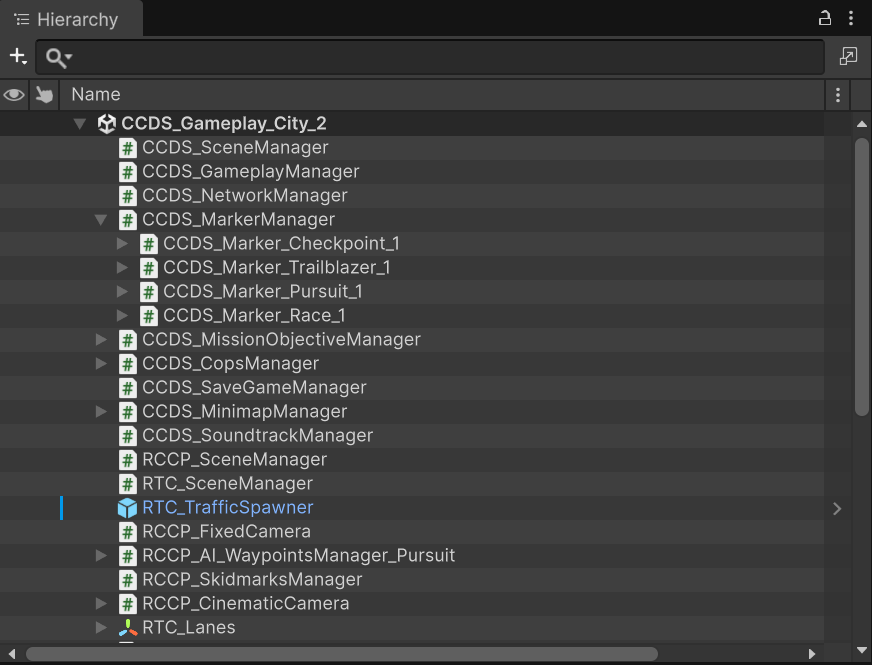
This is what a configured gameplay scene looks like: the CCDS managers, the mission markers nested under CCDS_MarkerManager, and the RCCP_SceneManager / RTC_SceneManager / RTC_TrafficSpawner objects that the vehicle and traffic systems need.
What gets created
CCDS_SceneManager is the scene's root reference holder. Its levelType decides the manager set.
Gameplay scenes
| Manager | Responsibility |
|---|---|
CCDS_GameplayManager |
Game state machine, player reference |
CCDS_UI_Manager |
In-game HUD |
CCDS_MarkerManager |
Mission marker spawning and tracking |
CCDS_MissionObjectiveManager |
Mission registration and completion |
CCDS_MissionObjectivePositionsManager |
Objective positions |
CCDS_MinimapManager |
Minimap rendering |
CCDS_CopsManager |
Police AI |
CCDS_NetworkManager |
Photon connection and spawning |
CCDS_SaveGameManager |
Save and load |
CCDS_TutorialManager |
Tutorial dispatch |
CCDS_UI_NametagManager |
Multiplayer nametags |
CCDS_Minimap_Camera |
Minimap camera |
RCCP_SceneManager |
RCCP scene services |
RCCP_Camera |
Vehicle camera |
Main menu scenes
| Manager | Responsibility |
|---|---|
CCDS_MainMenuManager |
Menu flow |
CCDS_UI_MainMenuManager |
Menu UI |
CCDS_Camera_Orbit |
Orbiting showcase camera |
CCDS_SoundtrackManager |
Music playlist |
RCCP_SceneManager |
RCCP scene services |
Note what is not in the main menu set: no gameplay manager, no mission managers, no minimap. A main menu scene that has them was built as a gameplay scene by mistake.
Register the scene
Add it to File → Build Profiles → Scene List. The index matters:
CCDS_Settings.mainMenuSceneIndex(default0) points at your main menu.CCDS_Settings.defaultSelectedSceneIndex(default1) is the gameplay scene a new player starts in.- The player's chosen scene is saved and read back by
CCDS.GetScene()/CCDS.SetScene().
Adding a gameplay scene without updating those defaults gives new players a scene index that does not exist.
Register network bindings
The same gameplay scene can run single-player without Photon PUN2 and multiplayer with the optional integration. Network authoring lives in CCDS_NetworkBinding components, so keep those components when working without the SDK.
For a scene containing bindings:
- Save the scene and make it active, outside Play Mode and Prefab Mode.
- Open Tools → BoneCracker Games → CCDS → Multiplayer Setup.
- Click Register Active Scene and Assign IDs.
- Save the scene changes when ready.
Registration records the scene in the CCDS scene ID policy, assigns IDs to placed bindings, and adds an active CCDS_NetworkSceneBootstrap if the scene has bindings and no bootstrap. The bootstrap prepares runtime views before their consumers initialize. Keep exactly one bootstrap in each scene containing authored bindings.
In registered scenes, the editor also assigns IDs after placing or duplicating bindings. It preserves existing valid unique IDs and replaces missing, duplicate or out-of-range IDs. These edits support Undo and mark the scene dirty; they do not save it automatically. Prefab assets keep sceneId = 0. Do not apply a placed instance's scene ID back to its prefab.
Under Advanced: several scenes in one room, Select Scene ID Policy opens Assets/CCDS/Editor/Networking/Data/CCDS_NetworkSceneIdSettings.asset. If multiple scenes will coexist in one room, their bindings need distinct IDs across that scene combination; the policy's matching nonempty roomSet identifies that relationship. Registration alone does not partition IDs between those scenes.
Scene requirements
Beyond the managers, a gameplay scene needs:
| Requirement | Why |
|---|---|
| A baked NavMesh | Cop and mission AI path on it. Unbaked means AI that will not move. |
| Ground colliders | The vehicle ground-snap in ACCDS_Vehicle.OnEnable raycasts downward. |
| Correct layers | Markers, checkpoints and minimap items are layer-driven. |
| A spawn point | CCDS_SpawnPoint for the player. Main menu scenes use CCDS_MainMenuManager.spawnPoint. |
| Lighting | Bake it. The demo scenes use Adaptive Probe Volumes. |
Re-bake the NavMesh whenever you change the city geometry. Nothing warns you that it went stale; the AI simply stops moving.
Layers
With CCDS_Settings.enableAutoLayerManagement enabled (the default), CCDS creates and assigns these automatically:
| Setting field | Default layer |
|---|---|
layerCCDSMap |
CCDS_Map |
layerCCDSMinimapItem |
CCDS_MinimapItem |
layerCCDSTrailblazerObstacle |
CCDS_TrailblazerObstacle |
layerCCDSCheckpoint |
CCDS_Checkpoint |
layerCCDSMarker |
CCDS_Marker |
layerCCDSProp |
CCDS_Prop |
Put your city's drivable geometry on CCDS_Map — that is the layer the minimap and raycasting use.
Turning auto layer management off means assigning all six by hand, on every object, forever. Leave it on unless you have a specific conflict.
Traffic
Traffic comes from RTC. Drag RTC_TrafficSpawner.prefab from the RTC package into the scene and lay out its waypoints along your roads.
Density is player-facing: CCDS.GetTrafficDensity() / CCDS.SetTrafficDensity() range 0–2 with 1 meaning 100%, and CCDS_Settings.defaultTrafficDensity sets the starting value.
Two runtime controls exist for gameplay moments:
CCDS.DisableTrafficForAWhile();        // temporary, e.g. during a race
CCDS.ToggleTrafficPermanently(false);  // until turned back on
In multiplayer, the master client owns traffic. The spawner instantiates over the network and non-master clients receive it. Do not spawn traffic locally on a client.
Validate
Tools → BoneCracker Games → CCDS → Open Validation Panel.
It checks the scene against CCDS_SceneManager.CheckMisconfigurations() and every component implementing ICCDS_CheckEditorError, and reports specific missing references — for example "Missing 'Spawn Point' on CCDS_MainMenuManager!" or "Missing UI Text 'Money Text' on MainMenu Manager!".
Run it before every build. It catches the broken-reference class of bug that otherwise only shows up at runtime.
Common problems
| Symptom | Cause |
|---|---|
| Player spawns and falls through the world | No ground collider, or the city is not on a collidable layer |
| AI cars never move | NavMesh not baked, or baked before the geometry changed |
| Minimap is blank | City geometry not on CCDS_Map; minimap camera missing |
| Markers invisible or not triggering | Wrong layer, or enableAutoLayerManagement disabled |
CreateMission returns null |
Managers not created — run Create Scene Managers |
| Menu scene tries to run gameplay logic | levelType set to Gameplay; fix it on CCDS_SceneManager |
| Duplicate managers after re-running the menu | Pre-existing managers were renamed, so they were not found |
| Missing or duplicate network scene IDs | Register the saved active scene through Multiplayer Setup; keep prefab IDs at zero and save the assigned scene IDs |