Installation
This chapter walks you through installing RCCP Tuner, explains what the automatic installer does, and shows you how to confirm everything is ready before you open the demo.
System Requirements
Unity Version
RCCP Tuner requires Unity 6000.0 or newer - the same requirement as Realistic Car Controller Pro itself.
Realistic Car Controller Pro (Required)
RCCP Tuner is an add-on for Realistic Car Controller Pro (RCCP). It drives RCCP's own customization component (RCCP_Customizer), which sits as a child object on each RCCP vehicle prefab - so RCCP must already be in the project. Without it, the Tuner deliberately does not activate.
RCCP Tuner requires RCCP V3.0.0 or newer. An older RCCP is detected and refused rather than half-compiled, because building the Tuner's RCCP-facing code against an older API would break the whole editor, not just the Tuner.
A full copy of RCCP ships inside the Tuner. The bundled installer is Assets/RCCP Tuner/Installer/RCCP_Pro_V3.0.0.unitypackage. If RCCP is missing when the Tuner first loads, it offers to import that package for you, and you can run the same import at any time from Tools > BoneCracker Games > RCCP Tuner > Setup > Install Bundled Realistic Car Controller Pro.
If you already own RCCP on the Asset Store, import and update it yourself through the Package Manager instead. The bundled copy is a convenience, not the canonical source, and installing it overwrites the RCCP files already in your project.
If the Tuner loads into a project with no RCCP at all, nothing breaks. You get one console warning per editor session:
[RCCP Tuner] Realistic Car Controller Pro was not detected. RCCP Tuner
includes RCCP — use 'Tools > BoneCracker Games > RCCP Tuner > Setup >
Install Bundled Realistic Car Controller Pro' to install it.
⚠ If you once deleted an RCCP folder by hand, the warning is worded differently and mentions "a leftover BCG_RCCP setting". That is the half-removed case: RCCP's scripts are gone, but the project setting RCCP left behind is not, so the setting alone cannot be trusted as proof that RCCP is installed. Installing the bundled copy restores it.
Input System (for the keyboard hotkey)
The optional T hotkey that toggles the garage uses Unity's Input System package. RCCP already installs and uses the Input System, so in practice this is always present. If the Input System were ever missing, the hotkey component silently does nothing - the garage can still be opened from code or with Open On Start.
What Happens When You Import
RCCP Tuner installs itself. On the first editor load after import, the installer (RCCPT_InitLoad) runs automatically:
- It probes for RCCP by looking for RCCP's compiled classes (
RCCP_CarControllerandRCCP_Version) and comparing the version it reports against the V3.0.0 minimum. It deliberately does not trust RCCP'sBCG_RCCPproject setting for this - that setting survives a manual folder delete, so it only proves RCCP was here at some point, not that it is here now. - If RCCP checks out, it registers the Tuner's own scripting define symbol,
BCG_RCCP_TUNER. A scripting define symbol is a project-wide compile switch - you can see the list under Edit > Project Settings > Player > Other Settings > Scripting Define Symbols. Nearly every one of the Tuner's runtime scripts is wrapped in this symbol, which is why the asset stays inert in a project without RCCP. - Unity recompiles once (this is normal - the symbol changed) and the Console logs
[RCCP Tuner] Installed. Registered BCG_RCCP_TUNER. - The Welcome Window opens, showing the install status.
⚠ Step 4 happens once per machine, not once per project. The "already shown" flag lives in Unity's
EditorPrefs, which is shared by every project on that Unity installation. If you have imported RCCP Tuner before, no window appears in your second project - that is not a failed install.
You do not need to do any of this manually. To re-check the status at any time, open Tools > BoneCracker Games > RCCP Tuner > Welcome Window:
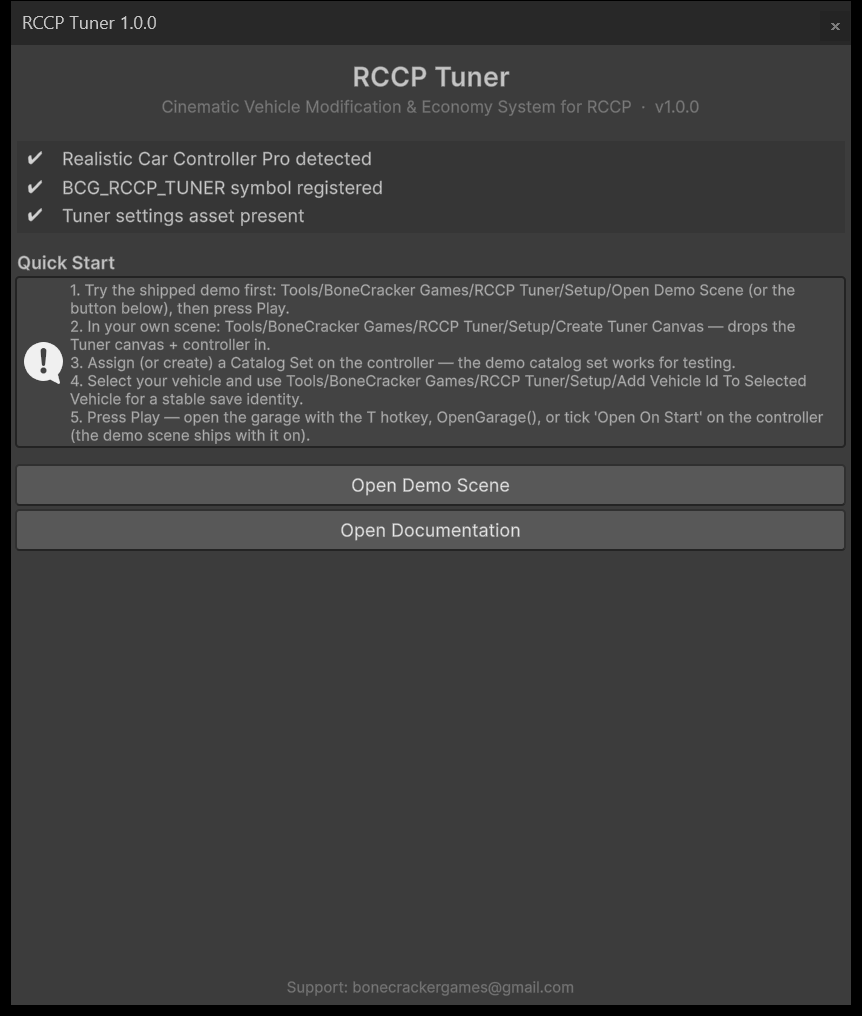
The three status rows should all show a checkmark:
| Status row | What it means |
|---|---|
| Realistic Car Controller Pro detected | RCCP's classes are compiled in this project and its version meets the V3.0.0 minimum. When RCCP is found, the detected version is appended in brackets, for example (V3.0.0). An RCCP that is present but too old shows a cross here, not a checkmark |
| BCG_RCCP_TUNER symbol registered | The Tuner's own define is active - its scripts are compiled |
| Tuner settings asset present | RCCPT_Settings.asset was found in the Tuner's own Resources folder (it is created automatically on first access) |
When the first row shows a cross, the window explains which case you are in - missing, or present but too old - and, if the bundled package is there, gives you a button to install it without leaving the window. A full tour of the window is in Editor Tools.
Folder Structure
After import you will find everything under one folder:
Assets/RCCP Tuner/
  Audio/            <- Garage theme music + 8 UI sound effects
  Demo/             <- Showroom demo scene and everything it needs
    Catalogs/       <- Ready-made demo content (paints, wheels, prices...)
    Environment/    <- Showroom set dressing and lighting assets
    Materials/      <- Demo sky / floor / city materials
    Thumbnails/     <- Generated catalog icons (24 PNGs: wheels, spoilers, siren)
  Documentation/    <- This documentation (MD + HTML + Images)
  Editor/           <- Editor tooling (menus, builders, validator, Welcome Window)
  Fonts/            <- Chakra Petch font (SIL Open Font License - license text included)
  Installer/        <- The bundled Realistic Car Controller Pro .unitypackage
  Prefabs/          <- RCCPT_TunerCanvas.prefab - the garage UI
  Resources/        <- RCCPT_Settings + default Theme / Economy Config / Shot Library
  Scripts/          <- Runtime code (Adapter, Camera, Core, Data, Economy, UI)
  Textures/         <- Procedural UI sprites and category icons
Demo/Thumbnails/ is the output folder of the thumbnail generator - if you run Tools > Generate Catalog Thumbnails From Selected Vehicle, that is where the rendered icons land. See Editor Tools.
Two things worth knowing about this layout:
- You can move or rename the
RCCP Tunerfolder. The asset finds its own install path in the editor (the same self-locating pattern RCCP uses), so the menu items, the canvas builder, the thumbnail generator and the demo builder all keep working wherever you put it. This self-location is editor-only - it is not something the game does while running. - Keep
RCCPT_Settings.assetinside a folder namedResources. It is loaded with Unity'sResources.Load, which only sees assets that live under some folder calledResources. Any such folder in the project works at run time, but the Welcome Window's third status row looks for it specifically in the Tuner's ownResourcesfolder, and if the asset is missing entirely the Tuner recreates it there.
Opening the Settings Asset
Several chapters ask you to change a field on RCCPT_Settings, and it has no menu item of its own. Two ways to reach it:
- Select
Assets/RCCP Tuner/Resources/RCCPT_Settings.assetin the Project window. - Click Project Settings in the footer of any
RCCPT_TunerControllerinspector.
That asset holds the four project-wide defaults (Catalog Set, Economy Config, Theme, Shot Library) that every scene falls back to. Each empty slot has a Locate button that finds and assigns a matching asset for you - handy right after a first import, so you can wire all four without dragging anything. It guesses, preferring assets inside the RCCP Tuner folder and ones named *_Default, so double-check the pick if you have authored your own. The full field reference is in Editor Tools.
Verification
After the import settles, confirm the install in under a minute:
- Open Tools > BoneCracker Games > RCCP Tuner > Welcome Window - all three status rows show checkmarks.
- The menu Tools > BoneCracker Games > RCCP Tuner shows the full tree: a Setup submenu, a Tools submenu, and Documentation. If the only entries are Welcome Window and Setup > Install Bundled Realistic Car Controller Pro, the
BCG_RCCP_TUNERdefine never registered - RCCP is missing or older than V3.0.0. Those two entries are deliberately not gated on the define, so the tools you need to fix the problem are always reachable. The complete list is in the Menu Map below.
Both checks are true at any time, so they are the reliable ones. If the Console is still open from the import you will also see [RCCP Tuner] Installed. Registered BCG_RCCP_TUNER. - but that line is written only in the moment the symbol is registered, so a cleared Console or a later session will not show it. Its absence does not mean anything is wrong.
Menu Map
Everything the Tuner adds to the editor lives under Tools > BoneCracker Games > RCCP Tuner:
| Menu item | What it does |
|---|---|
| Welcome Window | Install status, quick-start steps, links (Editor Tools) |
| Setup > Install Bundled Realistic Car Controller Pro | Imports the RCCP copy that ships inside the Tuner. Overwrites any RCCP files already in the project - back up first |
| Setup > Create Tuner Canvas | Drops the garage UI + a controller into the open scene (Scene Setup) |
| Setup > Add Vehicle Id To Selected Vehicle | Gives the selected vehicle a stable save identity (Scene Setup) |
| Setup > Open Demo Scene | Opens the shipped showroom (Quick Start). If the scene file is missing, it offers to build it for you |
| Setup > Build Demo Scene | Rebuilds the showroom from scratch. Destructive - see the warning below |
| Tools > Validate Catalogs | Checks your content for missing prices, bad indices, foreign materials (Editor Tools) |
| Tools > Generate Catalog Thumbnails From Selected Vehicle | Renders 256 px catalog icons for wheels, spoilers and sirens from the selected vehicle's real models (Editor Tools) |
| Tools > Upgrade Tuner Canvas (Paint Studio) | One-time patch for canvases built before the Paint Studio existed |
| Tools > Upgrade Tuner Canvas (UI Audio) | One-time patch for canvases built before UI audio existed |
| Documentation | Opens this documentation |
⚠ Build Demo Scene overwrites files, and asset writes cannot be undone. It rewrites the showroom scene, the demo catalog assets under
Demo/Catalogs/, and the demo sky and floor materials. Ctrl+Z will not bring your edits back. It asks for confirmation first and lists exactly what it is about to overwrite, so read that dialog instead of clicking through it. If you have hand-edited the showroom, save a copy under a different name before you run it.
Content assets (catalogs, themes, configs) are created through Assets > Create > BoneCracker Games > RCCP Tuner - covered in Creating Items. Every menu item, custom inspector and one-click fix in the asset is catalogued in Editor Tools.
Troubleshooting Installation
The Welcome Window shows a red cross on "Realistic Car Controller Pro detected"
Either RCCP is not in the project at all, or the RCCP that is there is older than V3.0.0. The window says which case you are in, and gives you a one-click install button when the bundled package is present. If you own RCCP on the Asset Store, updating it through the Package Manager is the better route - the bundled copy overwrites whatever RCCP files are already there.
The Welcome Window never opened after import
Expected on any machine that has imported RCCP Tuner before. It opens once per Unity installation, not once per project, so a second project on the same machine gets no window. Open it yourself from Tools > BoneCracker Games > RCCP Tuner > Welcome Window.
Unity recompiled right after import
Expected. Registering the BCG_RCCP_TUNER scripting define always triggers one recompile.
Unity recompiled again after I switched build target, and the install log repeated
Also expected, and not a broken install. Unity stores scripting define symbols per build target group, and the Tuner only ever writes the group that is currently selected. So the first time you switch to Android, iOS or WebGL, BCG_RCCP_TUNER is not yet defined for that platform and the installer registers it again: one extra recompile, a repeat of the [RCCP Tuner] Installed. Registered BCG_RCCP_TUNER. line, and a brief cross on the Welcome Window's second status row until it settles. The Welcome Window will not re-open, because that is gated separately.
I imported the Tuner before RCCP
That is fine, and it is the normal case when you use the bundled copy. Install RCCP - either from the Asset Store, or with Setup > Install Bundled Realistic Car Controller Pro - and on the next editor load the Tuner detects it and completes its own installation automatically.
Next Steps
- Open the shipped demo and press Play - see Quick Start.
- When you are ready for your own scene, continue with Scene Setup.
- To see what every menu item and inspector in the asset does, browse Editor Tools.