Prices & Economy
This chapter covers everything about money: where each price is authored, how to change what things cost, the wallet, who owns what, and where it is all saved.
Where Every Price Lives
There are exactly five places a price can come from - knowing them means never hunting:
| What | Where to edit it |
|---|---|
| A cosmetic item's price (paint color, finish, wheel, spoiler, siren, decal, neon) | The Price field on its catalog entry (Creating Items) |
| Performance upgrade prices | The four five-rung ladders on the Upgrade Catalog (Creating Items) |
| The custom color picker unlock | Custom Color Price on the Paint Catalog |
| The tuning category unlock | Tuning Unlock Price on the Economy Config |
| A global "make everything cheaper/dearer" dial | Global Price Multiplier on the Economy Config |
What a "ladder" and a "rung" mean, because the rest of this chapter uses both words. Each performance category (Engine, Brake, Handling, Speed) owns one ladder: an array of exactly five prices where element 0 is the price of level 1 and element 4 the price of level 5. Each of those five entries is a rung. A purchase charges the sum of the rungs between the level you already own and the level you are buying - going from level 2 to level 4 charges rungs 3 and 4 - which is why an upgrade card can show a much bigger number than any single rung you typed. A rung of 0 is an authoring error, never a freebie; the validator flags it. The authored-versus-displayed picture is in Creating Items.
The Economy Config
The RCCPT_EconomyConfig asset is the economy's control panel. The asset shipped in Resources/ (RCCPT_EconomyConfig_Default) is the project default; assign a different one per scene via the controller's Economy Override slot. Create your own with Assets > Create > BoneCracker Games > RCCP Tuner > Economy Config.
Not sure which asset a given scene is actually using? Select the RCCPT_TunerController and read the Setup Health block - the Economy row names the asset that resolves and where it came from (Editor Tools).
If neither slot resolves - no override on the controller and no economy config on
RCCPT_Settings- the garage still runs. The economy stays enabled, the wallet is seeded with a built-in 25,000, and every price is charged exactly as authored because there is no multiplier to apply. That is the fallback, not an error, and the Setup Health row says so on screen.
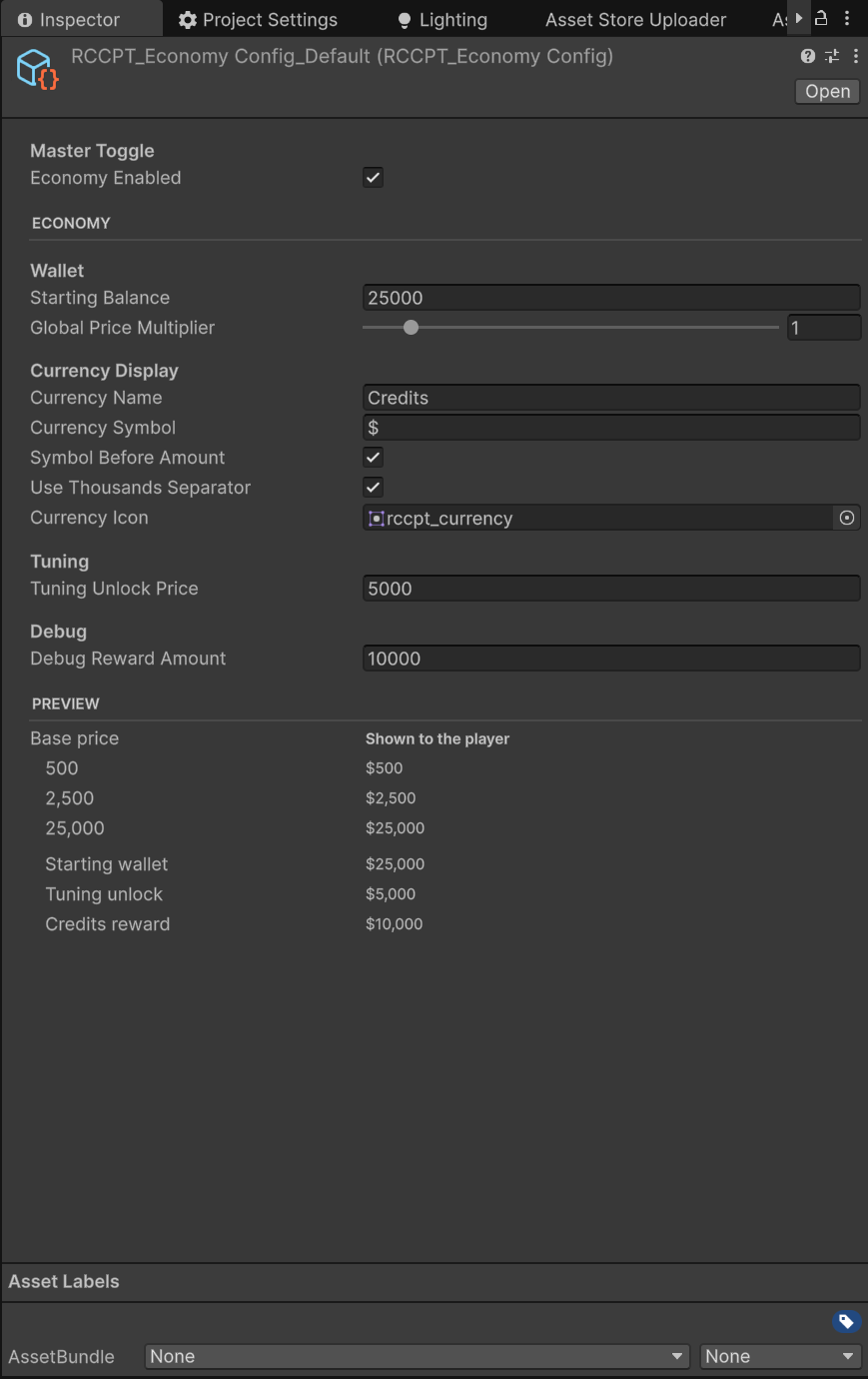
| Setting | Type | Default | Description |
|---|---|---|---|
| Economy Enabled | bool | true | Master toggle. Off = everything owned/free/unlocked and all wallet UI hides - pure live customization |
| Starting Balance | int | 25000 | One-time starting balance seeded into a fresh save |
| Global Price Multiplier | float (0-10) | 1 | Global multiplier applied to every base price (difficulty dial) |
| Currency Name | string | Credits | Currency display name used in UI copy |
| Currency Symbol | string | $ | Symbol shown next to amounts |
| Symbol Before Amount | bool | true | On: $100 - off: 100 $ |
| Use Thousands Separator | bool | true | On: 1,000 - off: 1000 |
| Currency Icon | Sprite | (coin icon) | Icon shown beside the wallet balance |
| Tuning Unlock Price | int | 5000 | One-time account-wide unlock price for the Tuning category |
| Debug Reward Amount | int | 10000 | Amount granted by debug / integration reward helpers |
This asset has a custom inspector, and the part worth knowing about is the Preview block at the bottom. It runs the asset's own pricing and formatting code over three sample base prices (500, 2,500 and 25,000) and prints the exact strings a player will see, then does the same for the starting wallet, the tuning unlock and the debug reward. Currency symbol, symbol placement, thousands separator and the multiplier all interact, so this is the fastest way to get your currency reading the way you want without entering Play Mode. Full tour: Editor Tools.
Untick
Economy Enabledand the remaining fields grey out instead of disappearing. They stay authored - they simply have no effect until you switch it back on.
Two of these deserve a closer look:
Global Price Multiplier
Every displayed and charged price is round(base price x multiplier). Authored prices stay untouched - this is the one dial for "hard mode" economies (multiplier 2) or quick playtesting (multiplier 0.1). At exactly 0, everything effectively costs nothing.
⚠ A multiplier of 0 is almost always an accident. It makes every priced item free while the economy still reads as enabled, so the wallet stays on screen and nothing on screen explains why nothing costs anything. The inspector warns about it and offers a one-click Reset To 1. If you genuinely want a free garage, untick
Economy Enabledinstead (Turning the Economy Off) - that also hides the wallet UI.
Starting Balance
Seeded once, the first time a save is created on the device. Changing it later does not retroactively change existing saves. To see a new starting balance you have to wipe first, and you do not need code for that: select the RCCPT_TunerController while in Play Mode and press Reset Progress in its inspector (it asks for confirmation), call ResetProgress() yourself, or delete the PlayerPrefs key RCCPT_Save_v1.
The demo showroom does not run the values in the table above. It assigns its own
RCCPT_DemoEconomyasset in the controller's Economy Override slot, and that asset differs in two places, not one: a 50,000 starting balance and an 8,000 tuning unlock price, against the shipped default's 25,000 and 5,000. So the demo's locked Tuning tab readsUnlock Tuning - $8,000and neither figure is a documentation error. The Default column above describesRCCPT_EconomyConfig_DefaultinResources/.
Who Owns What (the Hybrid Model)
                    ONE global wallet
                           |
      +--------------------+--------------------+
      |                                         |
  GLOBAL ownership                     PER-VEHICLE ownership
  (buy once, every car)                (each car earns its own)
      |                                         |
  - paint colors and finishes          - Engine level    0..5
  - the custom color unlock            - Brake level     0..5
  - wheels, spoilers, sirens           - Handling level  0..5
  - decals, neons                      - Speed level     0..5
  - the tuning unlock                  (keyed by the vehicle's
                                        RCCPT_VehicleId GUID)
It is all one save file underneath. The diagram below splits it the way the code does - global cosmetics, per-vehicle performance levels, and an account bucket holding the wallet balance and the one-time Tuning unlock (which the box above lists as global, because paying once covers every car):
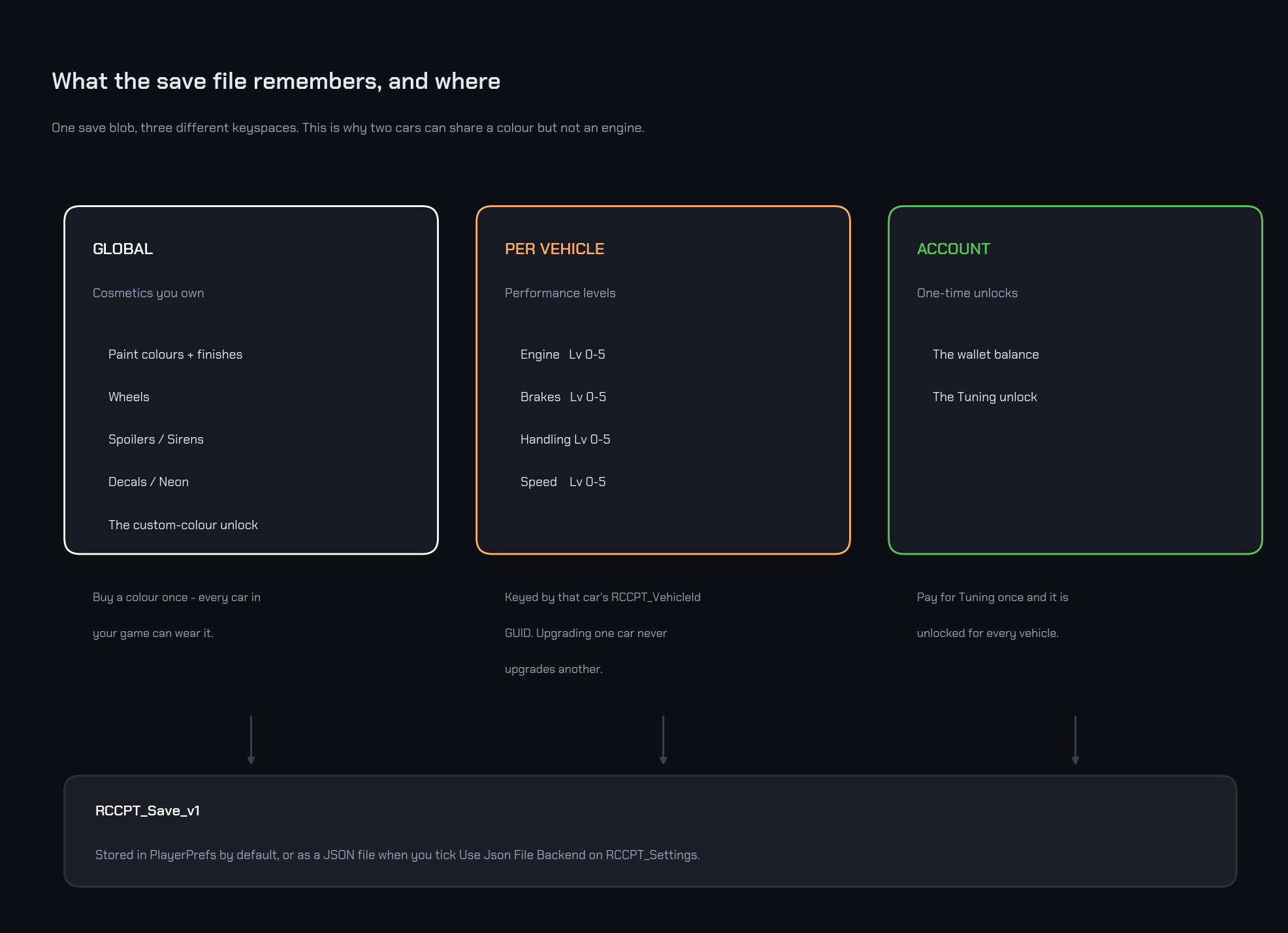
The reasoning: cosmetics feel like a collection (you bought Midnight Purple - it is yours), while performance is per build (your Skyline being level 5 should not make a fresh truck fast). Owning is also distinct from wearing: ownership lives in the Tuner save; what each car currently wears lives in RCCP's own save.
RCCPT_VehicleId is a small component holding one stable 32-character GUID. The controller adds it to a vehicle automatically the first time that vehicle is bound, so you rarely place it by hand - but it is what stops two identically-named cars from sharing progress, and regenerating it forks ownership and orphans everything the old GUID had bought. It is introduced properly in Scene Setup.
Giving the Player Money
Wire your game's rewards to the controller - one call, persisted immediately:
RCCPT_TunerController.Instance.AddCurrency(2500); // e.g. a race payout
While developing, the + button next to the in-garage balance grants Debug Reward Amount per click. It is visible while Debug Add Cash Button is enabled on RCCPT_Settings - it ships enabled; turn it off before releasing your game (the field's own tooltip says the same). It also hides itself whenever the economy is off, since there is no wallet to top up.
You do not have to remember that on your own: selecting RCCPT_Settings shows a ship-readiness warning while the debug button is enabled, with a one-click Turn Off Debug Cash fix beside it (Editor Tools). That asset has no menu item of its own - reach it with the Project Settings button at the bottom of the RCCPT_TunerController inspector, or open Assets/RCCP Tuner/Resources/RCCPT_Settings.asset in the Project window.
There is also a no-code route to money while testing. Select the RCCPT_TunerController in Play Mode and its Live Session block gives you a live balance readout plus an Add button granting the same Debug Reward Amount as the in-game + (Editor Tools).
More wallet control (reading the balance, spending, change events) is in Scripting API.
Where the Money and Ownership Are Saved
The whole economy - balance, ownership, unlocks, applied paint finishes - is one save blob with two possible backends, chosen on RCCPT_Settings:
| Backend | Where | When to use |
|---|---|---|
| PlayerPrefs (default) | PlayerPrefs key RCCPT_Save_v1 |
Zero setup, works everywhere including WebGL |
JSON file (opt-in: Use Json File Backend) |
rccp_tuner_save.json under Application.persistentDataPath |
When you want an inspectable/copyable file. Not WebGL-safe |
A corrupt save never breaks the game - it logs a warning and resets to fresh data. Save writes are also failure-tolerant: if the backend cannot write, progress is kept in memory and a warning is logged.
RCCP's applied configuration save (what the car wears) is separate and untouched by backend choice - it always lives in PlayerPrefs under the vehicle's GUID (Using the Garage).
Turning the Economy Off
Two switches, same effect - every item owned, everything free, tuning unlocked, all wallet UI hidden. Either one turns the economy off; turning it back on takes both.
- Authoring-time: untick
Economy Enabledon the Economy Config. - Runtime:
RCCPT_TunerController.Instance.SetEconomyEnabled(false);- useful for a "sandbox garage" mode or a demo build.
⚠
SetEconomyEnabled(true)cannot revive an economy whose config hasEconomy Enabledunticked. The runtime flag and the config toggle are ANDed together, so the asset always has the final say. If a runtime re-enable seems to do nothing, that untick is why.
Resetting
| Call | What it wipes | What it keeps |
|---|---|---|
ResetProgress() |
Balance, all ownership, all unlocks, and applied paint finishes (the finish lives in the Tuner save); then re-seeds the starting balance | Every vehicle's applied RCCP configuration (paint color, wheels, levels...) |
ResetVehicleToStock() |
The bound vehicle's applied RCCP configuration (back to factory) | All ownership and money |
Both live on RCCPT_TunerController - see Scripting API. Both are also buttons: select the controller in Play Mode and the Live Session block offers Reset Progress (behind a confirmation dialog) and Reset To Stock (Editor Tools).
ResetVehicleToStock()only does something while the garage is open - it needs a bound vehicle to reset. Called with the garage closed it returns silently. The inspector makes that visible by greying its Reset To Stock button out until you open the garage.
Why a Purchase Can Be Refused
Checkout validates the whole cart before touching anything. The possible outcomes (also raised to code as RCCPT_PurchaseResult):
| Result | Meaning |
|---|---|
| Success | Paid and committed |
| Free | Total was zero (all-free cart) - committed without charge |
| InsufficientFunds | The wallet cannot cover the total - nothing changes |
| AlreadyOwned | A cart entry is already owned (owned items equip, they never cart) |
| EconomyDisabled | Economy is off - there is nothing to buy |
| Invalid | Bad data: an entry without a price/id, or an upgrade ladder that does not start at the owned level |
Invalid in practice means a catalog authoring problem - run Validate Catalogs, which is a menu item and also a button on the controller inspector (Editor Tools).
InsufficientFunds is the one the player meets, and the garage explains it before they ever press the button. Staging more than the wallet holds is allowed - the cart prints MISSING with the exact shortfall in the error color, and CHECKOUT stays disabled until the total is covered:
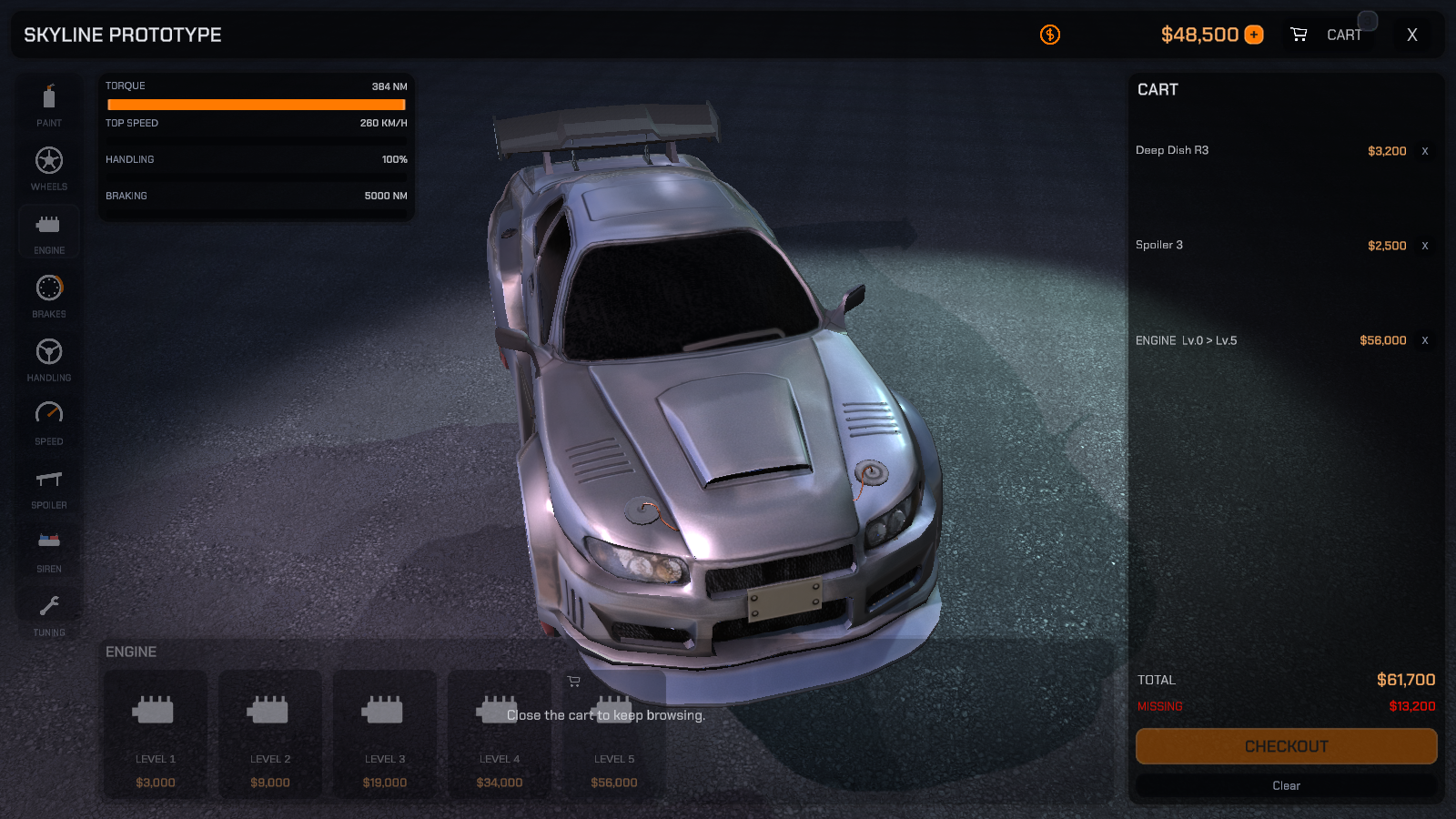
When the cart does fit, the same line reads REMAINING in the success color with the balance you would be left with.
The Player Sees a Shortfall Before Checkout
InsufficientFunds is the one result a player should almost never actually hit, because the garage tells them about it while they shop rather than at the till:
- The cart carries a balance line. Below the total, the drawer prints what is left after buying (
REMAINING, in the theme's success color) or what the cart is short by (MISSING, in the theme's error color, showing the shortfall as a positive amount). It appears as soon as the cart holds something and hides again when the economy is off. - Items you cannot afford dim to 55% - and stay clickable. That looks like a disabled control but is deliberate: staging an item you cannot yet afford is allowed, and the
MISSINGline is what explains the gap. Dim means "this pushes you over budget", not "this is unavailable". - CHECKOUT itself goes non-interactable while the wallet cannot cover the total, so
MISSINGis the on-screen answer to "why is the checkout button greyed out?".
So the intended flow is stage freely, watch MISSING grow, then remove something or earn more. InsufficientFunds is the backstop for a purchase attempted through code, not the normal way a player learns they are broke.
Next Steps
- Make the garage look like your game: Theming & Editing the UI.
- Hook rewards, resets, and events into your game code: Scripting API.