Flight Tuning
This document explains how Realistic Helicopter Controller Pro (RHCP) turns rotor physics into the way your helicopter flies, and how to shape that behavior to your taste. It covers the flight model at a high level, the two tuning modes of the RHCP_FlightConfig inspector (Basic and Expert), the six outcome-based Basic controls and the field each one drives, the full field reference for every category of RHCP_FlightConfig, the live Performance Envelope readout, the Calibrate-to-targets test flight, and practical tuning tips.
All tuning lives in one ScriptableObject asset: RHCP_FlightConfig. A helicopter is a prefab plus one config asset; the runtime modules read the asset every physics tick, so edits you make in the Inspector while in Play Mode tune the aircraft live. If you only want to read this once, read Basic vs Expert Mode and The Six Basic Controls: they let you describe a helicopter in plain outcome terms without learning the underlying physics. The rest is reference for when you want exact control.
Customize the Demo Helicopter (no flight knowledge needed)
If you just want to make the demo's helicopter faster, climb harder, turn quicker, or feel easier — without learning any rotor theory — this is the whole recipe. Select RHCP_Maverick in the demo scene, and in its Inspector click the Tune Flight button (the most prominent action on the helicopter). That opens its Flight Config in Basic mode: a short list of plain-language sliders.
| You want… | Drag this Basic slider |
|---|---|
| Go faster | Top Speed (m/s) up (it shows an ≈ km/h / mph hint) |
| Climb harder | Climb Power (m/s) up |
| Turn / roll quicker | Roll Rate, Pitch Rate, Yaw Rate up |
| Easier / more forgiving | Flight Style toward Arcade |
| Limit how far it banks | Bank Limit (0 = no limit) |
| Snappier stick response | Responsiveness toward Snappy |
Press Play to feel the change — the Performance Envelope readout at the bottom shows the real numbers (estimated in edit mode, measured live in Play mode), so you can confirm "yes, it's actually faster now."
Before you tune, make it yours. The demo flies a shared, shipped config asset — editing it in place changes the demo and every helicopter that uses it, and a package update could overwrite your edits. The helicopter's Inspector shows an amber "Shared preset" notice with a one-click Clone for this helicopter button: click it once and you'll be tuning an isolated copy. (You can also use Duplicate Preset on the Flight Config header.) If you ever tinker yourself into a corner, the Flight Config header has a Restore Defaults button that puts every value back, and the Validator will warn you if a config ends up genuinely unflyable.
Where do I change X?
The things you can customize live on a few different layers. This table tells you which one owns what:
| To change… | Edit… |
|---|---|
| Speed, climb, turn rates, bank limit, flight style | The Flight Config in Basic mode (the Tune Flight button) |
| Body / paint color | The helicopter's materials — the body is RHCP_BodyPaint (on the Main_Body renderer); the landing skids are RHCP_BluePaint / RHCP_WhitePaint |
| Engine / rotor sounds | The Audio module — open it from the hub's Modules card → Audio row (Engine Sound / Rotor Sound slots) |
| Camera chase distance | The Chase Camera component's Anchor Offset — its Z value is the distance behind (more negative = further out) |
| Invert pitch, mouse sensitivity, camera view, quality, units | The in-game Settings panel (press Esc) — per-session, never touches the assets |
| A captured mouse cursor | Press Esc (or open Settings) to free it — it is captured during flight so the mouse drives the cyclic |
| Mass, center of mass, collider, overall size | Don't hand-edit these — they're tuned for this airframe. Don't scale the Transform either; see the FAQ |
Flight Model Overview
RHCP does not fake movement. In the v2.0 flight model, every Newton of propulsive force originates at the main rotor as a thrust vector whose magnitude is gated by engine RPM and whose direction is the (tiltable) rotor disc normal. There are no hidden "push the body forward when it pitches" forces and no constant body-up lift — hover, climb, and translation are all emergent from the same thrust pipeline. This is what makes the asset "realistic," and it is also why the tunable surface is expressed in physics units rather than in arbitrary game numbers.
The model is split across cooperating modules on the helicopter:
RHCP_Rotor(main) — the heart of flight. EachFixedUpdateit reads the latched cyclic and collective commands, tilts a virtual rotor disc toward the cyclic stick (first-order response), then applies thrust along the tilted disc normal at the rotor hub. Because the hub sits above the center of mass, the offset produces a natural pitch/roll moment; explicit cyclic body torques reinforce it for game feel. The main rotor also computes the ground-effect and translational-lift factors and applies the anti-torque reaction.RHCP_Engine— a state machine (Off → Starting → Running → Shutdown → Off). It spools RPM up along a curve (no instant-on), holds governed RPM under a proportional governor with load droop, and on shutdown winds the rotor down through a freewheel so control authority fades with the square of RPM. The engine owns the commanded rotor RPM; the rotor tracks it through a one-way coupling.- Anti-torque — pulling collective loads the engine, and the main rotor's torque reaction yaws the fuselage opposite to its spin direction. You counter that yaw with the pedals (the tail rotor). At the arcade end of the profile this workload can be auto-compensated; at the realistic end you fly the pedals yourself.
- Ground effect — within roughly 1.5 rotor radii of the ground, the rotor gains a lift cushion. A single downward ray from the hub measures height above ground (in rotor radii, so one curve works at any airframe size) and multiplies thrust by the ground-effect factor.
- Effective Translational Lift (ETL) — the rotor becomes more efficient in forward flight. As indicated airspeed rises through roughly 8 to 15 m/s, the lift factor ramps up, so pushing into forward flight noticeably reduces the collective you need to hold altitude.
Two normalization conventions make presets portable between airframes of very different mass. Thrust is expressed as multiples of weight (mass × gravity, evaluated at runtime), so hover works under any mass or gravity. Control torques are expressed as angular accelerations (deg/s²) applied with ForceMode.Acceleration, which ignores the inertia tensor — so the same preset feels consistent on a light drone and a heavy transport. There are no hard speed or rate caps anywhere: top speed, climb rate, and rotation rates all emerge as equilibria between driving forces and drag/damping.
Basic vs Expert Mode
The RHCP_FlightConfig inspector has a Tuning Mode toggle at the top with two choices: Basic and Expert. The mode is an editor preference (stored in EditorPrefs, not in the asset), so switching is always lossless and never changes your data. Both modes always show the Performance Envelope readout at the bottom.
- Basic (the default the first time you open a config) is the Performance panel: a short list of outcome controls in player units (climb in m/s, top speed in m/s, rotation rates in °/s, bank limit in degrees). The raw fields are hidden; the Basic controls write them behind the scenes. Use this when you think in outcomes — "climb at 8 m/s, top out at 50 m/s, roll at 60°/s, never past 45° of bank." If you previously chose Expert, that choice sticks.
- Expert is the full inspector: every
[Header]-grouped physics field exactly as authored, with a one-line banner at the top pointing back to Basic. Use this when you know what you want to change at the physics level, or to fine-tune after a Basic pass.
The key design principle is that the detail fields are the single source of truth. Basic mode is purely a view that reads from and writes to the existing serialized fields — there is no separate "basic" data model. As a consequence, the runtime, the presets, the validator, and Expert mode are all unchanged by the existence of Basic mode, and any tuning you do in one mode is faithfully reflected in the other. If a field was hand-set in Expert to a value that lands outside a Basic slider's range, the Basic slider shows a small note like actual ≈ 53.0 — set in Expert, beyond this slider's range rather than silently pinning the handle.
The Six Basic Controls
The Basic Performance panel exposes outcome controls grouped into Performance, Rotation Rates, and Feel, plus two realism toggles. Each control resolves to one or more Expert fields. The table below maps every Basic control to the field it drives and how the value is resolved.
| Basic control | Player meaning | Drives (Expert field) | Resolution |
|---|---|---|---|
| Flight Style (Arcade → Realistic) | how forgiving vs demanding | profileBlend |
Direct (it is already a master slider) |
| Climb Power (m/s) | best climb rate at full collective | maxThrustToWeight |
Closed-form from target climb and current vertical drag |
| Top Speed (m/s) | terminal forward speed | dragCoefficients.z |
Closed-form from target speed, T/W, disc tilt, bank limit |
| Roll Rate (°/s) | roll speed at full cyclic | cyclicRollAccel |
Profile-scaled estimate (Tier A), exact via Calibrate (Tier B) |
| Pitch Rate (°/s) | pitch speed at full cyclic | cyclicPitchAccel |
Profile-scaled estimate (Tier A), exact via Calibrate (Tier B) |
| Yaw Rate (°/s) | yaw speed at full pedal | pedalYawAccel |
Exact closed-form (pedal is not profile-scaled) |
| Bank Limit (° · 0 = none) | max roll attitude | maxBankDeg |
Direct field; 0 = unlimited |
| Responsiveness (Calm → Snappy) | how fast the target rate is reached | discTiltResponse |
Direct field; does not change the terminal rates |
| Ground Effect | lift cushion near the ground | groundEffectEnabled |
Direct toggle |
| Translational Lift | efficiency gain in forward flight | etlEnabled |
Direct toggle |
A few points worth understanding so the controls do not surprise you:
- Climb Power is resolved with
T/W = 1 + c_y · v_climb² / g, wherec_yis the current vertical drag coefficient (dragCoefficients.y). The result is clamped to themaxThrustToWeightrange of 1.1 to 3.0, so if you ask for a climb rate that would exceedT/W = 3, you will hit the clamp. - Top Speed depends on the maximum tilt angle the disc can reach, which is
maxDiscTiltDeg + maxBankDeg. Because of that dependency, resolve Climb Power and Bank Limit before Top Speed: each Basic slider writes only its own field, and Top Speed re-reads the current T/W, disc tilt, and bank when you drag it, so the order in which you drag the sliders matters. - Roll Rate and Pitch Rate are a Tier-A estimate. Toward the Arcade end of the profile, cyclic commands an attitude rather than a sustained rate (there is no terminal roll/pitch rate to set there), so these sliders are most meaningful toward the Realistic end. Yaw Rate is exact because pedal authority is not profile-scaled. To make roll and pitch hit your numbers exactly on your specific airframe, use the Calibrate to targets button (see The Performance Envelope and Calibrate-to-Targets).
- Responsiveness maps to
discTiltResponse— how quickly the rotor disc follows the stick. Raising it makes the helicopter snappier without changing the terminal rates the rate sliders set.
Note that the Auto-start engine toggle mentioned in some designs lives on the RHCP_Engine component (startOnAwake), not on the config asset, so it does not appear in the config-asset Basic panel — set it on the helicopter's engine component instead.
The Arcade ↔ Realistic Slider (profileBlend)
profileBlend is the master slider that decides how forgiving or demanding the helicopter is. It ranges from 0 (Arcade) to 1 (Realistic) and defaults to 0.25 — arcade-leaning, for an approachable first-run experience. In Basic mode it is the Flight Style control. A single value drives five derived behaviors, each computed from profileBlend:
| Derived behavior | At Arcade (0) |
At Realistic (1) |
How it is computed |
|---|---|---|---|
| Attitude assist (auto-level) | Full auto-level / attitude-hold | Off — aerodynamic damping only | AttitudeAssist01 = 1 − profileBlend |
| Anti-torque compensation | Pedals optional (reaction auto-cancelled) | Full pedal workload | AutoTorqueCompensation01 = 1 − profileBlend |
| Raw cyclic torque scale | Cyclic is an attitude command (no raw torque) | Cyclic is a raw rate command | RawCyclicScale = profileBlend |
| Governor droop | Solid RPM (no droop) | Full droop under load | DroopScale = profileBlend |
| Governor response | Faster/stiffer (×3) | Author's governorResponse |
EffectiveGovernorResponse = Lerp(governorResponse × 3, governorResponse, profileBlend) |
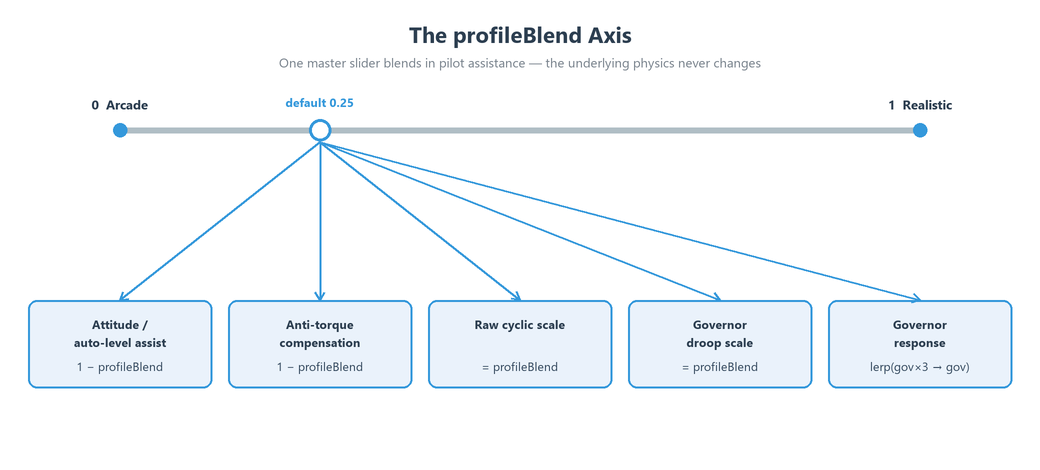
What profileBlend never touches, at any position, is the core flight model: the thrust-vectoring magnitude-times-direction pipeline, hover-from-gravity, RPM gating, the engine state machine's existence, the drag model, and telemetry truthfulness. Assists are added inputs, and the underlying physics (the real reaction torque, the real droop demand) is always computed and published in telemetry — Arcade mode hides the workload, not the physics. Because the raw cyclic torques fade to zero at the Arcade end, the rate-based Roll/Pitch sliders and the Calibrate button only meaningfully apply toward the Realistic end; the disc tilt itself is never profile-scaled, so translation (cyclic-driven forward flight) works at both ends.
The other assists that fade with profileBlend are the hover hold (a hands-off drift and heading damper, active toward Arcade) and the attitude limit (see Attitude (Bank/Pitch) Limits). Both are strongest at the Arcade end and soften toward Realistic, on the principle that a real helicopter has none of these crutches.
Full Field Reference
Every field below lives on the RHCP_FlightConfig asset (the RHCP_Rotor geometry fields such as rotorRadius and governedRpm live on the rotor component instead and are covered in the component documentation). Defaults, ranges, and meanings are taken directly from the source. Each field is exposed as a read-only C# property with a PascalCase name (for example maxThrustToWeight → MaxThrustToWeight); for the full scripting surface, see the XML documentation comments on RHCP_FlightConfig (surfaced by your IDE's IntelliSense).
Identity, Rigidbody, and Limits
These are consumed by the helicopter hub once at Awake. Keep the PhysX damping values near zero — aerodynamic drag and rotation damping are modeled by the flight model, not by the Rigidbody.
| Field | Type | Default | Range | Meaning |
|---|---|---|---|---|
displayName |
string | New Helicopter |
— | Display name shown by UI and tooling. |
archetypeTag |
string | Light Utility |
— | Archetype label for tooling and preset organization (e.g. Light Utility, Transport, Drone). |
mass |
float | 1500 |
min 1 |
Helicopter mass in kilograms. Applied to the Rigidbody once at Awake. |
linearDamping |
float | 0 |
min 0 |
PhysX linear damping. Keep near zero — drag is the flight model's job. |
angularDamping |
float | 0 |
min 0 |
PhysX angular damping. Keep near zero — rotation damping is the flight model's job. |
solverIterations |
int | 6 |
min 1 |
Rigidbody solver position iterations. Raise only if joint-heavy attachments jitter. |
interpolation |
RigidbodyInterpolation |
Interpolate |
— | Rigidbody interpolation mode. Keep Interpolate so the cameras follow smoothly at any frame rate. |
maxAngularVelocity |
float | 7 |
1–20 |
PhysX angular velocity ceiling, rad/s. Set once, deliberately; all other limits are emergent. |
Main Rotor — Thrust
Thrust is expressed as multiples of weight and gated by RPM, so hover is emergent rather than a scripted force.
| Field | Type | Default | Range | Meaning |
|---|---|---|---|---|
maxThrustToWeight |
float | 1.6 |
1.1–3.0 |
Maximum rotor thrust as a multiple of weight at 100% RPM, out of ground effect. Higher = stronger climb and snappier response. |
collectiveThrustCurve |
AnimationCurve |
linear (0,0)→(1,1) |
x,y ∈ 0–1 | Maps collective lever (0 = flat pitch, 1 = full) to thrust fraction of maximum. Leave linear unless you want a softer bottom end. |
thrustVsRpmCurve |
AnimationCurve |
≈ quadratic (0,0)(0.5,0.25)(1,1) |
x,y ∈ 0–1 | Thrust the rotor can produce at a given fraction of governed RPM. Quadratic (lift ∝ Ω²) makes spool-up and shutdown progressively gain/lose authority. |
Control Response
Cyclic tilts the rotor disc (for pitch and roll); the disc-tilt response sets how quickly the disc tracks the stick. The cyclic accelerations are mass-independent, so presets transfer between airframes.
| Field | Type | Default | Range | Meaning |
|---|---|---|---|---|
maxDiscTiltDeg |
float | 8 |
0–15 |
Maximum rotor-disc tilt under full cyclic, degrees. Higher = faster acceleration into forward flight and harder attitude authority. |
discTiltResponse |
float | 6 |
1–20 |
How quickly the disc follows the cyclic stick (first-order response rate, 1/s). Higher = snappier, twitchier. |
cyclicPitchAccel |
float | 60 |
10–360 |
Pitch authority from cyclic, as angular acceleration (deg/s²). Mass-independent. |
cyclicRollAccel |
float | 80 |
10–360 |
Roll authority from cyclic, as angular acceleration (deg/s²). Typically a bit higher than pitch. |
Drag & Stability
Quadratic per-axis drag sets top speed and bounded descent naturally; per-axis angular damping, together with the cyclic accelerations, sets maximum rotation rates smoothly (no hard rate gates).
| Field | Type | Default | Range | Meaning |
|---|---|---|---|---|
dragCoefficients |
Vector3 |
(0.004, 0.006, 0.001) |
each ≈ 0–0.05 | Quadratic drag per body axis (X side, Y vertical, Z forward), 1/m. Deceleration = c × speed². Forward lowest = streamlined; sets top speed naturally. |
aeroAngularDamping |
Vector3 |
(1.5, 0.8, 1.5) |
each ≈ 0–10 | Aerodynamic rotation damping per axis (X pitch, Y yaw, Z roll), 1/s. With the cyclic accelerations, sets maximum rotation rates smoothly. |
Anti-Torque
The main rotor's torque reaction is the yaw you must counter with pedals; the tail rotor provides the counter authority. Both are gated by RPM.
| Field | Type | Default | Range | Meaning |
|---|---|---|---|---|
reactionYawAccelAtHover |
float | 20 |
0–90 |
Main-rotor torque reaction at hover power: the yaw the pilot must counter, deg/s². Scales with engine torque. 0 disables the coupling. |
pedalYawAccel |
float | 45 |
10–180 |
Yaw authority from the tail rotor at full pedal and 100% RPM, deg/s². |
translatingTendency |
float | 0 |
0–1 |
Optional realism garnish: small lateral drift from tail-rotor thrust that the pilot trims out. 0 = off. |
Realism — Ground Effect
A lift cushion near the ground, measured by a downward ray from the rotor hub. The curve domain is height in rotor radii, so one default works across airframe sizes.
| Field | Type | Default | Range | Meaning |
|---|---|---|---|---|
groundEffectEnabled |
bool | true |
— | Extra lift cushion when hovering within ~1.5 rotor radii of the ground. |
groundEffectCurve |
AnimationCurve |
(0,1.18)(0.5,1.08)(1,1.02)(1.5,1.0) |
x: 0–1.5, y: ≈1–1.3 | Lift multiplier vs height above ground in rotor radii (h/R → factor). Left edge = skids on the deck. |
groundEffectLayers |
LayerMask |
Everything (~0) |
— | Layers the ground-effect ray tests against. Leave default unless your terrain uses ignored layers. |
Realism — Translational Lift (ETL)
Rotor efficiency rises with forward airspeed. The 8–15 m/s ramp is the classic ETL transition.
| Field | Type | Default | Range | Meaning |
|---|---|---|---|---|
etlEnabled |
bool | true |
— | Effective Translational Lift: the rotor gets more efficient in forward flight. |
etlCurve |
AnimationCurve |
(0,1)(8,1.02)(15,1.10)(30,1.12)(60,1.12) |
x: 0–60, y: ≈1–1.3 | Lift efficiency vs indicated airspeed (m/s → factor). |
Assists — Arcade ↔ Realistic Profile
profileBlend is the master; the other fields here set the strength of the assists at the Arcade end of the blend.
| Field | Type | Default | Range | Meaning |
|---|---|---|---|---|
profileBlend |
float | 0.25 |
0–1 |
Flight profile: 0 = Arcade (auto-torque, auto-level, solid RPM, soft landings), 1 = Realistic (pedal discipline, raw cyclic, RPM droop). Drives the assist sub-parameters. |
attitudeAssistMaxAccel |
float | 40 |
0–180 |
Strength of the auto-level / attitude-hold assist at full effect (Arcade end), deg/s². |
maxAssistBankDeg |
float | 25 |
5–45 |
At the Arcade end, full cyclic commands this pitch/bank attitude instead of raw disc tilt, degrees. |
arcadeGroundEffectBoost |
float | 1.10 |
1.0–1.5 |
Extra ground-effect cushion at the Arcade end for forgiving landings, ×factor. |
Assists — Hover Hold
A hands-off hover assist that bleeds off residual drift and yaw when the controls are centered near a hover. It is an Arcade-end assist (fades toward Realistic) and releases the instant cyclic or pedal is applied.
| Field | Type | Default | Range | Meaning |
|---|---|---|---|---|
hoverHoldEnabled |
bool | true |
— | Master toggle for the hands-off hover hold (translational + heading). |
hoverHoldStrength |
float | 1.2 |
0–5 |
Strength of the low-speed translational drift damper, 1/s. Higher = drift bleeds off faster. 0 disables the translational hold. |
hoverHoldYawStrength |
float | 3.5 |
0–15 |
Strength of the heading-hold yaw damper, 1/s. 0 disables the heading hold. |
hoverHoldMaxSpeed |
float | 6 |
1–20 |
Horizontal speed above which the translational hover hold fully fades out, m/s, so deliberate forward flight is never fought. |
Assists — Attitude Limit
A soft cap on maximum bank and pitch. See Attitude (Bank/Pitch) Limits for behavior. A value of 0 reproduces today's emergent (uncapped) behavior exactly, so existing presets are unaffected.
| Field | Type | Default | Range | Meaning |
|---|---|---|---|---|
maxBankDeg |
float | 0 |
0–90 |
Maximum roll attitude (bank), degrees. Soft cap; 0 = unlimited. Fades toward the Realistic end of the profile. |
maxPitchDeg |
float | 0 |
0–90 |
Maximum pitch attitude (nose up/down), degrees. Soft cap; 0 = unlimited. |
attitudeLimitStiffness |
float | 5 |
0.5–12 |
How stiffly the limit resists near the cap, as a natural frequency (1/s). Higher = firmer wall. Active only when a non-zero limit is set. |
Engine
The engine state machine: spool-up, governed RPM with droop, shutdown freewheel. Authority builds and fades along these curves and durations — there is never an instant-on.
| Field | Type | Default | Range | Meaning |
|---|---|---|---|---|
startupDuration |
float | 6 |
0.5–30 |
Time from start command to governed RPM, seconds. |
spoolCurve |
AnimationCurve |
ease-in-out (0,0)→(1,1) |
x,y ∈ 0–1 | RPM build-up shape during start (t01 → Rpm01), sampled over Startup Duration. |
shutdownDuration |
float | 2 |
0.1–10 |
Time for engine torque to reach zero after a stop command, seconds. The rotor then freewheels. |
rotorSpinDownDuration |
float | 25 |
1–120 |
Freewheel decay time of rotor RPM after shutdown, seconds. Thrust authority dies with RPM², so control fades much sooner. |
governorResponse |
float | 2.0 |
0.1–10 |
How aggressively the governor restores RPM after load changes, 1/s. Low values feel like an old turbine winding up. |
maxRpmDroop01 |
float | 0.08 |
0–0.3 |
RPM sag under maximum collective load before the governor catches up, fraction (at the Realistic end of the profile). |
The Performance Envelope and Calibrate-to-Targets
The Performance Envelope foldout at the bottom of the inspector shows the real-world numbers this config produces, in player units — for both Basic and Expert modes. It is the bridge that makes any setting legible whether or not you speak rotor. It reports six rows: Climb / Descent, Top speed, Roll / Pitch / Yaw rates, Max bank, Hover collective, and Cold start.
The envelope has two sources, labeled so you always know which you are reading:
≈ estimated(edit mode) — values computed from the closed-form solver (RHCP_PerformanceSolver) using the config's current field values. Climb issqrt((T/W − 1)·g / c_y); descent is the drag-limited sinksqrt(g / c_y); top speed issqrt((T/W)·g·sin(θ_max) / c_z)whereθ_max = maxDiscTiltDeg + maxBankDeg; yaw rate is exact (pedalYawAccel / d_yaw); roll/pitch are the profile-scaled Tier-A estimate. Infinite drag-free cases display as∞.measured (live)(Play mode) — values read directly off the flyingRHCP_Helicopter's telemetry, polled a few times a second. This is the honest ground truth and continuously cross-checks the formulas. If the estimate and the measured numbers disagree, trust the measured one.
Because the rotation-rate estimates (especially roll and pitch) depend on your airframe's inertia and the disc-tilt moment, which the closed-form solver cannot know exactly, the Basic panel includes a Calibrate to targets button. This is the "the editor flies your helicopter to hit your numbers" feature. It is only available in Play Mode with a live helicopter in the scene flying this config.
When you press it, RHCP_PerformanceProbe takes over: it disables your input manager, attaches a scripted-input writer, and flies the real airframe one axis at a time. For each axis it commands full input, lets the rate settle (about 2.5 seconds), measures the terminal BodyAngularRates, and proportionally corrects the matching acceleration field (cyclicRollAccel, cyclicPitchAccel, or pedalYawAccel) by accel ×= target / measured, repeating up to five passes until measured is within ±5% of your target. It then restores your input setup. Yaw typically converges in about two passes. For roll and pitch, if the profile is too far toward Arcade (cyclic commands an attitude, not a sustained rate), the probe detects that the measured rate stays far below target and reports raise Flight Style toward Realistic to calibrate <axis> rate rather than writing a meaningless value. The calibrated values are written to the config and marked dirty, so remember to save the asset afterward.
Attitude (Bank/Pitch) Limits
By default, RHCP imposes no hard limit on how far the helicopter can bank or pitch — maximum attitude is emergent from damping, and at maxBankDeg = 0 / maxPitchDeg = 0 the airframe can roll right over. That default (0 = unlimited) reproduces the uncapped baseline exactly, which is why it is the shipped value and why existing presets are unaffected by the feature.
Set a non-zero maxBankDeg (and/or maxPitchDeg) to add a soft cap. As the absolute roll (or pitch) angle approaches the limit, a restoring spring ramps up; right at and past the limit it adds a firm wall plus critical damping, so the airframe firmly resists going further but never snaps to the limit. attitudeLimitStiffness controls how abrupt that resistance is, expressed as a natural frequency in 1/s: higher is a firmer, more arcade-like wall; lower is a softer, spongier limit. The stiffness field only does anything when a non-zero bank or pitch limit is set.
The attitude limit is an Arcade-end assist: like auto-level and hover hold, it is strongest toward Arcade and fades toward the Realistic end of the profile, on the principle that a real helicopter has no such limit. In Basic mode it is the Bank Limit control (where 0 reads as "none"). Setting a bank limit also raises the effective maximum disc tilt used by the top-speed calculation (θ_max = maxDiscTiltDeg + maxBankDeg), so a higher bank limit yields a higher estimated top speed — which is why you should resolve Bank Limit before Top Speed in Basic mode. Attitude-limit activity is published in telemetry (RHCP_AssistActivity.AttitudeLimit) so the HUD and your own code can react to it.
Preset Archetypes
A helicopter's tuning is one RHCP_FlightConfig asset. RHCP ships one ready-made preset, RHCP_Maverick (under Runtime/Configs/Presets/), the config for the demo hero airframe. Its archetypeTag is Light Utility. Its airframe-specific values are: displayName Maverick, mass 1550 kg, small non-zero PhysX damping (linearDamping 0.01, angularDamping 0.1) and solverIterations 8 for stability on this mesh, profileBlend 0.25 (arcade-leaning), hover hold on, and both attitude limits at 0 (unlimited). For a punchier, more responsive demo airframe it tunes a few control fields above the framework defaults — maxThrustToWeight 1.8 (default 1.6), discTiltResponse 8 (default 6), cyclicPitchAccel 100 (default 60), and pedalYawAccel 80 (default 45) — while keeping the standard maxDiscTiltDeg (8°), cyclicRollAccel (80), the standard ground-effect and ETL curves, and the standard engine spool/shutdown timings (startupDuration 6 s, shutdownDuration 2 s).
The archetypeTag field is a label for tooling and organization (for example Light Utility, Transport, Drone); it does not change physics by itself. To build your own archetypes, create new config assets and differ them along the fields that define the feel. A heavier transport leans on mass, a lower maxThrustToWeight, slower cyclicPitchAccel/cyclicRollAccel, and a longer startupDuration for a sluggish, deliberate feel. A light drone or scout leans on a low mass, a higher maxThrustToWeight, higher cyclic accelerations and discTiltResponse, and lower drag for agility. The arcade-vs-realistic character of any archetype is set independently by profileBlend.
When you create a new config, prefer cloning a working preset over starting from a blank asset, so you inherit sane curve shapes and engine timings. The Setup Wizard (see Setup Wizard) can also generate a starting config as part of building a flyable helicopter from a bare model.
Tuning Tips
Tune from the math, not from vibes — the Performance Envelope gives you the numbers to aim at. A practical workflow:
- Start in Basic mode and set outcomes first. Enter your target climb rate, top speed, bank limit, and rotation rates. Resolve in this order: Flight Style → Climb Power → Bank Limit → Top Speed → rotation rates, because Top Speed reads the others and each slider writes only its own field. Then switch to Expert if you need finer control over the curves.
- Verify in Play Mode. The envelope's
measured (live)source is the truth. Edit the config while in Play Mode — modules re-read it every tick, so changes apply live. For roll and pitch especially, press Calibrate to targets in Play Mode to make the real airframe hit your numbers; the closed-form estimate cannot account for your inertia and the disc-tilt moment exactly. - Mind the clamps. Climb Power clamps
maxThrustToWeightto[1.1, 3.0]. If a target seems to stop responding, you have probably hit a field's[Range]. The Basic sliders show an out-of-range note when an Expert hand-edit pushes a value past the slider. - Set
profileBlenddeliberately, early. It changes the meaning of cyclic (rate vs attitude), whether pedals are required, and how solid RPM feels — so set the flight character first, then tune rates and speeds within it. Remember that roll/pitch rate tuning only bites toward the Realistic end. - Keep the PhysX damping near zero.
linearDampingandangularDampingon the config are Rigidbody fields; the flight model does drag and rotation damping itself. UsedragCoefficientsandaeroAngularDampingto shape those, not the PhysX values. - Reason about the equilibria. Top speed is roughly
√((T/W)·g·sin(θ_max) / c_z); max rotation rate is roughlyaccel / damping; terminal climb is√((T/W − 1)·g / c_y). Lowering forward dragc_zraises top speed; raising acyclicAccelor lowering itsaeroAngularDampingaxis raises that rotation rate. Because there are no hard caps, every limit you feel is one of these equilibria — adjust the inputs to it rather than looking for a cap field. - Save after Calibrate. Calibrate writes the config and marks it dirty but does not save the project; save the asset (or the project) so the calibrated values persist.
For how these settings show up to the player in flight, see Flight Model Overview above and the Cameras and HUD and Mobile docs; for the full editor tooling that builds and validates a helicopter, see Editor Tools. If a freshly tuned helicopter will not hover or behaves unexpectedly, see Troubleshooting.