Create a Mission
Place a mission in a gameplay scene and let the player start it from a marker.
The four mission types
| Type | Component | The player must |
|---|---|---|
| Race | CCDS_MissionObjective_Race_MP |
Beat AI racers around a circuit |
| Pursuit | CCDS_MissionObjective_Pursuit_MP |
Chase or escape, with felony and arrest mechanics |
| Checkpoint | CCDS_MissionObjective_Checkpoint_MP |
Pass waypoints in order before time runs out |
| Trailblazer | CCDS_MissionObjective_Trailblazer_MP |
Drive a marked path through obstacles without hitting them |
All four are multiplayer-capable and derive from ACCDS_MultiplayerMissionBase. There is no separate single-player mission type — a mission with one participant is single-player.
A fifth component, CCDS_MissionObjective_FreeRoam_MP, exists as an open-world placeholder. It is not exposed by CCDS.CreateMission.
The three pieces
A working mission is always three things:
| Piece | Component | Lives under |
|---|---|---|
| The mission itself | CCDS_MissionObjective_*_MP |
CCDS_MissionObjectiveManager |
| Where its objectives are | CCDS_MissionObjectivePosition |
CCDS_MissionObjectivePositionsManager |
| How the player starts it | CCDS_Marker_MultiplayerMission |
Anywhere in the scene |
Missing any one of them produces a mission that exists but can never be played.
Create the mission
From a script, or from an editor script / the Console:
using BoneCrackerGames.CCDS;

// Creates the GameObject, adds the right component, parents it to the
// mission manager, and registers it. Returns null if the manager is absent.
GameObject mission = CCDS.CreateMission("Downtown Sprint", CCDS.MissionType.Race);
CreateMission requires CCDS_MissionObjectiveManager to be in the scene. Without it you get "CreateMission: CCDS_MissionObjectiveManager not found in scene!" and a null return — see Set Up a New City Scene for creating the managers.
By hand: create an empty GameObject under CCDS_MissionObjectiveManager, add the mission component from Add Component → BoneCracker Games → CCDS → Missions → Multiplayer →, and register it with the manager.
Place the objective positions
Positions are where the mission's checkpoints, race waypoints or obstacles go.
// At a specific place in the world
CCDS.CreateMissionPosition(new Vector3(120f, 0f, -45f), Quaternion.identity, "Checkpoint_01");

// Or at the origin, to drag into place
CCDS.CreateMissionPosition("Checkpoint_01");
Both overloads route through CCDS_MissionObjectivePositionsManager, which owns the object and parents it. Creating a bare GameObject with the component on it will not register it.
Rotation matters for anything directional — checkpoint gates and race waypoints use forward to decide which way the player should be travelling.
Add the start marker
Drag a marker prefab from Assets/CCDS/Prefabs/Markers/ into the world where the mission should begin:
| Prefab | For |
|---|---|
CCDS_Marker_Race.prefab |
Race |
CCDS_Marker_Pursuit.prefab |
Pursuit |
CCDS_Marker_Checkpoint.prefab |
Checkpoint |
CCDS_Marker_Trailblazer.prefab |
Trailblazer |
CCDS_Marker_NewMission.prefab |
Generic starting point |
Then set the marker's fields:
| Field | Type | Range | Default | Purpose |
|---|---|---|---|---|
mission |
ACCDS_Mission |
— | none | The mission to start. Required. |
missionName |
string |
— | "Multiplayer Challenge" |
Shown to the player |
missionDescription |
string |
— | "Complete the mission before time runs out!" |
Shown to the player |
markerCooldown |
float |
5–60 | 15 |
Seconds before the marker can be used again |
uiPrefab |
GameObject |
— | — | Marker UI, instantiated at runtime |
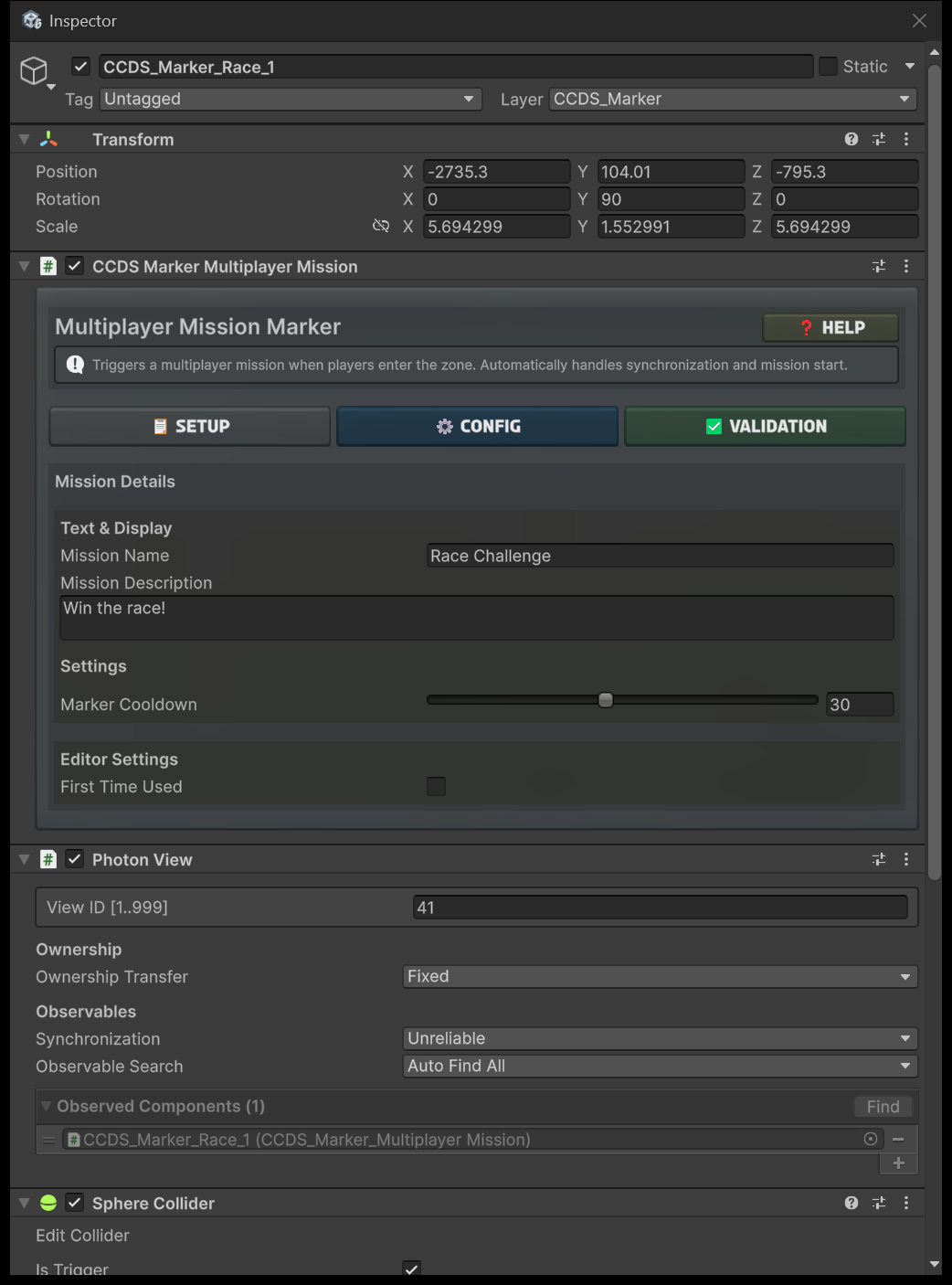
The marker inspector has three tabs — Setup (the mission reference), Config (name, description, cooldown) and Validation.
Three things on the marker have to be right and are easy to miss:
- Its Layer is
CCDS_Marker. - Its collider has Is Trigger enabled.
- Its PhotonView observes the marker component, with Ownership Transfer Fixed and Synchronization Unreliable.
Dragging in a marker prefab gives you all three. Building one from an empty GameObject does not.
How the player starts it
Drive into the marker, then press Y.
The key is CCDS_Settings.missionConfirmKey, read live by CCDS_MissionMarkerInputHandler. Change it in CCDS_Settings.asset and the marker's own prompt text updates to match — it is not hard-coded anywhere in the UI.
If you rebind it, avoid F and R: both are already taken by RCCP (NOS and record). See the control table in Install and First Drive.
When the mission ends, the marker enters cooldown for markerCooldown seconds and shows a Cooldown Ns countdown before becoming available again.
Marker states
CCDS_Marker_MultiplayerMission synchronises its state across the network. In multiplayer the master client is authoritative.
| State | Meaning |
|---|---|
Available |
Ready to start |
WaitingPlayers |
Waiting for participants to gather |
InProgress |
Mission running |
Cooldown |
Recently finished, counting down |
Disabled |
Not usable |
Cops and pursuit
Pursuit missions need police vehicles. CCDS_CopsManager handles spawning, and you can add one directly:
// Uses CCDS_Settings.copVehicle
CCDS.CreateCop(new Vector3(50f, 0f, 20f));

// Or an explicit prefab
CCDS.CreateCop(myCopPrefab, position, rotation);
The prefab must carry CCDS_AI_Cop. Build one with Tools → BoneCracker Games → CCDS → Vehicle Setup → Add Cop AI Components To Selected.
Mission AI runs locally — keep it that way
Each participant activates the mission's AI locally, when the mission GameObject enables. There is no RPC broadcast telling everyone to spawn racers.
The consequence: players who are not in the mission never enable it, so they never see its AI racers or pursuit vehicles. That is deliberate. If you add code that spawns mission AI over the network, every player in the room gets them and the city fills with cars that should not be there.
The rationale is written up in Assets/CCDS/Scripts/Missions/MISSION_SYSTEM_REFACTORING.md.
Verify
- Open a gameplay scene, press Play.
- Drive into the marker — the prompt appears.
- Press
Y. - The mission starts, objectives appear, the arrow indicator points at the next one.
- Complete it and confirm the marker goes into cooldown.
If the prompt appears but Y does nothing, the marker's mission field is empty.
Common problems
| Symptom | Cause |
|---|---|
CreateMission returns null |
CCDS_MissionObjectiveManager not in the scene |
| Marker prompt appears, nothing starts | mission field not assigned on the marker |
| Mission starts with no objectives | No CCDS_MissionObjectivePosition created, or created without the manager |
| Objectives in the wrong order | Order comes from the positions list — reorder there |
| Player drives through checkpoints backwards | Position rotation is wrong; forward is the travel direction |
| AI racers appear for non-participants | Mission AI is being spawned over the network — see above |
| Marker permanently on cooldown | markerCooldown set high, or the mission never raised completion |
Next
- Set Up a New City Scene — the managers missions depend on.
- Multiplayer — spawn assignment and participant tracking.
- Events Catalog —
OnMissionStarted,OnMissionCompletedand friends.