What You Get
An inventory of the package: what shipped, where it lives, and which parts you are expected to edit.
Package layout
Everything customer-facing is under Assets/CCDS/.
| Folder | Contents |
|---|---|
Scripts/ |
112 runtime C# files |
Editor/ |
90 editor scripts — inspectors, windows, validation, the scene overlay |
Scenes/ |
4 scenes |
Prefabs/ |
41 prefabs in Cameras, Markers, Minimap, Misc, Missions, UI, Wheels |
Resources/ |
Settings assets, vehicle prefabs, tutorials, GUI skin |
Documentation/ |
These pages |
Realistic Car Controller Pro/ |
Bundled RCCP V3.3.0 |
Realistic Traffic Controller/ |
Bundled RTC V2.0 |
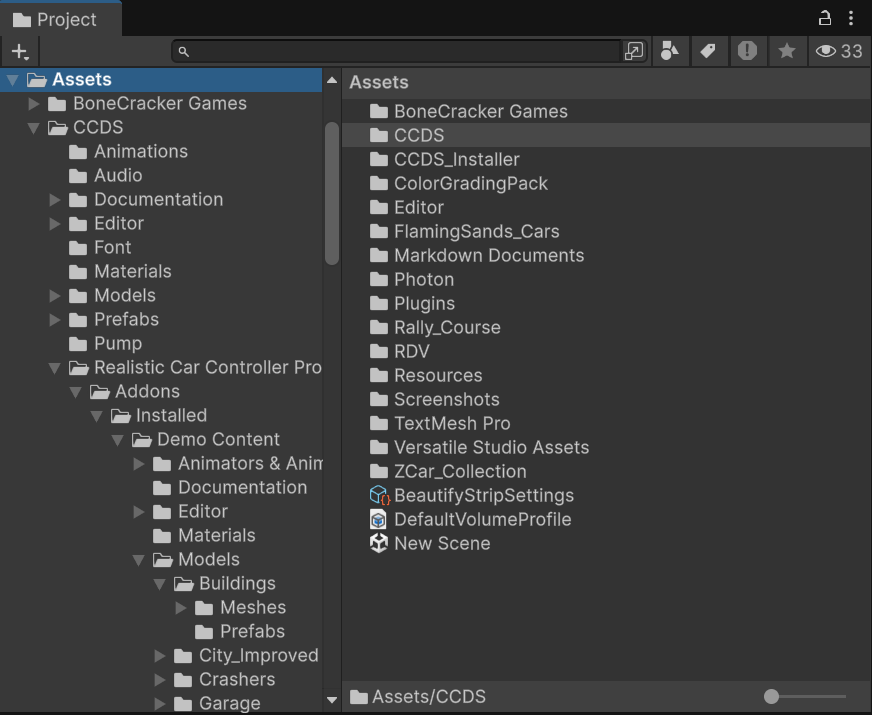
Assets/CCDS_Installer/ holds the first-import Setup Wizard. It is tooling, not runtime content.
Scenes
| Index | Scene | Role |
|---|---|---|
| 0 | CCDS_MainMenu_City.unity |
Main menu, vehicle selection, customization, multiplayer entry |
| 1 | CCDS_Gameplay_City_1.unity |
City gameplay with missions and free roam |
| 2 | CCDS_Gameplay_City_2.unity |
Alternative city layout |
| — | CCDS_Vehicles_Prototype.unity |
Vehicle test sandbox — disabled in Build Settings |
Vehicles
Ten player vehicles in Assets/CCDS/Resources/Player Vehicles/:
Coupe · CTR · Jeep · M3_E36 · M3_E46 · M5_E30 · Muscle · Pickup · Sedan · SUV2
Five AI vehicles in Assets/CCDS/Resources/AI Vehicles/:
| Prefab | Used by |
|---|---|
CCDS_Police_1 |
Police pursuit AI |
CCDS_Pursuit_1 |
Pursuit mission target |
CCDS_Race_1, CCDS_Race_2, CCDS_Race_3 |
Race mission opponents |
Every vehicle is an RCCP car. Which ones the player can select, what they cost and how they perform is data in CCDS_PlayerVehicles.asset, not code — see Add Your Own Vehicle.
Settings assets
All in Assets/CCDS/Resources/, all loaded by name at runtime. These are the files you tune.
| Asset | Controls |
|---|---|
CCDS_Settings.asset |
Defaults, graphics, layers, network rates, prefab references — see Settings Reference |
CCDS_PlayerVehicles.asset |
The player's vehicle roster, prices and performance stats |
CCDS_ChangableWheels.asset |
Wheels the player can buy |
CCDS_TutorialData.asset |
Tutorial definitions (16 tutorial assets in Tutorials/) |
CCDS_EditorTourData.asset |
Content for the in-editor tour |
CCDS_Gui.guiskin |
Editor GUI skin |
Gameplay systems
| System | Entry point | Notes |
|---|---|---|
| Missions | CCDS_MissionObjectiveManager |
Race, Pursuit, Checkpoint, Trailblazer — all multiplayer-capable |
| Vehicle physics | RCCP RCCP_CarController |
Bundled, not written by CCDS |
| Traffic | RTC RTC_TrafficSpawner |
Bundled; density is player-adjustable |
| Police AI | CCDS_CopsManager, CCDS_AI_Cop |
Felony and arrest mechanics |
| Networking | CCDS_NetworkManager |
Photon PUN2 |
| Save | CCDS_SaveGameManager |
JSON in Application.persistentDataPath |
| Replay | CCDS_ReplayManager |
Records and plays back every vehicle in the scene |
| Tutorials | CCDS_TutorialManager |
Popup-driven, 16 built-in tutorials |
| Customization | RCCP RCCP_Customizer |
Paint, wheels, upgrades, spoilers, neons, sirens |
| Minimap | CCDS_MinimapManager |
Orthographic camera and icon layer |
| Chat | CCDS_ChatManager |
Multiplayer text chat |
| Debug | CCDS_DebugPanel |
F12, four modules, off by default |
Full component list: Component Reference.
Editor tools
Under Tools → BoneCracker Games → CCDS → and mirrored on the GameObject menu.
| Menu item | Does |
|---|---|
| Welcome Window | Five tabs: Welcome, Demo Scenes, Features, Setup, Health |
| Setup Wizard | First-import dependency and Photon setup |
| Edit Settings | Selects CCDS_Settings.asset |
| Player Vehicles | Selects CCDS_PlayerVehicles.asset |
| Create Scene Managers → Main Menu / Gameplay | Builds the manager set for a new scene |
| Open Validation Panel | Reports missing managers and broken references |
| Open CCDS Scene Tools Overlay | Scene View overlay — hierarchy, managers, quick select, stats, tools, validation |
| Scene Tools Window | The same tools as a dockable window |
| Documentation | Opens these pages in your browser |
| Editor Tour | Guided walkthrough of the project |
| Sort Manager Hierarchy | Orders manager objects in the Hierarchy |
| Toggle Hierarchy Highlighting | Colour-codes CCDS objects in the Hierarchy |
| Delete Save Data | Clears the save file |
| Vehicle Setup → … | Adds CCDS components to a selected RCCP vehicle |
What is safe to edit
| Edit freely | Edit with care | Avoid |
|---|---|---|
CCDS_Settings.asset and the other Resources assets |
Scene contents — re-run the Validation Panel after | RCCP and RTC source under Assets/CCDS/ |
| Your own scripts and prefabs | Manager prefabs and UI prefabs | Script execution order — it is set automatically |
| Materials, models, audio | Mission prefabs |
Script execution order is managed by CCDS_ScriptExecutionOrderSetup on every editor load. Setting it by hand per script is overwritten.
Editing RCCP or RTC source is not forbidden, but a vendor upgrade overwrites those folders wholesale. Extend them from your own scripts instead.