Set Up a New City Scene
Take an empty scene, or your own city, and make it a working CCDS gameplay or main menu scene.
The one-step version
- Open the scene.
- Tools → BoneCracker Games → CCDS → Create Scene Managers → Gameplay (or Main Menu).
That creates a CCDS_SceneManager, sets its levelType, and builds every manager that scene type requires. Run it again at any time — it reuses what already exists instead of duplicating it, and reactivates a manager that had been disabled.
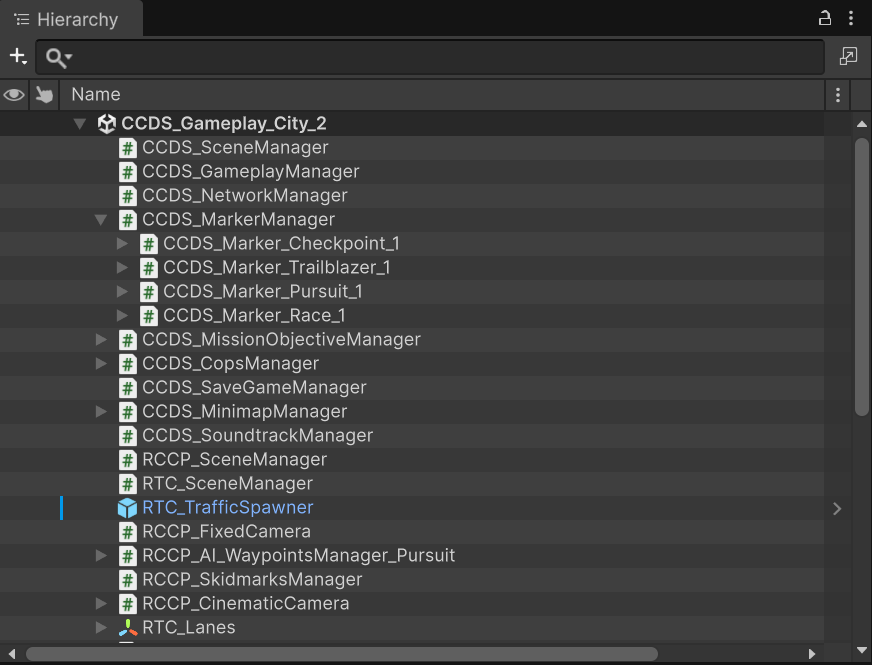
This is what a configured gameplay scene looks like: the CCDS managers, the mission markers nested under CCDS_MarkerManager, and the RCCP_SceneManager / RTC_SceneManager / RTC_TrafficSpawner objects that the vehicle and traffic systems need.
What gets created
CCDS_SceneManager is the scene's root reference holder. Its levelType decides the manager set.
Gameplay scenes
| Manager | Responsibility |
|---|---|
CCDS_GameplayManager |
Game state machine, player reference |
CCDS_UI_Manager |
In-game HUD |
CCDS_MarkerManager |
Mission marker spawning and tracking |
CCDS_MissionObjectiveManager |
Mission registration and completion |
CCDS_MissionObjectivePositionsManager |
Objective positions |
CCDS_MinimapManager |
Minimap rendering |
CCDS_CopsManager |
Police AI |
CCDS_NetworkManager |
Photon connection and spawning |
CCDS_SaveGameManager |
Save and load |
CCDS_TutorialManager |
Tutorial dispatch |
CCDS_UI_NametagManager |
Multiplayer nametags |
CCDS_Minimap_Camera |
Minimap camera |
RCCP_SceneManager |
RCCP scene services |
RCCP_Camera |
Vehicle camera |
Main menu scenes
| Manager | Responsibility |
|---|---|
CCDS_MainMenuManager |
Menu flow |
CCDS_UI_MainMenuManager |
Menu UI |
CCDS_Camera_Orbit |
Orbiting showcase camera |
CCDS_SoundtrackManager |
Music playlist |
RCCP_SceneManager |
RCCP scene services |
Note what is not in the main menu set: no gameplay manager, no mission managers, no minimap. A main menu scene that has them was built as a gameplay scene by mistake.
Register the scene
Add it to File → Build Profiles → Scene List. The index matters:
CCDS_Settings.mainMenuSceneIndex(default0) points at your main menu.CCDS_Settings.defaultSelectedSceneIndex(default1) is the gameplay scene a new player starts in.- The player's chosen scene is saved and read back by
CCDS.GetScene()/CCDS.SetScene().
Adding a gameplay scene without updating those defaults gives new players a scene index that does not exist.
Scene requirements
Beyond the managers, a gameplay scene needs:
| Requirement | Why |
|---|---|
| A baked NavMesh | Cop and mission AI path on it. Unbaked means AI that will not move. |
| Ground colliders | The vehicle ground-snap in ACCDS_Vehicle.OnEnable raycasts downward. |
| Correct layers | Markers, checkpoints and minimap items are layer-driven. |
| A spawn point | CCDS_SpawnPoint for the player. Main menu scenes use CCDS_MainMenuManager.spawnPoint. |
| Lighting | Bake it. The demo scenes use Adaptive Probe Volumes. |
Re-bake the NavMesh whenever you change the city geometry. Nothing warns you that it went stale; the AI simply stops moving.
Layers
With CCDS_Settings.enableAutoLayerManagement enabled (the default), CCDS creates and assigns these automatically:
| Setting field | Default layer |
|---|---|
layerCCDSMap |
CCDS_Map |
layerCCDSMinimapItem |
CCDS_MinimapItem |
layerCCDSTrailblazerObstacle |
CCDS_TrailblazerObstacle |
layerCCDSCheckpoint |
CCDS_Checkpoint |
layerCCDSMarker |
CCDS_Marker |
layerCCDSProp |
CCDS_Prop |
Put your city's drivable geometry on CCDS_Map — that is the layer the minimap and raycasting use.
Turning auto layer management off means assigning all six by hand, on every object, forever. Leave it on unless you have a specific conflict.
Traffic
Traffic comes from RTC. Drag RTC_TrafficSpawner.prefab from the RTC package into the scene and lay out its waypoints along your roads.
Density is player-facing: CCDS.GetTrafficDensity() / CCDS.SetTrafficDensity() range 0–2 with 1 meaning 100%, and CCDS_Settings.defaultTrafficDensity sets the starting value.
Two runtime controls exist for gameplay moments:
CCDS.DisableTrafficForAWhile();        // temporary, e.g. during a race
CCDS.ToggleTrafficPermanently(false);  // until turned back on
In multiplayer, the master client owns traffic. The spawner instantiates over the network and non-master clients receive it. Do not spawn traffic locally on a client.
Validate
Tools → BoneCracker Games → CCDS → Open Validation Panel.
It checks the scene against CCDS_SceneManager.CheckMisconfigurations() and every component implementing ICCDS_CheckEditorError, and reports specific missing references — for example "Missing 'Spawn Point' on CCDS_MainMenuManager!" or "Missing UI Text 'Money Text' on MainMenu Manager!".
Run it before every build. It catches the broken-reference class of bug that otherwise only shows up at runtime.
Common problems
| Symptom | Cause |
|---|---|
| Player spawns and falls through the world | No ground collider, or the city is not on a collidable layer |
| AI cars never move | NavMesh not baked, or baked before the geometry changed |
| Minimap is blank | City geometry not on CCDS_Map; minimap camera missing |
| Markers invisible or not triggering | Wrong layer, or enableAutoLayerManagement disabled |
CreateMission returns null |
Managers not created — run Create Scene Managers |
| Menu scene tries to run gameplay logic | levelType set to Gameplay; fix it on CCDS_SceneManager |
| Duplicate managers after re-running the menu | Pre-existing managers were renamed, so they were not found |