Realistic Helicopter Controller Pro — Overview
This is the starting point for the Realistic Helicopter Controller Pro (RHCP) user manual. It explains what the asset is, the major systems it ships with, how those systems fit together, who it is built for, and what you get in the package. Read this first to build a mental model of the asset, then follow the links to Installation and the Quick Start to get a helicopter flying.
What Is RHCP?
Realistic Helicopter Controller Pro is a complete helicopter flight-controller framework for Unity 6, built by BoneCracker Games. It gives you a physically-grounded rotary-wing flight model, a full editor tooling suite to set up your own helicopter models without hand-wiring components, runtime input across keyboard/mouse, gamepad and touch, a heads-up display (HUD), on-screen mobile controls, and demo content you can fly immediately. It is a ground-up v2.0 rebuild of the original 2018 asset, written for the New Input System and modern Unity rendering.
The asset is aimed squarely at making helicopter flight accessible to set up. Where most flight controllers assume you already know how to wire a rigidbody, place a center of mass, and align rotor axes, RHCP ships a Setup Wizard that turns a bare helicopter model into a flyable, validator-clean helicopter with zero manual component wiring, plus a Validator that catches misconfigurations and fixes most of them with one click. The flight model underneath is real — lift comes from a tilting rotor thrust vector, the engine is a spool-up state machine, and anti-torque, ground effect, and translational lift are all modeled — but a single Arcade ↔ Realistic slider lets you dial how much the asset helps the pilot.
Everything you ship lives under one folder and follows one naming convention. All runtime and editor types are in the BoneCrackerGames.RHCP namespace and carry the RHCP_ prefix (for example RHCP_Helicopter, RHCP_Rotor, RHCP_Engine), so the asset is easy to find in your project and never collides with your own code or other assets.
Key Features and Capabilities
RHCP is organized into a handful of cooperating systems. The sections below summarize what each one does; later documents in this manual cover each in depth.
Physically-Grounded Flight Model
The flight model does not fake movement by tilting the body and pushing it sideways. Lift is produced by a rotor thrust vector that tilts with cyclic input, so the helicopter accelerates because its lift is genuinely pointed where you tilt the disc. The flight model is implemented across the RHCP_Rotor (main and tail rotor) and RHCP_Engine modules, with whole-body aerodynamics (per-axis drag and angular damping) and optional stability assists running in the hub itself.
Several real rotary-wing behaviors are modeled and each can be tuned or toggled:
| Aviation term | Plain meaning | Where it lives |
|---|---|---|
| Collective | Vertical thrust / lift — how hard the rotor pushes up | RHCP_Rotor (main), driven by the collective input |
| Cyclic | Tilts the rotor disc to pitch and roll the aircraft | RHCP_Rotor (main), driven by the cyclic input |
| Pedals / anti-torque | Yaw — counters the main rotor's reaction torque | RHCP_Rotor (tail), driven by the pedal input |
| Ground effect | Extra lift when flying close to the ground | Thrust modifier inside the main rotor |
| Translational lift (ETL) | Efficiency gain as forward speed builds | Thrust modifier inside the main rotor |
| Engine spool / governor | The engine takes time to start and hold rotor RPM under load | RHCP_Engine state machine |
A single profileBlend value (the Arcade ↔ Realistic axis) on the flight configuration blends in pilot assistance — auto-stabilization, attitude/bank limiting, hover hold, and simplified torque — without changing the underlying physics. Top speed and maximum climb rate are emergent from the thrust, weight, and drag you configure rather than hard-capped numbers. See Flight Tuning for the full configuration surface and the accessible Basic/Expert tuning workflow.
The Editor Tooling Suite (the Headline Feature)
The tooling suite is what sets RHCP apart from a bare flight script. It is editor-only, lives under the BoneCrackerGames.RHCP.Editor assembly, and is the fastest path from "I have a model" to "I am flying":
- Setup Wizard — walks you (or runs headless) through turning a bare helicopter model into a complete, flyable hub: rigidbody tuning, collider generation that is aware of the rotor, module placement, a flight configuration, and a camera step. No manual component wiring required.
- Validator — a rule engine that scans a helicopter for misconfigurations (missing main rotor, wrong rotor axis, bad center of mass, demo/camera contamination in a product prefab, and more) and offers a one-click Fix for most findings, with a documented manual fix for the rest. There is also a Fix-All-Safe pass for the findings that are safe to batch.
- Project Doctor — checks project-level settings a buyer commonly gets wrong: active input handler, the Input System package, render pipeline, color space, Unity version, and TextMesh Pro resources. Project-settings changes are always confirmed by a dialog before they are applied.
- Custom inspectors — every concrete runtime component has a tailored inspector with a header, a validation strip, and live telemetry where useful (the hub inspector shows real-time flight readouts plus Validate and Wizard buttons).
- Scene gizmos and handles — always-on boundary volumes, an interactive center-of-mass handle you can drag, rotor-axis discs (which turn red when a rotor axis is misaligned), a ground-sensing ray, and a chase-camera anchor preview. These make the invisible parts of a helicopter setup visible and editable in the Scene view.
See Setup Wizard and Editor Tools for step-by-step coverage.
Input Across Keyboard, Gamepad, and Touch
RHCP uses the New Input System only — the legacy Input Manager is not supported. Input flows through a provider interface (IRHCP_InputProvider) so the source can be swapped, with the shipped provider reading a single RHCP_InputActions.inputactions asset. That action asset carries Keyboard & Mouse, Gamepad, and Touch bindings for collective, cyclic, pedals, look, camera switching, engine toggle, and the demo actions.
The input layer is built to be correct, not just convenient: input is sampled in Update and consumed in FixedUpdate so physics stays deterministic, the manager owns a counted input-lock API (so pause menus, crash states, and cutscenes can suspend control cleanly without fighting over a boolean), and it manages OS cursor capture for the local player so mouse motion drives the cyclic instead of the pointer wandering off-screen. See Controls and Input for bindings and rebinding notes.
HUD and Mobile Touch UI
The runtime HUD is built with uGUI and TextMeshPro and reads only the hub's read-only telemetry, so it never interferes with the flight model. It ships as a resolution-independent canvas with a safe-area handler and a set of flight instruments: altimeter, airspeed, vertical-speed indicator, rotor-RPM gauge, torque gauge, artificial horizon, compass, engine-state readout, and a warning indicator. All widgets are change-detected and allocation-free so the HUD does not generate per-frame garbage.
For mobile, RHCP ships on-screen touch controls implemented as a virtual gamepad: an on-screen collective, pedals, and a dynamic-origin cyclic stick, all activated only on touch devices. Because the controls feed the same virtual-gamepad path the rest of the input system already understands, your flight code does not need a separate mobile branch. See HUD and Mobile.
Dual Render Pipeline Support
RHCP supports both the Built-in Render Pipeline and the Universal Render Pipeline (URP). The High Definition Render Pipeline (HDRP) is not supported. The runtime assembly does not hard-reference URP, so a Built-in-only project compiles cleanly; pipeline detection happens at runtime and in the Project Doctor. Which pipeline you are on is your project's choice — the asset adapts rather than forcing one.
Cameras
The asset ships a self-contained camera rig with a single camera and audio listener plus a camera manager that switches between modes — a damped chase camera, a cockpit camera with lock-free freelook, and an orbit mode. The cameras only read helicopter telemetry; they never write to the helicopter's state, and cockpit freelook does not lock flight input, so the aircraft keeps flying its held cyclic while you look around. See Cameras.
How It Works
RHCP is built as a hub plus modules. There is no single "god class" doing everything; responsibility is split across small components that register with a central hub.
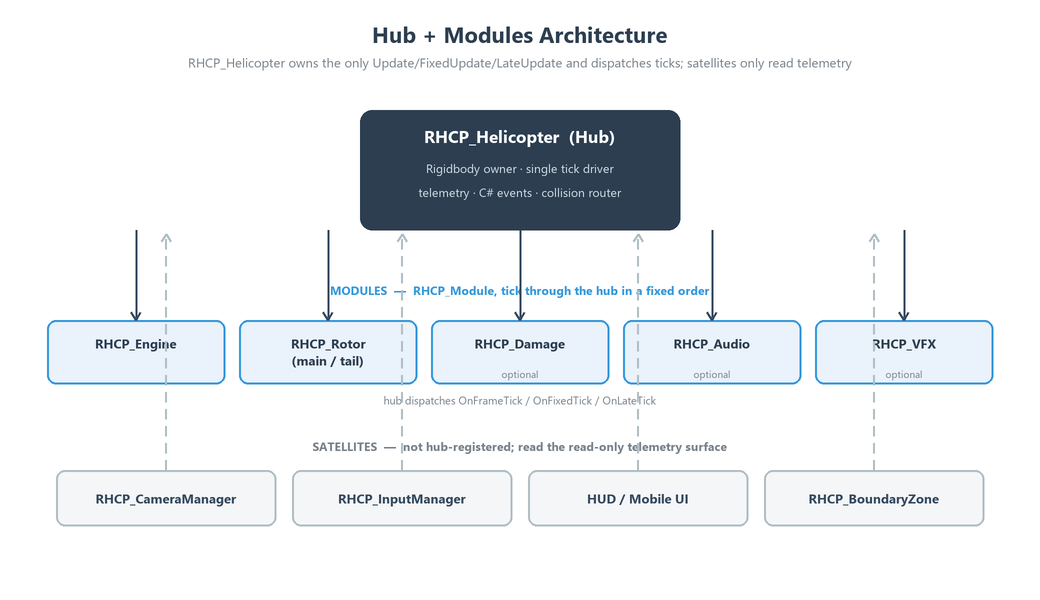
The hub owns the only Unity update loop and dispatches ticks to its modules; satellites (cameras, input, HUD, boundary zones) only read the hub's telemetry.
The Hub: RHCP_Helicopter
RHCP_Helicopter is the single root component on every helicopter. It requires a Rigidbody, and it is responsible for exactly a few things and nothing more:
- Rigidbody ownership. At
Awake, the hub applies rigidbody settings (mass, drag, solver iterations, max angular velocity, interpolation) once from the assignedRHCP_FlightConfig. It never touches your project's physics settings. - Module registry. At
Awake, the hub discoversRHCP_Modulechildren (including inactive ones) and callsInitializeon each. You can also register and unregister modules at runtime viaRegisterModule/UnregisterModule. - The single tick driver. The hub owns the only
Update,FixedUpdate, andLateUpdatein the module graph and dispatchesOnFrameTick,OnFixedTick, andOnLateTickto its modules in a deterministic order. Modules never declare their own Unity update methods, which removes a whole class of ordering and double-execution bugs. - Telemetry. The hub publishes a read-only property surface —
AltitudeAGL,Airspeed,VerticalSpeed,Heading,PitchAngle,RollAngle,MainRotorRPM,TorquePercent,EngineState,Collective,Cyclic, and many more — recomputed once per physics step. The HUD, cameras, and your own code read these instead of recomputing flight state. - Events. The hub exposes C# events for the things you usually want to react to:
OnEngineStateChanged,OnCrashed,OnRespawned,OnBoundaryEnter, andOnInputLockChanged. Components communicate through these events rather than reaching into each other. - Collision routing.
OnCollisionEnteron the hub buffers impact data and hands it to the damage module — collisions have one owner.
The Modules
Each module is a RHCP_Module (a MonoBehaviour that ticks through the hub) with a single responsibility. Most are optional: if a module is absent the helicopter simply lacks that capability and produces no errors.
| Module | Responsibility | Required? |
|---|---|---|
RHCP_Engine |
Engine state machine (Off → Starting → Running → Shutdown) that spools rotor RPM and drives the engine→rotor command | Required for powered flight |
RHCP_Rotor |
One per rotor; the main rotor converts RPM and controls into a tilting thrust vector plus torques, the tail rotor provides anti-torque. Also owns rotor visual spin | Main rotor required |
RHCP_Damage |
Crash-detection state machine with a re-entry guard; caches the spawn pose and exposes respawn; raises crash/respawn events — see Damage, Crashes, and Boundaries | Optional |
RHCP_Audio |
Engine and rotor audio layers driven by engine state, RPM, and load; plays the crash one-shot | Optional |
RHCP_VFX |
Particle effects — exhaust, ground dust, crash explosion — gated through a single tick path | Optional |
Around the hub sit satellites that are not hub-registered modules: the camera rig (RHCP_CameraManager and its modes), RHCP_BoundaryZone trigger volumes (which replace custom tags for water/out-of-bounds detection), the input manager, and the HUD/mobile UI. The input manager samples the input provider each frame and latches an immutable control snapshot that the physics step consumes.
This decomposition is deliberate: each piece can be understood, tested, and replaced on its own, and the architecture is enforced by the Validator (for example, it flags any module that illegally declares its own Unity tick method). For a deeper architectural treatment, point programmers to the XML documentation comments on the runtime types themselves — every public type and member is documented inline, and your IDE's IntelliSense surfaces those summaries as you read the code.
Who Is It For?
RHCP is built for competent Unity developers across a range of disciplines. You do not need to be a helicopter expert; the manual defines aviation terms as they come up.
- No-code designers can drag in a model, run the Setup Wizard, drop in the camera rig and HUD prefabs, and have a flyable helicopter — then tune feel with the Basic-mode inspector controls (climb power, top speed, turn rates, bank limit) expressed in plain outcomes rather than physics coefficients. UnityEvent inspector hooks on the damage and engine modules let you wire reactions to crashes, respawns, and engine start/shutdown without writing scripts.
- Programmers get a clean modular API: a documented hub with read-only telemetry and C# events, a provider-based input layer, a ScriptableObject flight configuration, and separate runtime/editor assemblies for faster compiles. You can subscribe to events, read telemetry, swap the input provider, or add your own modules.
- Mobile developers get first-class touch support: on-screen controls that map to a virtual gamepad, a resolution-independent HUD with safe-area handling, and a physics model that is timestep-tolerant (it behaves correctly whether your mobile project runs at a 0.02 or 0.0333 fixed timestep). Audio and content are kept mobile-friendly.
What You Can Do With It
RHCP is a controller, not a full game, so it is the flyable foundation you build on top of. Typical uses include:
- Flight and simulation projects where you want believable rotary-wing handling without writing a flight model from scratch — set
profileBlendtoward Realistic and tune the airframe to taste. - Arcade action and casual games where you want a helicopter that is fun and forgiving — set
profileBlendtoward Arcade and enable hover hold and the bank limit so non-pilots can fly comfortably. - Mobile games that need a helicopter with on-screen controls and a readable HUD out of the box.
- Prototypes and game jams where the priority is getting something flying fast: open the demo scene and press Play, or run the wizard on your own model.
- AI-flown or scripted helicopters — the interim/AI/QA input writer (
RHCP_ScriptedInput) feeds the same control seam the player uses, so you can script flight paths or drive non-player helicopters through the same flight model.
What Is in the Box
Everything the asset ships lives under a single root folder, Assets/Realistic Helicopter Controller Pro/. The layout is organized by responsibility:
Assets/Realistic Helicopter Controller Pro/
├── Runtime/        the flight stack (assembly: BoneCrackerGames.RHCP.Runtime)
│   ├── Core/       RHCP_Helicopter (hub), RHCP_Module, RHCP_BoundaryZone, shared types
│   ├── Modules/    RHCP_Rotor, RHCP_Engine, RHCP_Damage, RHCP_Audio, RHCP_VFX, RHCP_ScriptedInput
│   ├── Input/      RHCP_InputManager, the provider interface + Input System provider,
│   │               RHCP_InputActions.inputactions, RHCP_InputConfig
│   ├── Cameras/    RHCP_CameraManager + chase / cockpit / orbit modes, camera config
│   ├── UI/         uGUI + TextMeshPro HUD: manager, base widget, 9 instrument widgets
│   ├── Mobile/     on-screen collective / pedals / cyclic touch controls
│   ├── Demo/       demo glue: settings panel, demo controller
│   └── Configs/    RHCP_FlightConfig + Presets/
├── Editor/         the tooling suite (assembly: BoneCrackerGames.RHCP.Editor)
│                   Setup Wizard, Validator + rules, Project Doctor, custom inspectors,
│                   scene gizmos/handles, welcome window, accessible tuning tools
├── Prefabs/        RHCP_Maverick (hero airframe), RHCP_CameraRig,
│                   UI/RHCP_HUD, UI/RHCP_MobileControls, UI/RHCP_SettingsPanel
├── UI/             theme/units config + procedural HUD sprite art
└── Scenes/         RHCP_Demo.unity — the demo scene, flyable on the v2 stack
The package separates runtime code (what ships in your game) from editor tooling (which never enters a build) into two assembly definitions, so your build stays lean and your compile times stay short. The asset has a zero project-settings footprint: it adds no custom tags, layers, or input axes, and its only hard package dependency is the Input System.
Demo Content
The demo scene (RHCP_Demo.unity) is set up to fly immediately: a configured hero helicopter, the camera rig, ground and a landing pad, lighting, and the HUD reading live telemetry. A small demo controller wires the demo-only actions (restart and HUD toggle) and a settings panel lets you change invert, sensitivity, camera, quality, control scale, and units at runtime. Demo content is kept separable from the product, so you can remove it without breaking the runtime stack.
Airframes
The included hero airframe is the Maverick, shipped as a physics-rebuilt prefab with a tuned collider, center of mass, and inertia for stable hover, plus a matching RHCP_FlightConfig preset. The asset's architecture supports any number of airframes — the Setup Wizard is the intended path for configuring your own helicopter models, and the store roster is planned to grow to multiple configured airframes. Because helicopters are just a prefab plus a flight-config asset, adding your own is a first-class workflow, not a hack.
Getting Started
The fastest way to see RHCP fly is to open the demo scene and press Play; the slightly longer path is to run the Setup Wizard on your own helicopter model. Both are covered in the next two documents. From here:
- Read Installation to import the asset, confirm the Input System is active, and run the Project Doctor.
- Follow the Quick Start to open the demo scene, fly the Maverick, and learn the basic controls.
- When you are ready to bring in your own model, work through the Setup Wizard.
For everything else — control bindings, flight tuning, cameras, the HUD, the full editor tooling, troubleshooting, and frequently asked questions — use the other documents in this manual. If you hit a problem, the Troubleshooting guide and the FAQ are the right places to start.