Surfaces and Effects
Goal: give a road surface its own tire grip, skid sound and effects. Start with one surface on a simple piece of ground.
Before you start
Use a car you can already drive, following Your First Drive or Vehicle Setup. Stop Play Mode before editing.
A collider is the invisible shape the tires touch. A Physics Material is an asset assigned to that collider. RCCP uses it to identify a surface; the visible material that colors the road is a different asset.
1. Add a surface
- In the Project window, create a Physics Material asset and give it a recognizable name, such as
PracticeGrass. - Select the ground object in the Hierarchy. Drag that asset into its collider's Material slot.
- Open Tools > BoneCracker Games > Realistic Car Controller Pro > Configuration > Ground Physics.
- Click Add A Surface. In the new row, assign the same asset to Physics material.
- Set Grip under power and Cornering grip. Lower values give less tire grip; start with similar values for both.
Check: the ground collider and the new surface row reference the same Physics Material. Changing the ground's visible color alone does not connect it to RCCP.
Keep the first row as your normal road surface. Add new rows at the end: terrain mappings and wheel overrides refer to row numbers, so reordering or deleting rows can change their meaning.
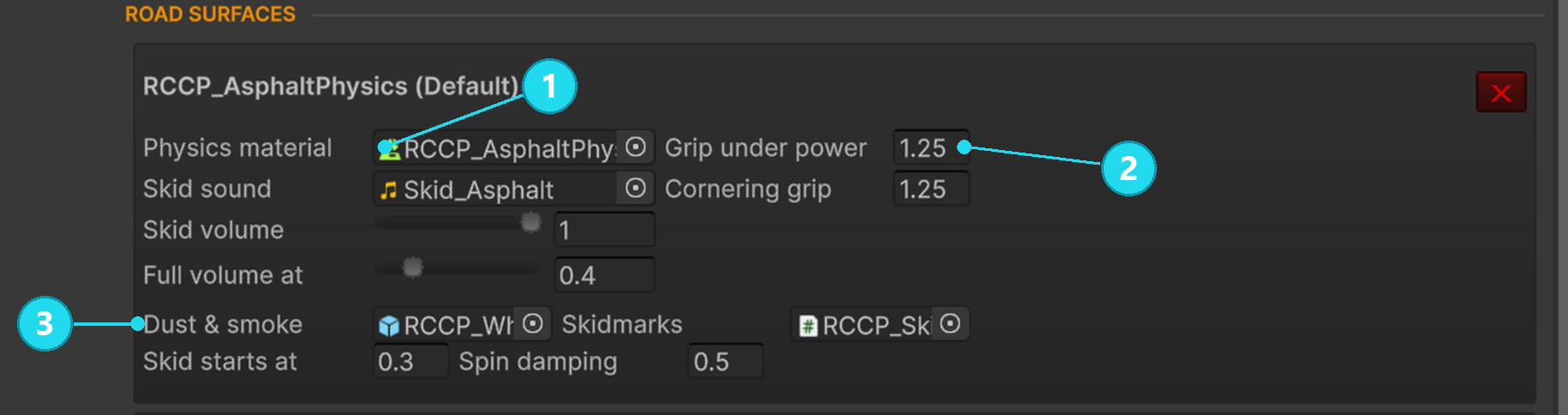
Open the screenshot at full size. 1 Assign the same Physics Material used by the ground collider. 2 Adjust grip under power and while cornering. 3 Assign tire particles; the Skidmarks slot sits beside them. This is the existing asphalt row, shown as an example. Add a separate row for your new surface.
2. Choose the sound and effects
In that surface row, assign only the effects you want:
| Setting | What to assign or change |
|---|---|
| Dust & smoke | A tire particle-effect prefab. Leave empty for no effect. |
| Skid sound | A looping tire sound. Leave empty for silence. |
| Skidmarks | A skidmark prefab with the desired material and color. Leave empty for no marks. |
| Skid starts at | How much sliding starts the effects. Lower values react to smaller slides. |
| Skid volume | Maximum skid-sound volume. |
| Full volume at | How much additional sliding makes the sound reach full volume. |
| Spin damping | How strongly the surface slows wheel spin. Higher values suit surfaces where wheels should settle more quickly. |
Skid starts at affects marks, particles and sound together. To quiet a surface without removing its marks, lower Skid volume instead.
3. Drive across it
- Save the scene and press Play.
- Drive across your normal road, then the new surface.
- Try braking and turning on each. Make a moving slide to check the sound and marks.
- Stop Play Mode before adjusting the surface again.
Check: the new surface has the grip and effects you intended. Compare the same maneuver at a similar speed on both surfaces; a gentle turn may never produce a skid.
RCCP uses a runtime copy of Ground Physics. Editing the settings asset during Play Mode does not update the running simulation. Stop, edit, then start a new test.
If the surface does not behave as expected
| What you see | What to check |
|---|---|
| Changing friction on the Physics Material does not change tire grip | Change Grip under power and Cornering grip in Ground Physics. RCCP uses the material as an identifier for tire grip. Its Unity friction still affects body contact. |
| Every surface feels the same | Check the material on the collider the wheels actually touch, then the matching Surface slot. Check for a wheel Force ground surface override. |
| No skidmarks | Assign a Skidmarks prefab, enable Draw skidmarks on the wheel, and test while moving and sliding. A stationary burnout does not draw a trail. |
| Marks flicker against the road | Increase Ground Offset on the skidmark prefab. |
| Little smoke at first | Smoke depends on both sliding and tire temperature. A cold tire produces less smoke. |
| Changes to Unity's Wheel Collider disappear | RCCP updates its friction and damping from RCCP wheel and surface settings. Edit those settings instead. |
Optional: paint different surfaces on a terrain
A Unity Terrain uses paint layers for its ground textures. Terrain physics materials maps each of those layers to a Road surfaces row.
- Assign a separate Physics Material to the terrain's Terrain Collider. Do not also use that material in a Road surfaces row: a direct surface match takes priority over terrain-layer mapping.
- Add an entry in Terrain physics materials, using the terrain collider's material.
- Add one Splatmap Indexes entry per terrain paint layer, in the terrain's layer order.
- Set each entry's Index to the Road surfaces row that layer should use, counting from zero.
For example, if grass is surface row 1 and asphalt is row 0, a terrain painted with grass, grass and road layers needs indexes 1, 1, 0.
Check: drive across each painted region. The mapping uses surface row numbers, even though some nested tooltips describe them as paint-layer numbers. Test layer boundaries and blends as well as solid patches.
Keep the terrain active when the scene starts. The scene manager gathers terrain data during startup; terrain added or enabled later is not automatically included in that collection.
Optional: adjust marks, smoke and collision effects
| Where to edit | Useful controls |
|---|---|
| Skidmark prefab | Max Marks controls how much trail is retained. Min Distance controls spacing between sections; larger spacing gives coarser trails. Ground Offset lifts marks above the road. |
| RCCP wheel | Draw skidmarks enables marks for that wheel. Tire width changes effect width. Force ground surface chooses a fixed surface row; -1 returns to normal detection. |
| Vehicle's Particles module | Tire smolder allows hot tires to keep smoking after a slide. Smolder smoke controls the amount. |
| Vehicle's Particles module | Assign impact, scrape and rim sparks. Use Spark on these layers to select which collision layers produce them. |
The Particles module also controls extra sparks on large impacts, impact flashes and spark build-up during a long scrape. Blown-tire, detached-panel and broken-lamp bursts have per-car slots; empty slots use the effects in RCCP Settings.
Skidmarks share a scene manager and are created when needed. You can place it before Play through Tools > BoneCracker Games > Realistic Car Controller Pro > Add to Scene > Skidmarks Manager. For clearing trails from code, see Transport and skidmarks API.
Exhaust smoke and backfire belong to the exhaust tips. Engine smoke and fire belong to Damage. Use Field Reference for the detailed settings, and Performance and Platforms when effects become expensive.
Next step
- Tuning Recipes — adjust a car that slides too much or too little.
- How the Car Drives — understand how wheel grip combines with surface grip.
- Damage — connect collision effects to vehicle damage.